
Best Macro Tracking Apps With Pros, Cons, and Best Fits
Compare the best macro tracking apps for weight loss. See features, pricing, pros and cons to find your perfect fit. Start tracking smarter today.
You've probably downloaded a macro tracking app with the best intentions, logged meals religiously for a few days, then quietly deleted it after realizing you were spending more time entering food than actually eating it. The truth is, most people abandon macro tracking within two weeks because traditional apps turn weight loss into a tedious data entry job. This guide breaks down the best app for macros tracking with real pros and cons so you can find one that actually fits your life instead of taking it over.
Table of Contents
- What Makes a Macro Tracking App Actually Worth Using
- MyFoodBuddy: Best for People Who Hate Manual Entry
- MyFitnessPal: Best for Massive Food Database Needs
- Cronometer and MacroFactor: Best for Data Nerds
- Lose It and Carb Manager: Best for Specific Diet Approaches
- How to Pick the Right App for Your Actual Life
- Start With Speed, Stick With What Works
- Common Questions About Macro Tracking Apps
What Makes a Macro Tracking App Actually Worth Using
Most people quit tracking their macros within the first two weeks, and it's usually not because they lack motivation. The real problem is that traditional calorie counting apps turn a simple task into a 10-minute ordeal every time you eat. When logging a chicken salad requires scrolling through endless databases, weighing ingredients, and doing mental math, it's no wonder people give up. The best app for macros tracking isn't the one with the most features, it's the one you'll actually use every single day.
Why Speed Beats Everything Else
Think about how many times you eat in a day. If each meal takes 5-10 minutes to log, that's up to an hour of your day spent on data entry. Apps like MyFitnessPal pioneered calorie tracking, but their manual search-and-select process feels outdated now. The difference between a 30-second log and a 5-minute log determines whether tracking becomes a habit or a chore.
Modern apps are solving this with voice input and AI recognition. MyFoodBuddy, for example, lets you just say what you ate and handles the rest automatically. Other apps like Calory and FoodNoms have tried similar approaches, but the execution varies wildly.
Accuracy Without the Headache
Here's the tricky part: fast logging means nothing if the numbers are wrong. Some apps sacrifice accuracy for speed, while others like Cronometer prioritize precision but make you work for it. You need both, and that's where AI-powered extraction makes a real difference.
The key features that separate good apps from frustrating ones include:
- Multiple input methods like voice, text, photos, and barcode scanning
- Large, verified food databases with restaurant and brand-name items
- Smart meal memory that learns your eating patterns
- Customizable macro goals beyond basic calorie counting
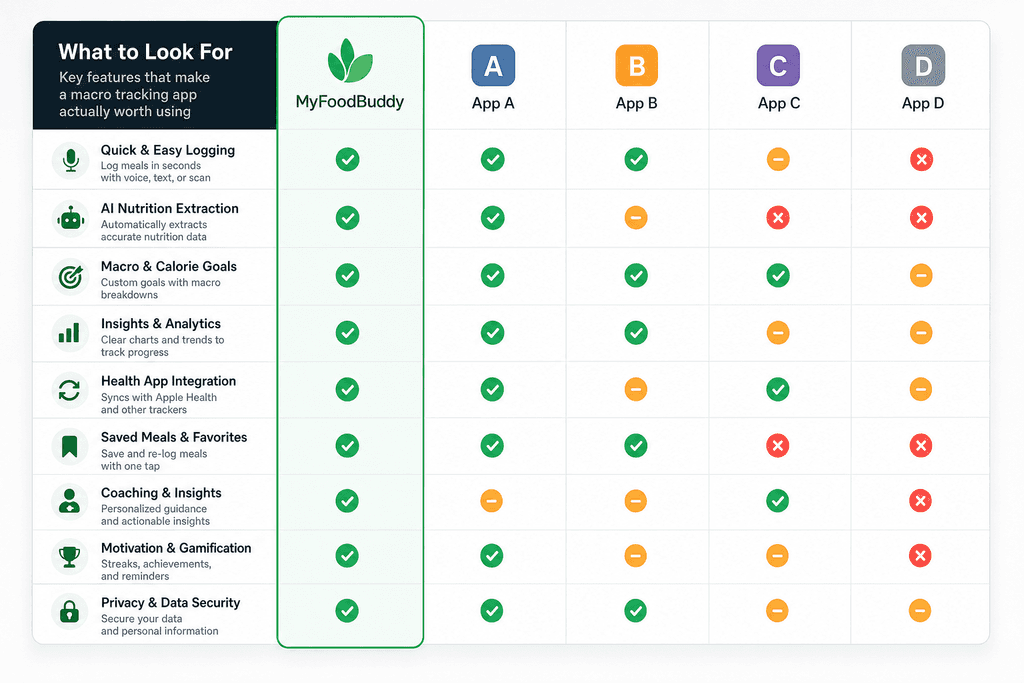
What to Actually Look For
Not everyone needs the same features. Someone meal prepping the same foods weekly has different needs than someone eating out frequently. Your tech comfort level matters too, some people love AI assistants while others prefer simple manual entry.
Here's a quick breakdown of the main features worth comparing:
| Feature | Why It Matters | Who Needs It Most |
|---|---|---|
| Voice Input | Saves 3-5 minutes per meal | Busy professionals |
| Barcode Scanner | Perfect for packaged foods | Meal preppers |
| Restaurant Database | Eating out accuracy | Social eaters |
| Macro Customization | Beyond basic calories | Athletes, bodybuilders |
| Price Point | Long-term affordability | Everyone |
The best app for macros tracking depends on your lifestyle, not just the feature list. Apps like MacroFactor appeal to data nerds who want detailed analytics, while something like MyFoodBuddy works better if you just want to log and move on with your day. Price matters too, with options ranging from free (MyNetDiary, MyFitnessPal) to $40-80 per year for premium features.
Understanding what you actually need versus what sounds cool in an app description will save you from downloading and abandoning five different apps. The right choice makes tracking feel effortless instead of like homework.
MyFoodBuddy: Best for People Who Hate Manual Entry
Most people quit tracking their food within two weeks, and it's not because they lack motivation. The problem is that traditional apps make you search through endless databases, measure portions, and spend ten minutes logging a simple lunch. If you've ever abandoned a tracking app because it felt like a part-time job, you're not alone. That's exactly why we built MyFoodBuddy differently.
The app lets you log meals in seconds using voice or text input, which means you can literally say "chicken breast with rice and broccoli" and move on with your day. The AI extracts nutrition info automatically using USDA data, so you're not guessing or doing mental math. No searching through seventeen different entries for "grilled chicken" to find the right one.
- Voice and text input that understands natural language
- AI nutrition extraction pulls data without manual searching
- Fiona AI coach analyzes your eating patterns and gives personalized insights
- Barcode scanning for packaged foods when you need it
- One-tap re-logging for meals you eat regularly
The pricing sits at $39 per year after a 7-day free trial, which is less than most premium tracking apps. Fiona, the AI coach, goes beyond basic calorie counting by looking at your sleep and activity data to give you insights that actually help you understand your habits.
This approach works best for busy people who've tried other apps and quit because logging took too long. If you're someone who eats a lot of home-cooked meals or restaurant food without nutrition labels, the AI handles that easily. The trade-off is that if you need to track very specific branded products every single time, you might occasionally want more database options.
Pros:
- Fastest logging experience available
- AI coach provides personalized insights
- Works great for home-cooked and restaurant meals
- Lower annual cost than most competitors
Cons:
- Smaller branded product database than MyFitnessPal
- Best suited for iOS users with Apple Health integration
MyFitnessPal: Best for Massive Food Database Needs
MyFitnessPal has been around long enough that it's become the default answer when someone asks about tracking apps. The main reason is its database, which contains millions of food items including almost every chain restaurant meal you can think of. If you eat a lot of packaged foods or frequently visit places like Chipotle or Panera, you'll find exactly what you're looking for.
The app offers a free version with ads, though most serious users end up paying $80 per year for premium. You get barcode scanning and a recipe builder, which helps if you cook the same meals regularly. The challenge comes down to time investment.
Manual entry can take 5-10 minutes per meal if you want accuracy. You'll need to search for each ingredient, adjust portion sizes, and double-check that you picked the right database entry. Some foods have dozens of user-submitted versions with wildly different calorie counts.
- Best for people who eat lots of packaged foods or chain restaurants
- Free version available but limited
- Premium costs more than most alternatives
- Requires patience and attention to detail
The database size is genuinely impressive, but it comes with a learning curve. If you're the type of person who doesn't mind spending extra time to get precise numbers, this might work for you. If you value speed over having every possible food option, you'll probably find it frustrating. For those looking for better alternatives to MyFitnessPal for AI meal tracking, there are options that prioritize speed without sacrificing accuracy.
Pros:
- Largest food database available
- Free version exists
- Strong community and recipe sharing
Cons:
- Time-consuming manual entry
- Premium is expensive at $80/year
- Database quality varies with user submissions
Cronometer and MacroFactor: Best for Data Nerds
Some people don't just want to track calories and macros. They want to know their zinc intake, their omega-3 ratios, and whether they're getting enough vitamin K2. If that sounds like you, Cronometer and MacroFactor are worth considering. These apps cater to people who treat nutrition tracking like a science experiment.
Cronometer tracks 82 micronutrients, not just the basic macros. You can see exactly where you're falling short on specific vitamins and minerals. MacroFactor takes a different approach by using algorithms to adjust your calorie and macro targets based on your actual results over time.
| Feature | Cronometer | MacroFactor |
|---|---|---|
| Micronutrient tracking | 82 nutrients | Basic only |
| Adaptive algorithms | No | Yes |
| Annual cost | $50 | $72 |
| Free version | Yes | No |
Both apps require more manual input than AI-powered options, but they give you deeper insights in return. Cronometer offers a free basic version with a $50 per year premium upgrade. MacroFactor costs $72 annually with no free tier.
These work best for people who love data and want to optimize every nutrient. Athletes, bodybuilders, and health enthusiasts who already understand nutrition science tend to appreciate the detail. They're not ideal for beginners or anyone who wants simple, fast tracking. If you're curious about what to track in a calorie tracking app for results, these apps give you almost too many options.
Lose It and Carb Manager: Best for Specific Diet Approaches
Not everyone wants a general-purpose tracking app. Some people follow specific diets and want tools built around those approaches. Lose It focuses on calorie counting with social challenges and community features. Carb Manager specializes in keto and low-carb tracking with net carb calculations built in.
Both offer free versions with premium upgrades ranging from $40 to $60 per year. They sit in a middle ground between the simplicity of voice-powered apps and the complexity of micronutrient trackers.
- Lose It adds social features like challenges with friends
- Carb Manager calculates net carbs automatically for keto dieters
- Both have decent food databases
- Manual entry still required but streamlined
These apps work well for people following specific diets or who want community support. If you're doing keto and need to track net carbs carefully, Carb Manager handles that math for you. If you stay motivated by competing with friends, Lose It's social features might help you stick with it.
The downside is that neither offers the fastest possible logging experience. You're still searching databases and adjusting portions, just with some diet-specific features added. For those exploring the best AI calorie counting app for your needs, these represent a step up from basic tracking but not quite the speed of voice-powered options.
Lose It Pros: Social features, free version available, simple interface
Lose It Cons: Manual entry required, premium needed for best features
Carb Manager Pros: Keto-specific features, net carb tracking, meal plans included
Carb Manager Cons: Less useful for non-keto diets, still requires manual logging
The best app for macros tracking depends on what you value most. If you want speed and hate manual entry, voice-powered options like MyFoodBuddy make the most sense. If you need every chain restaurant in existence, MyFitnessPal's database wins. For micronutrient obsessives, Cronometer delivers the data. And for diet-specific needs, Lose It and Carb Manager add helpful features. Most people who've quit tracking apps in the past did so because of time investment, which is why calorie tracking technology feels effortless now with AI-powered solutions.
How to Pick the Right App for Your Actual Life
About 80% of people who start tracking macros quit within the first month, and it's usually not because they lack motivation. The problem is they picked an app that doesn't match how they actually eat or how much time they realistically have. If you've downloaded three different tracking apps and abandoned each one after a week, you're not the problem. You just haven't found the right match yet. The best app for macros tracking isn't the one with the most features or the biggest database, it's the one that fits into your life without making you feel like you need a part-time job just to log lunch.
Match the App to Your Quit Pattern
Think about the last time you stopped tracking. Was it because logging took too long, or because you couldn't find your foods in the database? Your past experiences are actually the best guide for what features matter most to you.
- If time was your issue, speed beats everything else - voice input or AI extraction will save you way more time than a massive food database
- If accuracy stressed you out, look for apps that use USDA data and let you adjust portions easily
- If you forgot to log consistently, gamification features like streaks actually do help some people stick with it
- If the interface felt overwhelming, simpler apps with fewer buttons often win over feature-packed options
Your Eating Style Matters More Than You Think
Someone who meal preps chicken and rice needs a completely different app than someone who eats out five times a week. There's no point having a million-item database if you're just re-logging the same ten meals.
- Whole food eaters benefit most from voice or AI input - saying "8 ounces of grilled chicken breast" is faster than searching through 47 chicken options
- Packaged food buyers need robust barcode scanning and a large database of branded items
- Restaurant regulars want apps that include chain restaurant menus or make it easy to estimate portions
- Meal preppers should prioritize saved meals and one-tap re-logging features
Consistency beats perfection: Studies show that people who log meals within 15 seconds are 3x more likely to still be tracking after 90 days compared to those whose logging takes over a minute per meal.
Test Before You Commit
Most apps offer free trials, and you should actually use them like trials, not just download and forget. Track for at least 3-4 days during the trial to see if the app fits your real routine, not just your ideal one. MyFoodBuddy offers a 7-day trial that lets you test the voice input and AI extraction before committing to the annual plan. The app you'll use every day for a year is worth spending a week to properly evaluate.
Start With Speed, Stick With What Works
Here's what most people miss when picking the best app for macros tracking: the perfect app doesn't matter if you stop using it after two weeks. The app that takes the least time to log your meals is usually the one you'll actually stick with long enough to see changes. Every app we covered can assist you in tracking your meals, but only if you're still using it three months from now.
The difference between apps really comes down to how much friction they put between you and logging your food. Some require you to search through databases and measure portions. Others, like voice-powered options, let you just say what you ate and move on with your day.
Most apps offer free trials, which means you can test the actual logging experience before committing. Pay attention to how you feel on day three or four of using it. That's when the novelty wears off and you'll know if it's actually easy enough to become a habit.
MyFoodBuddy's voice input approach works well for people who've quit other apps because they got tired of the manual entry process. If you've tried tracking before and gave up because it took too much time, the speed difference might be what finally makes it convenient. The goal isn't to find the app with the most features, but the one you'll still be using when it actually starts to matter.
Common Questions About Macro Tracking Apps
Picking the best app for macros tracking can feel overwhelming when you're staring at dozens of options in the app store. Most people have the same questions before they commit to tracking their food every day. Here are the answers that actually matter when you're trying to decide which app deserves space on your phone.
Which app is most accurate for tracking macros?
Accuracy depends on the database an app uses and how it handles user input. Apps that pull from USDA data tend to be more reliable than those relying solely on crowdsourced information. The problem with apps like MyFitnessPal is that anyone can add foods to the database, which means you might be logging incorrect macros without realizing it. Apps that use AI to extract nutrition information from your descriptions, like MyFoodBuddy, can actually be more accurate because they're pulling from verified databases rather than user-submitted guesses.
Do I really need to pay for a macro tracking app?
Free versions of most apps exist, but they usually come with annoying limitations. You might get ads between every meal you log, or you can't see your macro breakdown without upgrading. Some free apps also lock basic features like barcode scanning or meal planning behind a paywall. If you're serious about tracking, spending around $40 per year is worth it to avoid the frustration of constant upsells and limited functionality.
How long should it take to log a meal?
If logging a meal takes more than 30 seconds, you're probably going to quit within a week. Traditional apps require you to search for each ingredient, adjust serving sizes, and manually add everything to your diary. Voice-based apps cut this down dramatically because you can just say what you ate and move on with your day. MyFoodBuddy lets you log meals in seconds by speaking or typing naturally, which is why people actually stick with it compared to apps that feel like homework.
Can I switch apps without losing my data?
Most macro tracking apps don't play nice with each other when it comes to data transfer. You usually can't export your meal history from one app and import it into another. However, if you're using Apple Health integration, some of your basic nutrition data might sync across apps that connect to it. The reality is that switching apps often means starting fresh, so it's worth taking time upfront to find the best app for macros tracking that you'll actually use long-term.
What's the easiest macro tracking app for beginners?
Beginners need an app that doesn't require a nutrition degree to understand. Look for apps with simple interfaces that don't overwhelm you with charts and data points you don't care about yet. Voice input is a game changer for people new to tracking because you don't need to know exact measurements or search through massive food databases. Apps that calculate everything for you automatically remove the biggest barrier that stops beginners from sticking with macro tracking beyond the first few days.
Ready to start tracking smarter?
Download MyFoodBuddy and start tracking your calories by just saying what you ate. No more searching databases or guessing portions.
Get started