Cal AI vs MyFoodBuddy, feature by feature
Cal AI and MyFoodBuddy are both AI calorie trackers built to make logging take seconds instead of minutes. They start from different inputs. Cal AI starts from a photo of your plate. MyFoodBuddy starts from a sentence, typed or spoken, like you would text a friend. Rows marked “Not listed publicly” are things Cal AI does not state on its own pages or store listings.
| Feature | MyFoodBuddy | Cal AI |
|---|---|---|
| Log by typing a normal sentence | Several foods in one sentence | Its homepage says you can describe your meal |
| Log by talking | Not listed publicly | |
| Log from a photo | The core feature. Scan results need a subscription | |
| Barcode scanner | Plus a nutrition label scanner | |
| Search a food database | Saved foods and meals. No database search screen, you describe the food instead | Uses the MyFitnessPal food database since the acquisition |
| Fix entries by chatting | Tell Fiona what changed and she updates the entry | Not listed publicly |
| Protein, carbs and fat | ||
| Vitamins and minerals | 20+ vitamins and minerals | Reviewers mention fiber, sugar and sodium. No full vitamin and mineral list is published |
| Personal calorie and macro goals | Set from your age, weight, height and activity, editable | A plan built from lifestyle questions at signup |
| Weight tracking | Log it in chat or sync from Apple Health | |
| AI coach you can ask questions | Fiona answers questions about your food, goals and progress | Not listed publicly |
| Streaks and badges | Day streaks and badges, plus a $0.99 Streak Restore purchase | |
| Friends or community | Friends and leaderboards | A Groups tab in the app |
| Apple Health sync | Weight, sleep, steps and workouts | Steps sync from Apple Health, or Google Fit on Android |
| Android app | iPhone only | |
| Web app | Not listed publicly | |
| Free version | Free download, but the App Store listing says food scan results require a subscription | |
| Free trial of the paid plan | 7 days | 3 days |
Two rows matter more than the rest. Photo logging is the whole point of Cal AI and MyFoodBuddy does not have it. Logging by typing or talking is the whole point of MyFoodBuddy. Cal AI’s homepage says you can also describe a meal, but its listing and screenshots are built around the camera.
How Cal AI works day to day
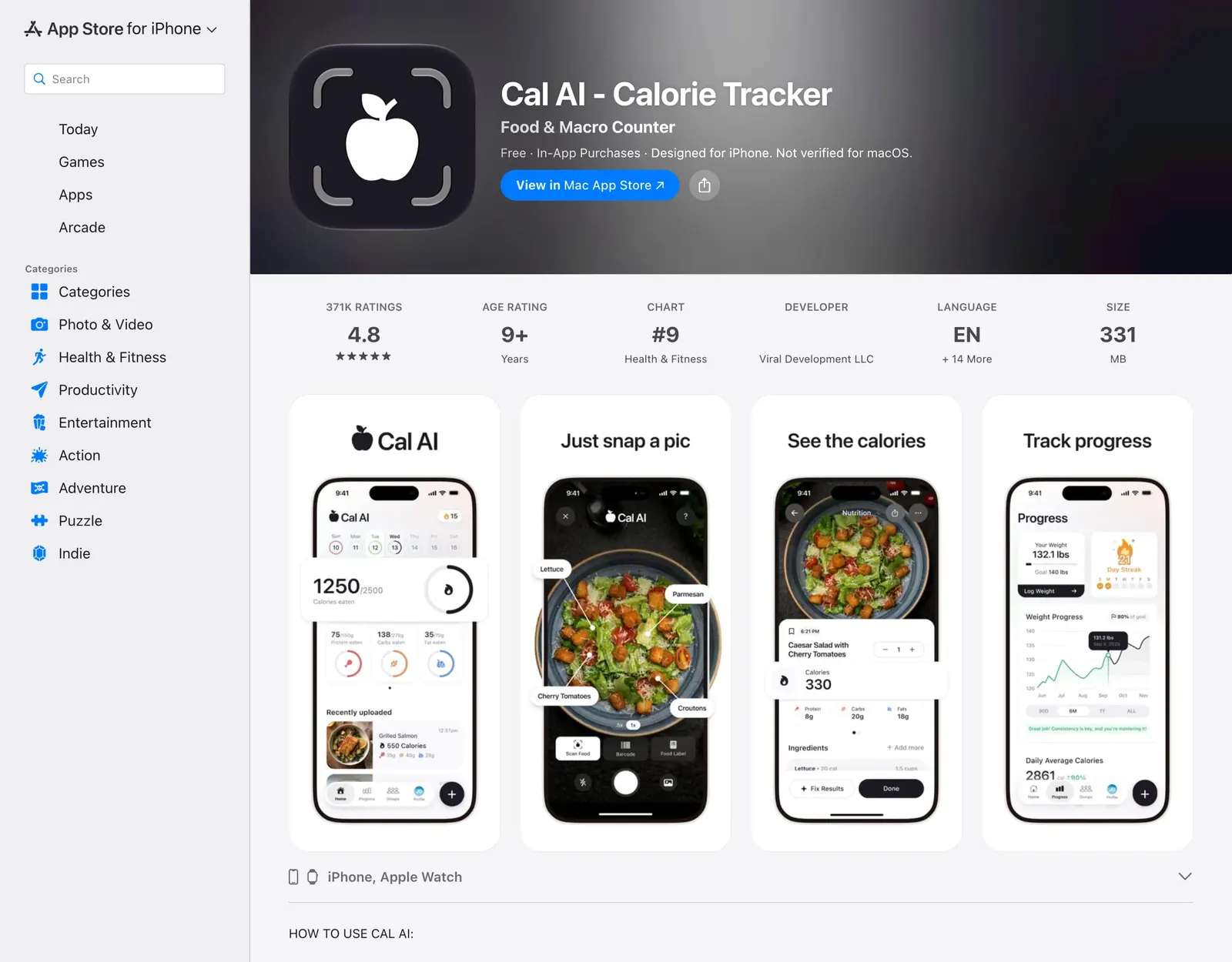
Cal AI was started by teenage founders, including CEO Zach Yadegari, and passed 15 million downloads in under two years. Here is the routine as its App Store listing, homepage and FAQ describe it.
- Answer lifestyle questions. Cal AI builds a calorie and macro plan from them.
- Snap a photo of the meal. The homepage says your phone’s depth sensor estimates food volume and the AI breaks the meal into calories, protein, carbs and fat. The camera screen also has barcode and nutrition label modes.
- Check the result. You see each food with its numbers, can change the serving count, and there is a Fix Results button if the scan is off. You can also search the food database or describe the meal instead.
- Track the day. A home screen shows calories and macros left, recent meals, your day streak, weight progress and steps synced from Apple Health or Google Fit.
- Pay to see scan results. The App Store listing says food scanning results require a subscription, after a 3-day free trial.
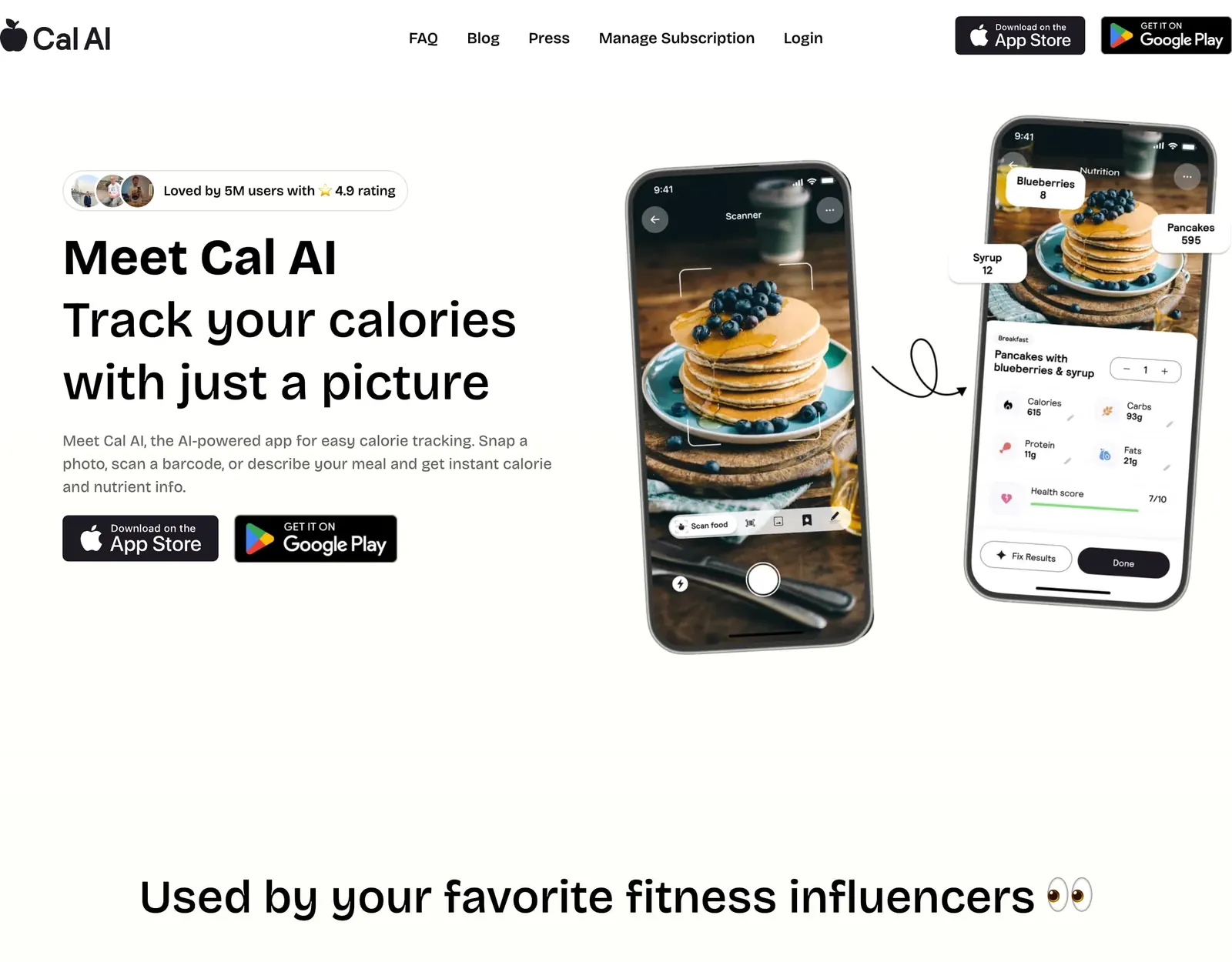
For a plate in front of you, this is quick. Point, shoot, check, done. Cal AI’s FAQ gives tips that matter for that speed, such as good lighting and making sure the food fills the frame.
How MyFoodBuddy works day to day
MyFoodBuddy is an iPhone app built by a solo founder in Denver and launched in July 2024. There is no camera step for meals. You describe them.
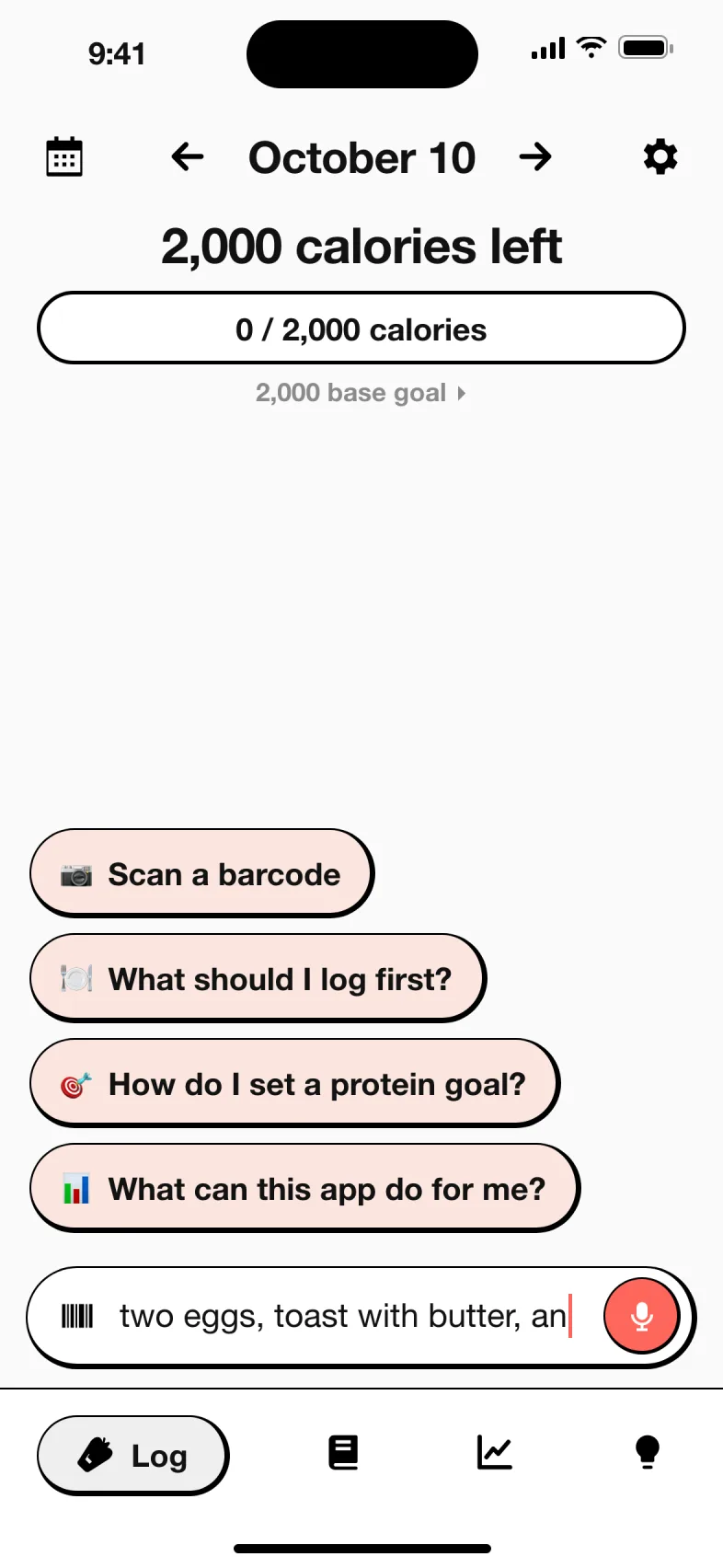
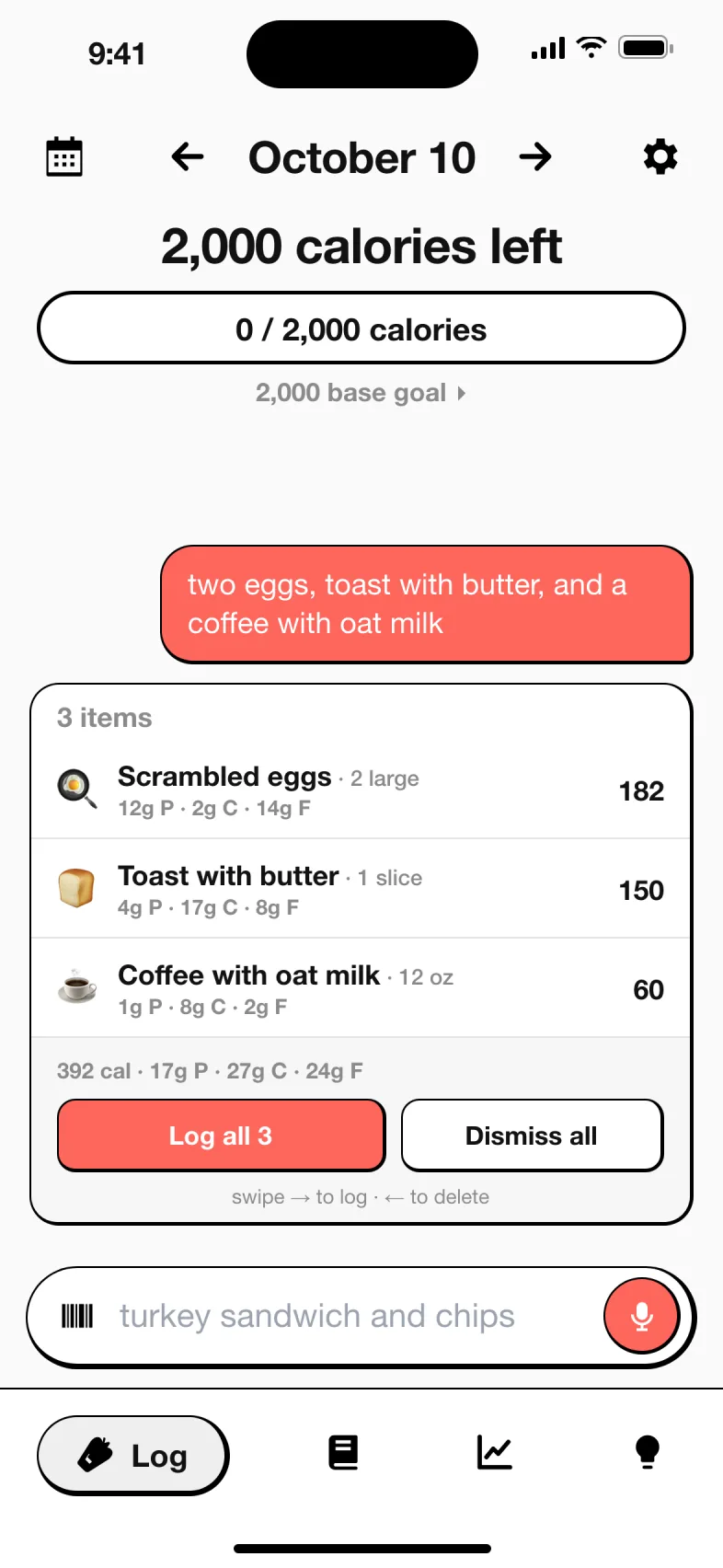
- Say what you ate. Type or speak a normal sentence, like “two eggs, toast with butter and a coffee with oat milk.” One sentence can hold the whole meal.
- Fiona logs it. Fiona, the AI coach, splits the sentence into foods and amounts, looks each one up and shows a card with the calories, protein, carbs and fat before anything is saved.
- Tap Log it. The day’s totals update. If you give a number yourself (“300 calories of chicken nuggets”), your number wins.
- Fix anything by chatting. Bigger portion, forgot the dressing? Tell Fiona and she updates the entry. You can ask her what is left for the day or how your week went.
- Scan packaged food. The barcode scanner covers anything with a label.
Nutrition values come from USDA FoodData Central for everyday foods, Edamam for branded foods and Open Food Facts for barcodes. AI reads your sentence and works out portion weights. When nothing matches, the AI estimates and the card shows it before you save. More on this is on the about page.
How much does Cal AI cost compared to MyFoodBuddy
Cal AI does not publish a price list. Its US App Store listing shows “Unlimited” purchases at $2.99, $5.99, $9.99, $19.99 and $29.99 without saying which billing period each one covers. Independent reviews from June and September 2026 report $29.99 a year and $9.99 a month, a $59.99 yearly family plan for up to six people, and paywall tests that show some people other prices. MyFoodBuddy has one plan at $39.99 a year or $7.99 a month after a 7-day free trial.
| App | Plan | Monthly | Yearly | Includes |
|---|---|---|---|---|
| MyFoodBuddy | Yearly | n/a | $39.99 | Everything, after a 7-day free trial |
| MyFoodBuddy | Monthly | $7.99 | n/a | Everything, billed monthly |
| Cal AI | Yearly (reported) | n/a | $29.99 | Photo scan results, barcode and label scanning, food search and progress tracking |
| Cal AI | Monthly (reported) | $9.99 | n/a | The same features, billed monthly |
| Cal AI | Family (reported) | n/a | $59.99 | Premium access for up to six people |
US prices from each app's public pricing or App Store listing, checked MyFoodBuddy Oct 18, 2026, Cal AI Oct 18, 2026. Apps change prices and run sales often, so confirm in the app before you buy.
What you would actually pay
| If you want | Cal AI | MyFoodBuddy |
|---|---|---|
| A first year, paid yearly | $29.99 (reported) | $39.99 |
| Twelve months, paid monthly | $119.88 at $9.99 a month (reported) | $95.88 at $7.99 a month |
| A free trial first | 3 days | 7 days |
| Free use after the trial | Free download, but scan results need a subscription | No free tier |
| A whole household | Family plan reported at $59.99 a year for up to six | No family plan listed |
| Extras | $0.99 Streak Restore | None. Everything is in the one plan |
Read honestly, Cal AI is $10 cheaper for one person on a yearly plan, and much cheaper for a family. MyFoodBuddy is cheaper if you pay month to month, and gives you four more trial days to decide.
How accurate is Cal AI photo logging
This is the question most people search before paying, so here is what is on the record. Cal AI’s own FAQ says, “CalAI is about 80% accurate. No food tracking app is perfect, and calories and nutrition values can vary.” Its terms call every calorie estimate an automated approximation that may be incomplete or inaccurate.
The researchers’ advice was that people using a photo app “without adjusting the portions or entering the amounts of food should take the results with a grain of salt.” The pattern makes sense. A camera sees the chicken and the rice. It cannot see the tablespoon of oil in the pan, the butter in the sauce or how much dressing soaked into the salad, and fat is where the calories hide.
Users report the same thing from the other side. One App Store reviewer said Cal AI was usually within about 10% for them but once listed a small bowl of popcorn at around 8,000 calories, fixed by retaking the photo. A Google Play reviewer said the same meal scanned twice could differ by 400 calories.
To be clear about our side, MyFoodBuddy was not in that study and we have no test data comparing the two, so we do not claim it is more accurate. What a sentence changes is what you can tell the app. You can write “salmon pan-fried in a tablespoon of olive oil, rice and a spoon of tahini sauce” and the oil and sauce get their own cards, with values from USDA FoodData Central or Edamam where there is a match. Every card shows before you save, and every entry can be changed later.
Is Cal AI free
Cal AI is free to download, but not really free to use. The App Store listing states, in capitals, that food scanning analysis results require a subscription. Cal AI’s own FAQ says tapping the + button to log food opens the paywall screen. In practice you get a 3-day free trial, then you pay.
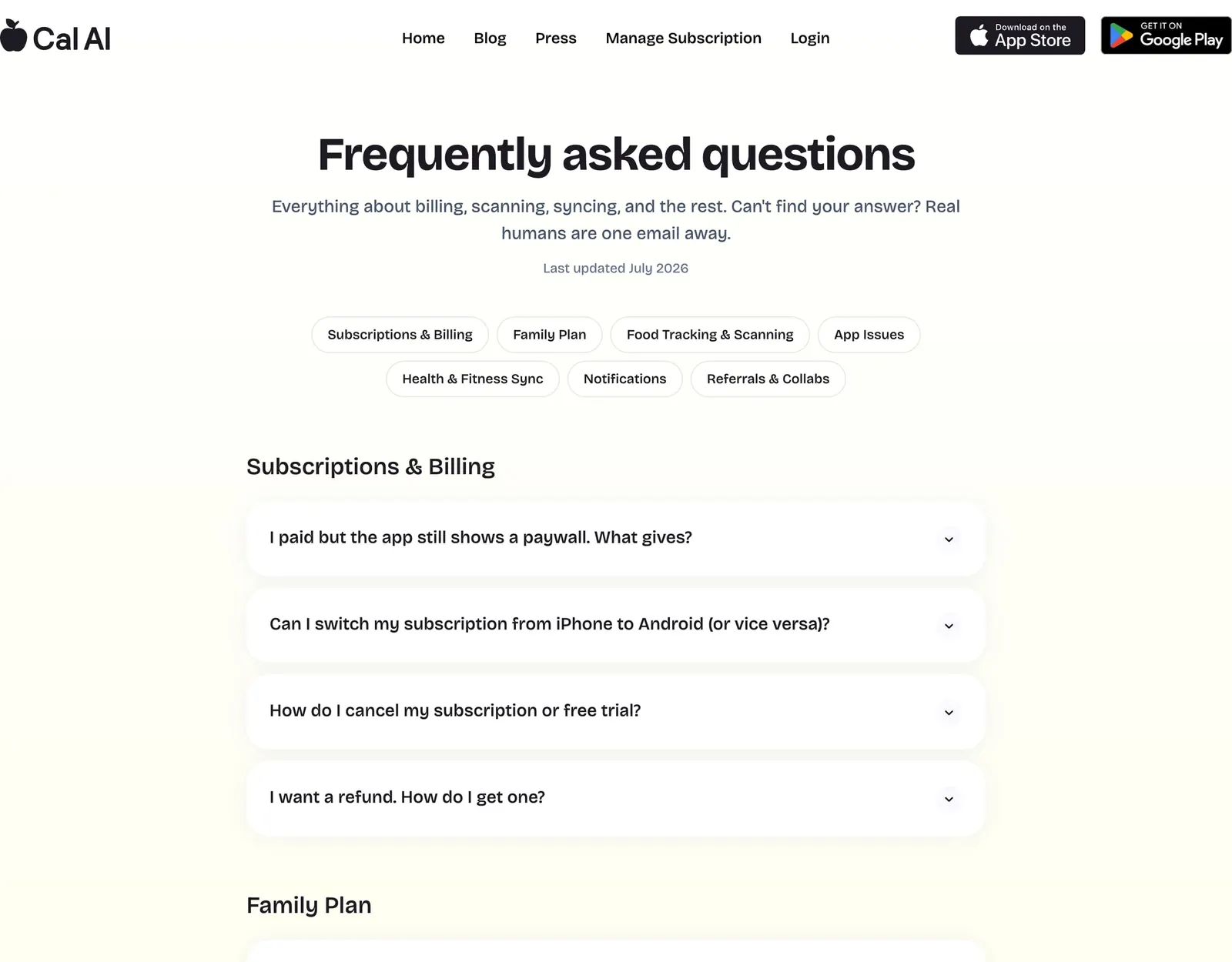
- Cancelling. You cannot cancel inside the app. It goes through your phone’s subscription settings, and the FAQ warns that deleting the app does not cancel the subscription.
- Refunds. Apple or Google handle them, depending on where you bought.
- Switching phones. A subscription bought on iPhone does not carry over to Android, or the other way around.
MyFoodBuddy is not free either, and we would rather say so plainly. It has a 7-day free trial and no free tier, then $39.99 a year or $7.99 a month, with no ads and nothing locked behind a higher plan.
Is Cal AI owned by MyFitnessPal now
Yes. TechCrunch reported on March 2, 2026 that MyFitnessPal had acquired Cal AI in a deal that closed in December 2025, after about a year of talks. The price was not disclosed. At the time Cal AI had passed 15 million downloads and more than $30 million in annual revenue.
- Cal AI stays a separate app, and its seven-person team, including CEO Zach Yadegari, stayed on.
- Cal AI now uses the MyFitnessPal food database, which TechCrunch put at 20 million foods, 68,500 brands and more than 380 restaurant chains.
- MyFitnessPal’s CEO described Cal AI’s users as people who want logging fast, AI based and out of the way, in contrast to MyFitnessPal’s more detailed approach.
- Cal AI’s FAQ says food history cannot be imported from MyFitnessPal yet.
If you are weighing the parent app as well, see MyFitnessPal vs MyFoodBuddy.
Photo or a sentence, which way of logging fits how you eat
Neither method is right for every meal. Here is a fair look at where each one asks less of you.
| The meal | Logging with a Cal AI photo | Logging with a MyFoodBuddy sentence |
|---|---|---|
| A plated restaurant meal in good light | Fast. One photo, then check the result | Also quick, but you have to name the dish and rough amounts |
| A home-cooked meal with oil, butter or sauce | The photo shows the food, not what it was cooked in. You add those yourself | Name the oil and sauce in the same sentence and each gets a card |
| A packaged snack | Barcode or nutrition label scan | Barcode scan |
| Something you already ate and did not photograph | Search or describe it instead | Describe it, the same as any other meal |
| A dim bar or restaurant | Cal AI’s FAQ says lighting makes a big difference | Lighting does not matter |
| Fixing a mistake | Retake the photo, use Fix Results or edit the numbers | Tell Fiona what changed |
If most of your meals are plates you did not cook, a photo app is a sensible fit. If you cook at home, eat mixed dishes, or often log after the fact, describing the meal tends to ask less of you.
Is Cal AI worth it, and what do reviews say
Cal AI is clearly popular. When we checked on October 18, 2026, it had about 371,000 US App Store ratings averaging 4.8, and about 272,000 Google Play reviews averaging 4.6.
The positive reviews praise speed. One App Store reviewer who had tried Lose It! before said multi-ingredient meals finally took a single photo, and another said the camera is great for eating out while the barcode and nutrition label options make it worth paying for, since you can adjust macros by hand when the database misses.
The critical reviews are about consistency. Reviewers describe occasional wild estimates, a barcode scan that logged a slice of bread at about ten times its sodium, the same meal scanning differently twice, and badges awarded twice or not at all. These are individual reports, not a measured error rate.
Credit where it is due. Cal AI ships an update almost every week, publishes a plain FAQ that admits it is about 80% accurate, and at a reported $29.99 a year it is one of the cheapest paid AI trackers. Whether it is worth it comes down to whether your meals photograph well.
When Cal AI is the better pick
- Most of your meals are plated food you can photograph, and pointing a camera is faster for you than describing.
- You use Android or want to log from an Apple Watch. MyFoodBuddy is iPhone only.
- You want the lowest yearly price, reported at $29.99 against $39.99, or a family plan for several people.
- You want to search MyFitnessPal’s large database, including restaurant chains, inside a simple app.
- You like scanning nutrition labels as well as barcodes.
When MyFoodBuddy is the better pick
- You would rather type or say a whole meal in one sentence than take a photo, including meals you already finished.
- You cook at home and want to name the oil, butter and sauce rather than hope a camera spots them.
- You want to fix entries by chatting and ask Fiona what is left for the day.
- You want to see where numbers come from, USDA FoodData Central, Edamam and Open Food Facts, and track 20+ vitamins and minerals.
- You want a 7-day trial, a cheaper month-to-month price ($7.99) and no ads, with friends, leaderboards and streaks included.
Still comparing AI trackers? See Calo vs MyFoodBuddy, BitePal vs MyFoodBuddy and Foodvisor vs MyFoodBuddy, or the full comparison hub.
Frequently asked questions
Is Cal AI free?
Cal AI is free to download, but its App Store listing says food scan results require a subscription, and its FAQ says tapping + to log food opens the paywall. New users get a 3-day free trial.
How much does Cal AI cost per year?
Cal AI does not publish prices. Independent reviews in 2026 report $29.99 a year, $9.99 a month and a $59.99 yearly family plan, and note that Cal AI tests different prices. MyFoodBuddy is $39.99 a year or $7.99 a month.
Is Cal AI accurate?
Cal AI’s own FAQ says it is about 80% accurate. In an NIH study presented in July 2026, its photo feature underestimated calories by 345 a meal on average and fat by about 30 grams, the largest calorie miss of the four apps tested.
Is Cal AI worth it?
It can be if most of your meals are plates you can photograph and you want the lowest yearly price. If you cook at home or prefer to describe meals, an app built around typing or speaking may fit better.
Is Cal AI owned by MyFitnessPal?
Yes. MyFitnessPal acquired Cal AI in a deal that closed in December 2025, announced in March 2026. Cal AI still runs as a separate app and now uses the MyFitnessPal food database.
What is a good Cal AI alternative without photos?
MyFoodBuddy logs meals from a typed or spoken sentence instead of a photo, with a barcode scanner for packaged food. Fiona shows a card for each food before you save, and you fix entries by chatting. It is iPhone only.
Does Cal AI work on Android?
Yes. Cal AI is on Google Play and the App Store, and supports Apple Watch. A subscription bought on one platform does not carry over to the other.
Is MyFoodBuddy more accurate than Cal AI?
We have no test data comparing them, so we do not claim that. MyFoodBuddy takes values from USDA FoodData Central, Edamam and Open Food Facts when there is a match, and lets you name things a photo misses, like cooking oil.
How do I cancel Cal AI?
Cancel in your phone settings, under Subscriptions on iPhone or Payments and subscriptions in Google Play. Cal AI’s FAQ warns that deleting the app does not cancel the subscription.
Related comparisons
Sources and how we checked
Every fact about another app on this page comes from that app's own public pages, its App Store listing or the independent sources below, read on the dates shown. We did not use paid accounts. If something has changed, email adam@foodbuddy.my and we will fix it.
MyFoodBuddy (verified Oct 18, 2026)
- MyFoodBuddy on the App Store checked Oct 18, 2026
- About MyFoodBuddy checked Oct 18, 2026
Cal AI (verified Oct 18, 2026)
- Cal AI homepage checked Oct 18, 2026
- Cal AI FAQ (last updated July 2026) checked Oct 18, 2026
- Cal AI terms and conditions, sections 4, 5 and 7 checked Oct 18, 2026
- Cal AI on the US App Store (description, in-app purchases, reviews) checked Oct 18, 2026
- Cal AI on Google Play checked Oct 18, 2026
- TechCrunch, MyFitnessPal has acquired Cal AI (March 2, 2026) checked Oct 18, 2026
- Healio, AI photo-based calorie-tracking tools underestimate calories by 33% (NIH study, NUTRITION 2026) checked Oct 18, 2026
- Medical Xpress, Photo-based calorie-tracking apps may underestimate energy in meals checked Oct 18, 2026
- eesel AI, Cal AI pricing 2026 (edited June 16, 2026) checked Oct 18, 2026
- Shelog, Cal AI review 2026 (a competing app, September 30, 2026) checked Oct 18, 2026