
Best Macro Tracking Apps for Faster Meal Logging
Compare the best macro tracker apps for 2026. See pricing, accuracy, and download links to find one that logs meals in seconds.
A good macro app tracker should let you log a meal in under ten seconds, because that is the real reason most people quit tracking calories within the first two weeks. Typing in grams of chicken breast or scrolling through a food database at 9pm when you just want to go to bed gets old fast, and that friction is what kills more diets than any cheat meal ever did. What follows is a ranked look at apps built for people who want the logging part to stop feeling like homework, with the actual download links and prices so you can try one tonight instead of just reading about it.
Table of Contents
The Top Macro Tracking Apps Ranked
Six apps cover most of what dieters actually need, and they split into two camps: fast entry or deep detail. MyFoodBuddy uses voice and text with AI extraction, so saying "two eggs and toast" logs the meal without you touching a food database. MyFitnessPal has the largest food database around, but most entries still mean manual search and portion math, which is where the slowdown happens.
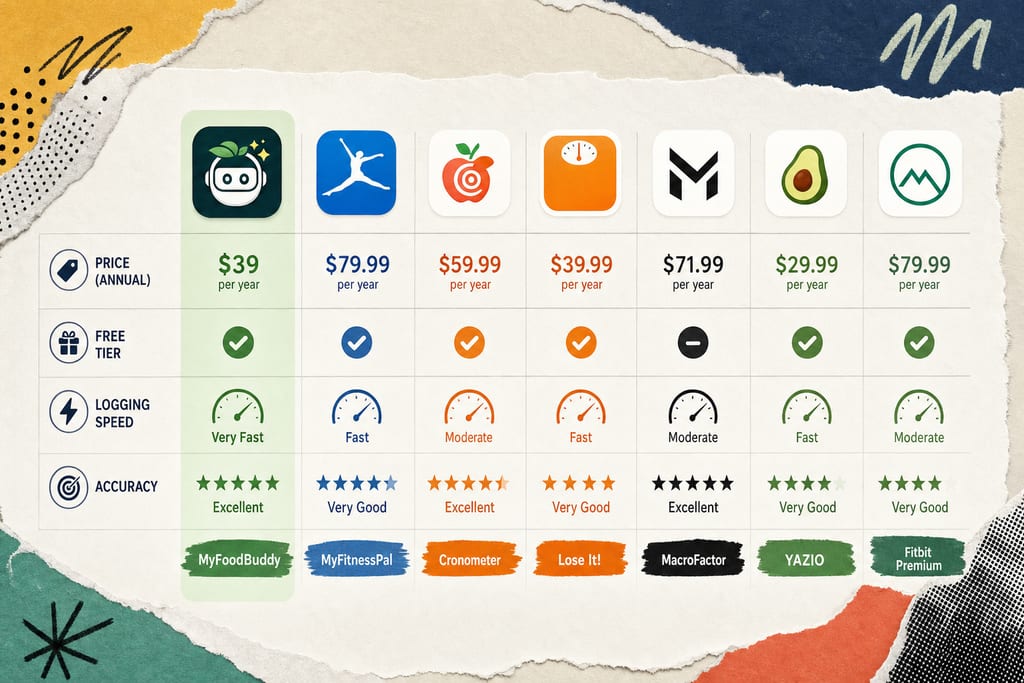
Cronometer leans on USDA data and is built for people who care about micronutrients, not just calories and protein. Lose It keeps things cheap and has solid barcode scanning for packaged food. MacroFactor adjusts your macro targets automatically as your weight trends change, which suits people who already track consistently and want the math done for them.
| App | Price | Free Tier | Logging Speed |
|---|---|---|---|
| MyFoodBuddy | $39/year | 7-day trial | Seconds, voice or text |
| MyFitnessPal | $79.99/year | Yes, limited | 1-3 min manual |
| Cronometer | $54.99/year | Yes, limited | 1-2 min, detailed entry |
| Lose It | $39.99/year | Yes, limited | Fast with barcode scan |
| MacroFactor | $71.99/year | No, trial only | 1-2 min manual |
The biggest gap is between apps that make you search a database and apps that just listen to you. If speed is what you're after, that single column matters more than any other feature on the list, and you can read more about fast ways to log meals before picking one.
Which App Fits Your Specific Situation
The right macro app depends on your habits, not just the feature list. Someone who hates typing needs a different tool than someone who just wants the cheapest option that works.
- Tight budget: Lose It, at $39.99 a year with ad-supported free use, is the cheapest full-featured option.
- Total beginner who feels overwhelmed: MyFoodBuddy's voice input skips the learning curve of searching food databases entirely.
- Lots of packaged, boxed, or bagged food: Lose It or Cronometer, both have reliable barcode scanning.
- Logging on the go, between errands or at work: MyFoodBuddy's voice logging works without stopping to type.
- Already quit MyFitnessPal because it felt slow: MyFoodBuddy or MacroFactor, both cut the manual search step MyFitnessPal relies on.
If you've tried and dropped a tracker before, the problem usually wasn't willpower, it was how long each entry took. Matching the app to how you actually eat and move through your day matters more than picking the one with the most features. A few minutes testing two apps side by side during a free trial will tell you more than any review, including this one.
Why Logging Speed Changes Your Results
Speed isn't a nice-to-have, it decides whether you keep logging past week two. Apps that take three minutes or more per meal get abandoned because nobody wants to do that three times a day for months straight.
MyFoodBuddy logged 1,901 meals in a single day across its users, which points to people actually sticking with the habit instead of giving up after a few entries. Voice logging is the reason: saying what you ate out loud takes seconds, compared to typing brand names and portion sizes into a search bar.
- Typing a meal into a standard database: 60 to 180 seconds per entry.
- Speaking a meal into an AI-based tracker: under 10 seconds per entry.
- Barcode scanning a packaged item: 15 to 30 seconds, but only works on products with barcodes.
- Checking an AI coach's feedback on sleep, activity, and food together: a few seconds, no extra data entry required.
Fiona, MyFoodBuddy's AI coach, adds context past the raw calorie count by looking at food logs next to sleep and activity data, which is more useful than a bare number on a screen. For a deeper look at how this kind of tracking compares to older methods, see this piece on AI meal tracking alternatives.
Try Your Next Meal Before You Pick a Winner
Pick whichever app from the list matches your situation and put it on your phone right now. Log your very next meal with it, whether that's lunch in an hour or a snack tonight, and time how long it actually takes you. That one test tells you more than any feature comparison. Use the free trial period to run this test for a few days before you pay for a full year, since every app on this list offers one. If voice logging is what you're after, MyFoodBuddy's trial is seven days, plenty of time to know if talking through a meal beats typing it.
Macro Tracking App Questions
Can I switch macro apps without losing my weight loss progress?
Yes. Your weight history, food logs, and habits live with you, not the app. Most trackers let you export your data or just start fresh and re-enter your current weight and goals. The only real loss is a few days of streaks or history graphs, which rebuild fast once you get back to logging daily.
Will a food tracking app work if I eat out a lot or cook from scratch?
It depends on how the app handles entries that aren't packaged with a barcode. Voice or text based logging handles homemade meals and restaurant dishes fine, since you're just describing what's on your plate instead of hunting for a matching database entry. Barcode-heavy apps struggle more here, since fresh food and restaurant meals rarely have one to scan.
What happens if I stop paying after the free trial ends?
You lose access to the paid features, like detailed analytics, goal tracking, and AI coaching, though most apps still let you view your past logs. If weight loss is the goal, treat the trial as your test window to confirm the logging speed actually fits your routine before committing to a year of a subscription.
Ready to start tracking smarter?
Download MyFoodBuddy and start tracking your calories by just saying what you ate. No more searching databases or guessing portions.
Get started