Lose It! vs MyFoodBuddy, feature by feature
Lose It! and MyFoodBuddy both count calories, protein, carbs and fat. Lose It! is a free calorie counter built around a daily budget, with logging tools that move to Premium. MyFoodBuddy is a paid iPhone app where you text or say what you ate and an AI coach named Fiona logs it.
| Feature | MyFoodBuddy | Lose It! |
|---|---|---|
| Log by typing a normal sentence | Several foods in one sentence | Not listed publicly |
| Log by talking | AI Voice, Premium only. Say a meal like “2 eggs, toast with butter and jam” | |
| Log from a photo | Snap It, Premium only | |
| Barcode scanner | Moving to Premium. Some free accounts keep it during the change | |
| Search a food database | Saved foods and meals. No database search screen, you describe the food instead | 50M+ foods, per its help center |
| Fix entries by chatting | Tell Fiona what changed and she updates the entry | Not listed publicly |
| Protein, carbs and fat | Custom nutrient goals are Premium | |
| Vitamins and minerals | 20+ vitamins and minerals | Vitamins and minerals are part of Premium Advanced Tracking |
| Goals that adjust to your real progress | The budget adjusts gradually as you record weight changes | |
| Fasting timer | Intermittent fasting, Premium only | |
| AI coach you can ask questions | Fiona answers questions about your food, goals and progress | Not listed publicly |
| Meal plans or recipes | Meal planning and meal targets, Premium only | |
| Streaks and badges | Logging streaks and badges | |
| Friends or community | Friends and leaderboards | Friends and groups |
| GLP-1 or medication program | GLP-1 dose logging and estimated levels, Premium only | |
| Apple Health sync | Weight, sleep, steps and workouts | Weight, food and exercise free. Nutrient goals sync on Premium |
| Android app | iPhone only | |
| Web app | Logging at loseit.com | |
| Free version | Calorie budget and food logging, with ads | |
| Ads | No ads | One-time purchase removes banner and full-page ads |
Two rows matter most. Voice logging exists in both, but in Lose It! it is a Premium tool next to search, while in MyFoodBuddy describing the meal is the whole app and you can type it as well as say it. And adaptive goals go to Lose It!, which lowers or raises your budget as you log weight. MyFoodBuddy sets goals from your stats and you edit them yourself.
How Lose It! works day to day
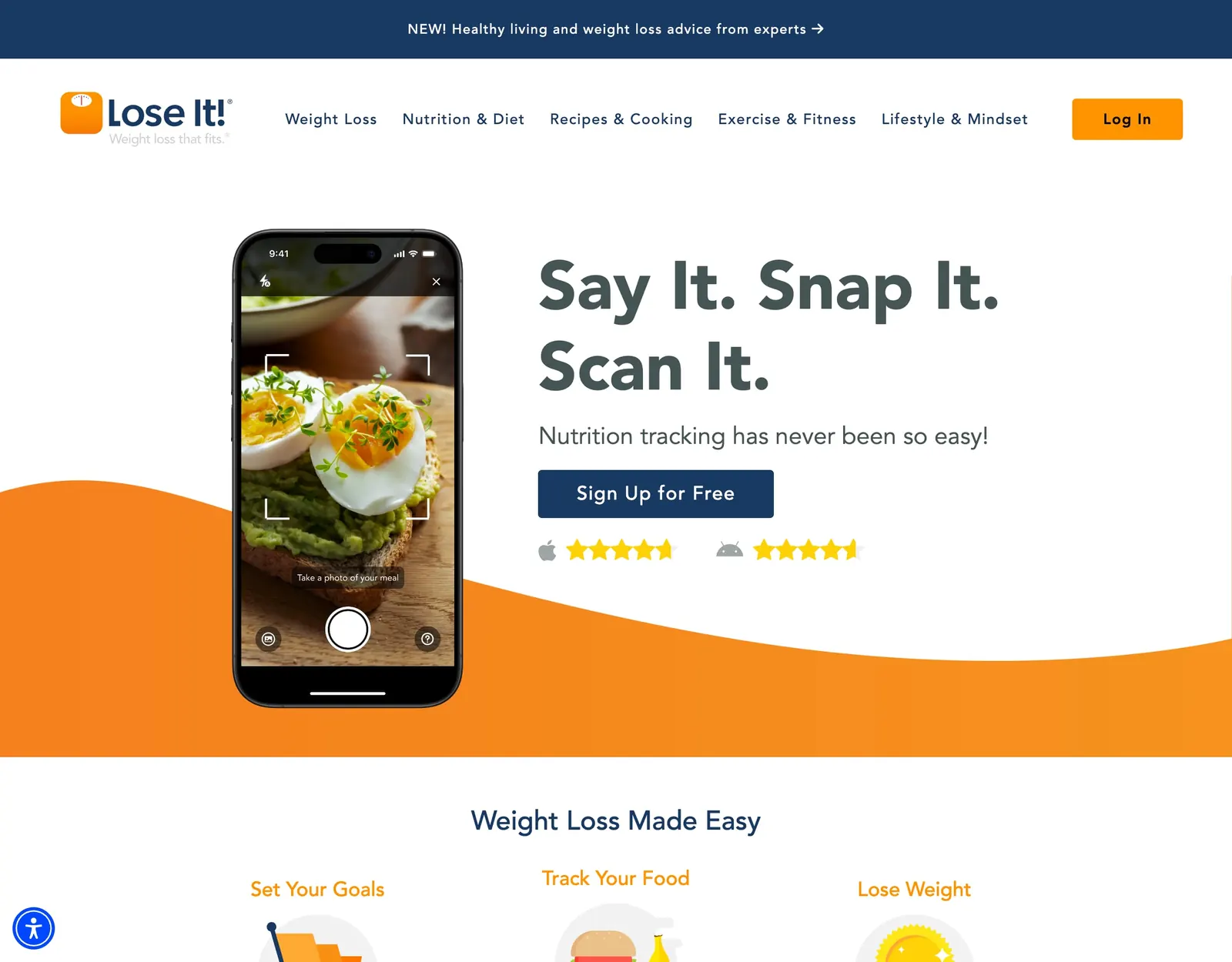
Lose It! launched in 2008 and is made by FitNow. Here is the daily flow as its help center and App Store listing describe it.
- Build a plan. Enter your profile and goal weight, pick a pace, and Lose It! sets a daily calorie budget.
- Log each meal. Tap Add Food under a meal and search the database, or pick from My Foods, recent Meals and Recipes.
- Use the faster tools. Scan It reads barcodes, Snap It suggests matches from a photo, and Say It or AI Voice logs a meal you say out loud. Snap It and AI Voice are Premium, and the barcode scanner is moving there too.
- Log weight. As you record weight changes, the budget adjusts gradually, and it switches to a maintenance plan when you reach your goal.
- Stay social. Add friends, join groups, build a logging streak and earn badges.
- Add Premium extras. Nutrient goals, intermittent fasting, meal planning, device syncing with Fitbit, Garmin and Withings, and GLP-1 dose logging.
How MyFoodBuddy works day to day
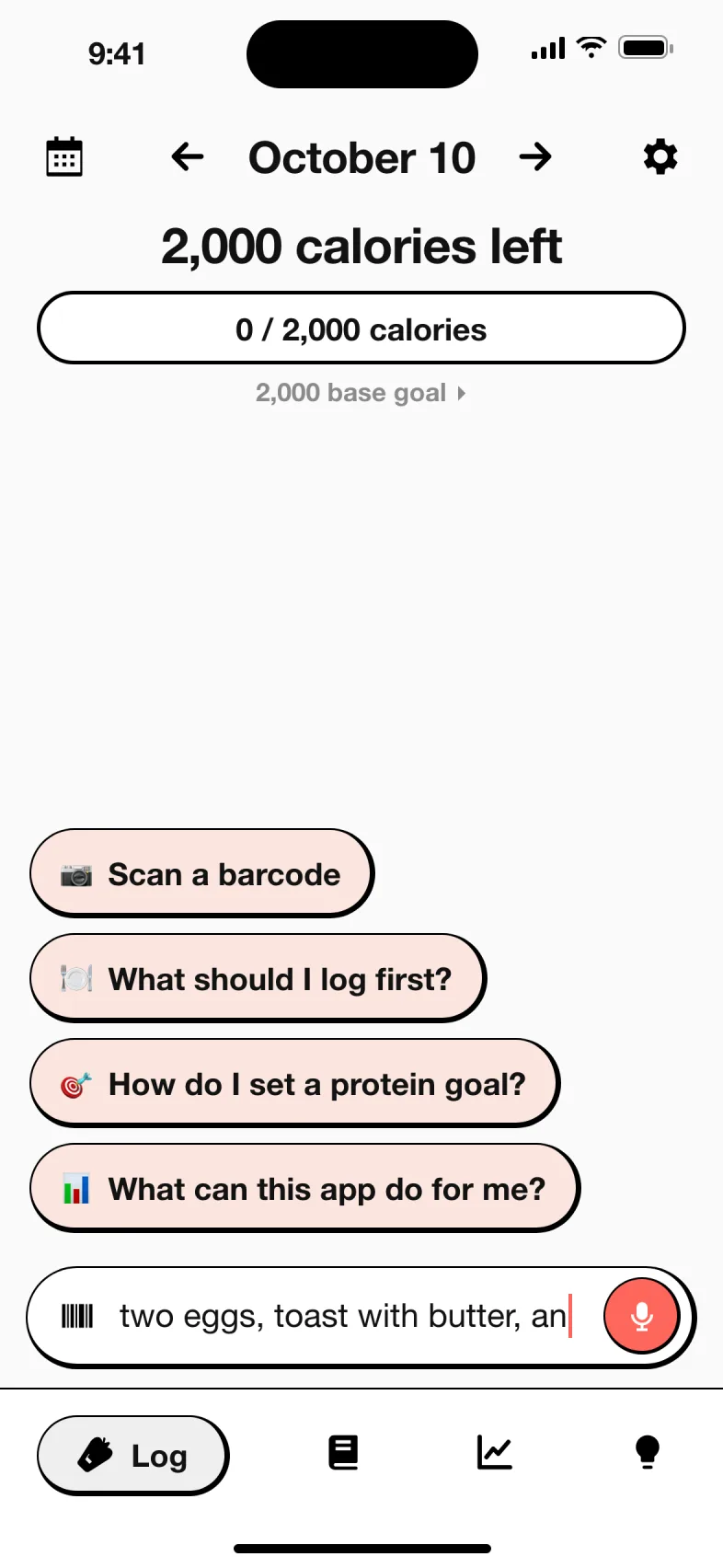
MyFoodBuddy skips the search screen. You describe the meal and Fiona does the looking up.
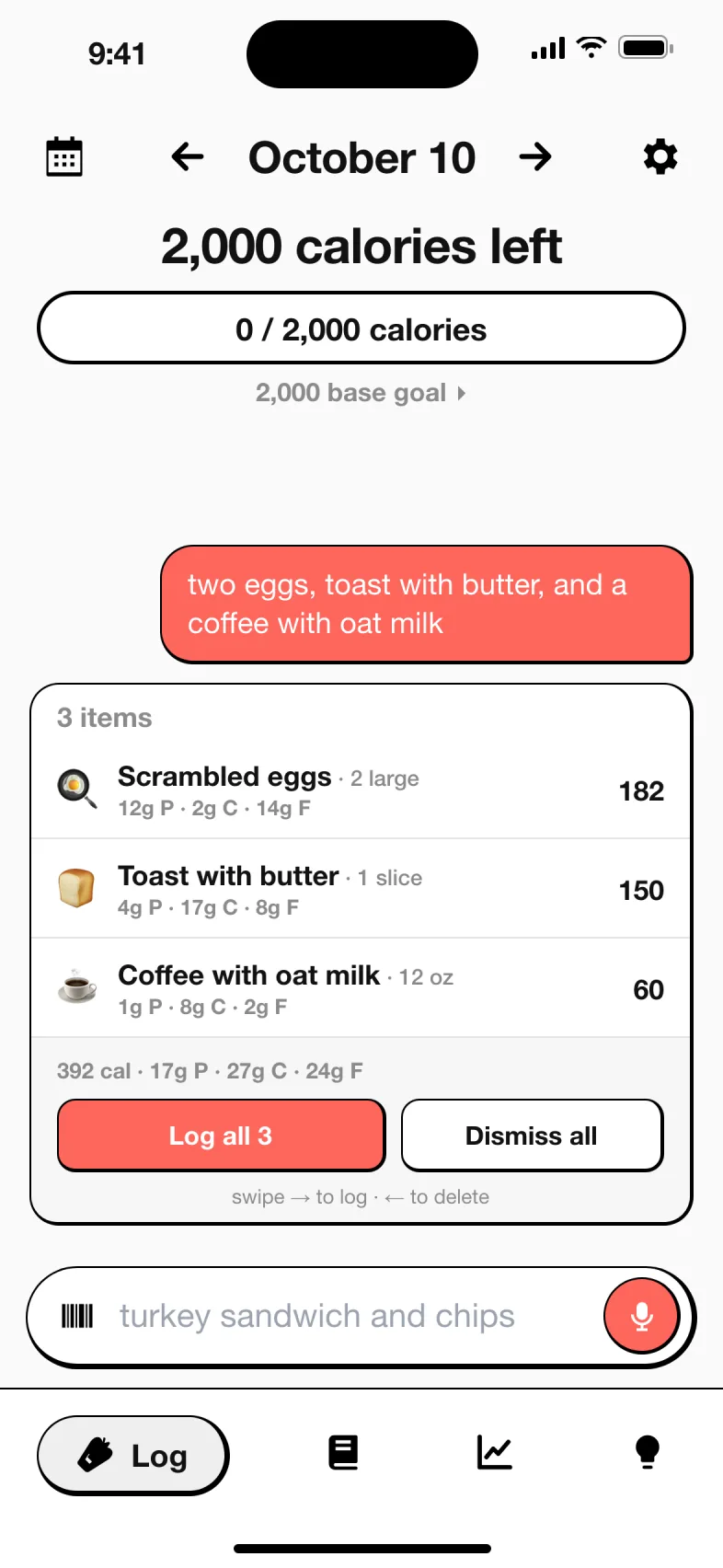
- Say what you ate. Type or speak a normal sentence, like “two eggs, toast with butter and a coffee with oat milk.”
- Fiona logs it. She splits it into foods and amounts, looks each one up and shows a card with calories, protein, carbs and fat. Tap Log it.
- Scan packaged food with the barcode scanner, included in the plan.
- Fix anything by chatting. Tell Fiona the portion was bigger and she updates the entry.
- Ask questions about what is left today or how your week went.
- Keep the habit with streaks, friends and leaderboards, and Apple Health sync for weight, sleep, steps and workouts.
How much does Lose It! cost compared to MyFoodBuddy
Lose It! has a free Basic version, Premium at a listed $79.99 a year, and Lifetime at $299.99 once ($229.99 if you already have Premium). MyFoodBuddy has one plan at $39.99 a year or $7.99 a month after a 7-day free trial.
| App | Plan | Monthly | Yearly | Includes |
|---|---|---|---|---|
| MyFoodBuddy | Yearly | n/a | $39.99 | Everything, after a 7-day free trial |
| MyFoodBuddy | Monthly | $7.99 | n/a | Everything, billed monthly |
| Lose It! | Basic | Free | Free | Personalized calorie budget, food search and logging, exercise, friends and groups, with ads |
| Lose It! | Premium | n/a | $79.99 | Barcode scanning, photo and voice logging, nutrient goals, fasting, meal planning, device sync |
| Lose It! | Lifetime | n/a | n/a | Premium for good, one payment of $299.99, or $229.99 for active Premium members |
US prices from each app's public pricing or App Store listing, checked MyFoodBuddy Oct 18, 2026, Lose It! Oct 18, 2026. Apps change prices and run sales often, so confirm in the app before you buy.
What you would actually pay
| If you want | Lose It! | MyFoodBuddy |
|---|---|---|
| A barcode scanner and voice logging, first year | $79.99 listed price for Premium, often discounted in the app | $39.99 |
| To pay month by month | No standard monthly price published | $7.99 a month |
| To pay once and keep it | $299.99 Lifetime | Not offered |
| No ads without a subscription | One-time ad removal purchase | No ads on the only plan |
| Never pay anything | Free Basic, with ads | Not offered. 7-day free trial only |
If you want free, Lose It! wins, since MyFoodBuddy has no free tier. If you plan to stay for years, Lose It! Lifetime pays for itself against its own $79.99 list price in about four years. For a first year with the faster logging tools, MyFoodBuddy’s $39.99 is half Lose It!’s listed Premium price, though Lose It! may offer you a discount.
Is Lose It! still free, and is the barcode scanner Premium now
Lose It! Basic is still free. It gives you a personalized calorie budget, food search and logging, exercise logging, friends and groups. It shows banner and full-page ads, which a separate one-time purchase removes.
The barcode scanner is a different story. Lose It!’s help center says it is “in the process of moving the barcode scanner (Scan It) and nutrition label scanner to part of our Premium features,” and that some free members still have access during the change while others do not. The App Store listing already puts the barcode scanner under Premium features. Snap It photo logging and AI Voice are Premium too.
Lose It! AI Voice vs describing a meal in MyFoodBuddy
This is the closest overlap between the two apps, so it is worth being precise. Lose It!’s App Store listing describes AI Voice as “Say ‘I had 2 eggs, toast with butter and jam’ to log your meal.” That is a Premium feature, and like Snap It it works only when the phone is set to English.
MyFoodBuddy works the same way for every meal, with a few differences.
- Typing works too. You can type the sentence into the chat when you cannot talk out loud.
- Your numbers win. Say “300 calories of chicken nuggets” and 300 is what gets logged.
- Fixes are a message. Tell Fiona “the toast had more butter” and she updates the entry.
- You can ask follow-ups. Fiona answers questions about your food, goals and progress. Lose It! does not list an AI coach or chat on its public pages.
Lose It! has something MyFoodBuddy does not, which is photo logging. If you would rather point your camera at a plate than describe it, that counts for Lose It!.
Is Lose It! worth it, and what do reviews say
Lose It! is well liked. When we checked on October 18, 2026, the US App Store showed about 781,000 ratings averaging 4.8, and Apple has given it an Editors’ Choice badge, praising the barcode scanner, restaurant meals and social features.
A review by a strength coach at FeastGood praised the setup questions and the calorie target, which matched what the reviewer would prescribe. The same review found that the default macro targets did not add up to the calorie target and that protein defaults were low, and concluded Lose It! suits people who mainly count calories rather than macros.
The common complaints are the ads in the free version and features moving behind Premium, the barcode scanner most recently. Those are also the main reasons people search for a Lose It alternative.
When Lose It! is the better pick
- You want a free calorie counter and can live with ads.
- You want a calorie budget that adjusts automatically as your weight changes.
- You use Android or a web browser. MyFoodBuddy is iPhone only.
- You want photo logging, a fasting tracker, meal planning or GLP-1 tracking.
- You would rather pay once with Lifetime than subscribe.
- You like groups as well as friends for motivation.
When MyFoodBuddy is the better pick
- You want to log by typing or saying the meal, every time, not search for each food.
- You want the barcode scanner and voice logging at one clear price, $39.99 a year or $7.99 a month.
- You want no ads and nothing held back for a higher tier.
- You want to fix entries by chatting and ask an AI coach questions about your day.
- You care about 20+ vitamins and minerals alongside calories and macros.
Still comparing? See MyFoodBuddy vs MyFitnessPal, MyFoodBuddy vs MyNetDiary and MyFoodBuddy vs Cronometer, or browse every comparison.
Frequently asked questions
Is Lose It! free?
Yes, Lose It! Basic is free, with a calorie budget, food search and logging, and ads. Photo and voice logging, nutrient goals, fasting and meal planning need Premium, and the barcode scanner is moving to Premium.
Is Lose It! no longer free?
The free version still exists. What has changed is that Lose It! is moving the barcode scanner and nutrition label scanner to Premium, so some free accounts no longer have them.
How much does Lose It! Premium cost?
The help center lists Premium at $79.99 a year and Lifetime at $299.99, or $229.99 for active Premium members. Lose It! says most users are offered discounts in the app, so your price may be lower. New users get a 7-day free trial.
Is Lose It! Premium worth it?
It is if you want photo logging, intermittent fasting, meal planning or GLP-1 tracking. If you mainly want faster logging and no ads, MyFoodBuddy includes typed and voice logging and the barcode scanner for $39.99 a year.
Is MyFoodBuddy a free Lose It alternative?
No. MyFoodBuddy has a 7-day free trial, then costs $39.99 a year or $7.99 a month. It has no free tier and no ads.
Does Lose It! have voice logging?
Yes. Lose It! Premium has AI Voice, which logs a meal you say out loud, and it works when the phone language is English. MyFoodBuddy logs a meal from a spoken or typed sentence on its one plan.
Is MyFoodBuddy on Android?
No. MyFoodBuddy is iPhone only. Lose It! runs on iPhone, Android and the web.
Can I move from Lose It! to MyFoodBuddy?
Yes, but MyFoodBuddy does not import a Lose It! log. You set your goals during setup from your age, weight, height and activity, and Apple Health sync brings in weight, sleep, steps and workouts.
Related comparisons
Sources and how we checked
Every fact about another app on this page comes from that app's own public pages, its App Store listing or the independent sources below, read on the dates shown. We did not use paid accounts. If something has changed, email adam@foodbuddy.my and we will fix it.
MyFoodBuddy (verified Oct 18, 2026)
- MyFoodBuddy on the App Store checked Oct 18, 2026
- About MyFoodBuddy checked Oct 18, 2026
Lose It! (verified Oct 18, 2026)
- Lose It! homepage checked Oct 18, 2026
- Lose It! Premium page checked Oct 18, 2026
- Lose It! on the US App Store, description, in-app purchases and release notes checked Oct 18, 2026
- Lose It! help center, Membership Tiers and Pricing (updated Sep 9, 2026) checked Oct 18, 2026
- Lose It! help center, What is Lose It! Premium checked Oct 18, 2026
- Lose It! help center, Unlocking the Barcode Scanner checked Oct 18, 2026
- Lose It! help center, How to Use Snap It checked Oct 18, 2026
- Lose It! help center, Ad-Free Version of Lose It! checked Oct 18, 2026
- Lose It! help center, Reasons Your Budget Might Change checked Oct 18, 2026
- Lose It! help center, Using Apple Health With Lose It! checked Oct 18, 2026
- Lose It! help center, GLP-1 Logging (updated Oct 14, 2026) checked Oct 18, 2026
- FeastGood, Lose It! app review by Amanda Parker, CSCS (Mar 14, 2025) checked Oct 18, 2026