
Seven Steps to Smarter App Tracking Food Habits
Master app tracking food with 7 simple steps. Learn how voice logging and AI make calorie tracking effortless. Start your 7-day free trial today.
You open your app tracking food intake with the best intentions, spend five minutes searching for "grilled chicken breast" through dozens of database entries, then give up and close the app. Research shows that most people abandon their food tracking apps within just two weeks because traditional methods demand too much time and mental energy for every single meal. Modern AI-powered tools like MyFoodBuddy have flipped this script entirely by letting you simply speak what you ate and handling all the complicated nutrition math automatically.
Table of Contents
- The Evolution of App Tracking Food Technology
- Step 1: Choose Voice Over Manual Entry
- Step 2: Let AI Handle the Nutrition Math
- Step 3: Build Your Favorite Meals Library
- Step 4: Set Personalized Goals That Actually Work
- Step 5: Use Visual Analytics to Spot Patterns
- Step 6: Get Personalized Coaching from AI
- Step 7: Build Consistency with Gamification
- Making App Tracking Food Work for Your Life
- Common Questions About App Tracking Food
The Evolution of App Tracking Food Technology
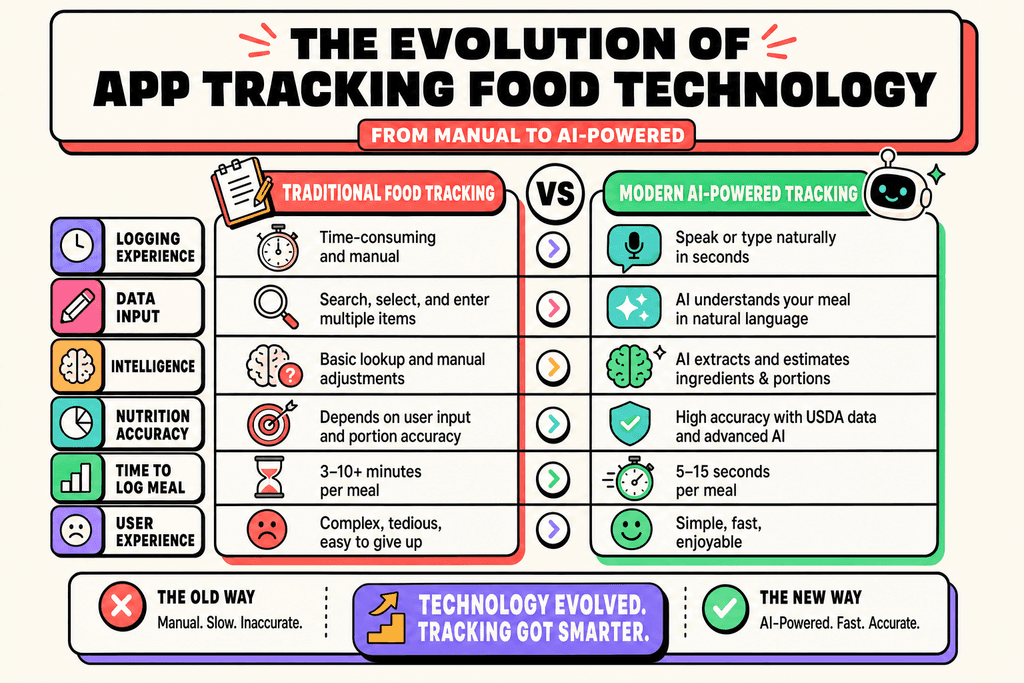
Most people who try tracking their food give up within the first two weeks. The reason isn't lack of motivation or willpower. It's because traditional app tracking food methods take way too much time and effort. Opening an app, searching through thousands of food items, adjusting portion sizes, and manually entering every ingredient can turn a simple lunch into a 10-minute data entry task. That's not sustainable for anyone with a busy life.
How Food Tracking Used to Work
The first generation of calorie tracking apps required users to become part-time nutritionists. You had to know exactly what you ate, how much you ate, and then find the right database entry among dozens of similar options. Apps like MyFitnessPal pioneered this space, but they built their systems around manual input because that's all the technology could handle back then.
Here's what a typical logging session looked like with traditional methods:
- Search for each food item individually in a database
- Scroll through multiple brand options and variations
- Manually adjust serving sizes and quantities
- Repeat for every ingredient in your meal
- Double-check that everything adds up correctly
This process could easily eat up 5 to 10 minutes per meal. Multiply that by three meals a day, and you're spending up to 30 minutes just logging food. Most people don't have an extra half hour each day to spend on data entry.
The Shift to Voice and AI Technology
Everything changed when AI and natural language processing got good enough to understand how people actually talk about food. Instead of forcing users to adapt to rigid database structures, modern app tracking food solutions adapted to users. You can now just say "two eggs, toast with butter, and a coffee with oat milk" and the app figures out the rest.
The technology behind this shift relies on several key components:
- Natural language processing that understands casual food descriptions
- USDA nutritional databases with over 20 nutrients per food item
- Machine learning algorithms that improve accuracy over time
- Voice recognition that works in noisy environments
Apps like MyFoodBuddy use this technology to reduce logging time from minutes to seconds. The difference isn't just about convenience. When tracking becomes this easy, people actually stick with it long enough to see results.
Comparing Old and New Tracking Methods
The gap between traditional and modern app tracking food approaches is bigger than most people realize. It's not just about saving time, though that's a huge factor. The entire experience has been redesigned around how humans naturally think and talk about meals.
| Feature | Traditional Apps | Modern AI Apps |
|---|---|---|
| Time per meal | 5-10 minutes | 10-30 seconds |
| Input method | Manual search and entry | Voice or natural text |
| Nutrients tracked | Basic macros only | 20+ nutrients automatically |
| Database accuracy | User-submitted entries | USDA verified data |
| Learning curve | Steep, requires training | Minimal, works immediately |
The data shows that faster logging directly correlates with better long-term adherence. When people can track their food in the time it takes to send a text message, they're far more likely to keep doing it. Integration with platforms like Apple Health adds another layer of insight, connecting your food intake with activity levels, sleep patterns, and other health metrics. This comprehensive view wasn't possible with older app tracking food systems that operated in isolation.
Step 1: Choose Voice Over Manual Entry
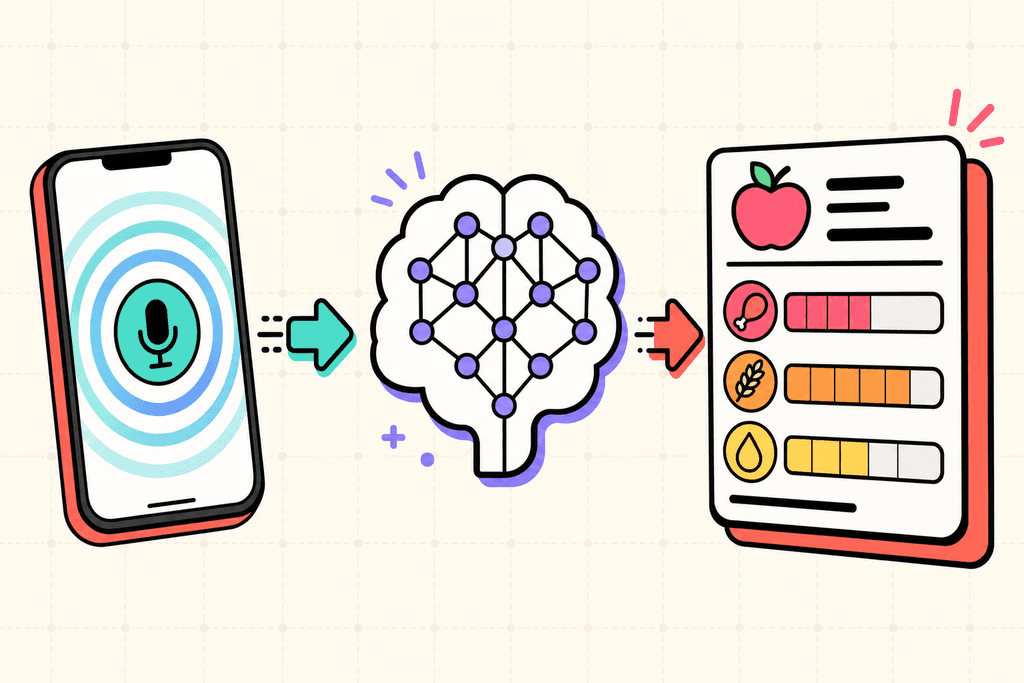
Most people quit tracking their food within the first week because it takes too long. You're standing in line at a coffee shop, trying to remember if that muffin was blueberry or chocolate chip, then spending five minutes searching through a database of 47 different muffin entries. Voice logging changes everything by letting you speak naturally instead of typing and tapping through endless menus. When you can just say "two eggs, toast with butter, and coffee with oat milk" and move on with your day, tracking becomes something you actually stick with. The difference between spending 30 seconds versus 5 minutes per meal adds up fast over a week.
Step 1: Choose Voice Over Manual Entry
- Voice logging reduces meal entry time from minutes to seconds
- Natural language processing understands casual descriptions without perfect formatting
- Works perfectly for on-the-go logging without interrupting your day
- No need to remember exact portion sizes or brand names while speaking
The beauty of voice entry is that it fits into the moments between everything else you're doing. You don't need to sit down with your phone and carefully input data. MyFoodBuddy processes these voice entries instantly, understanding context and common food descriptions the way another person would.
Step 2: Let AI Handle the Nutrition Math
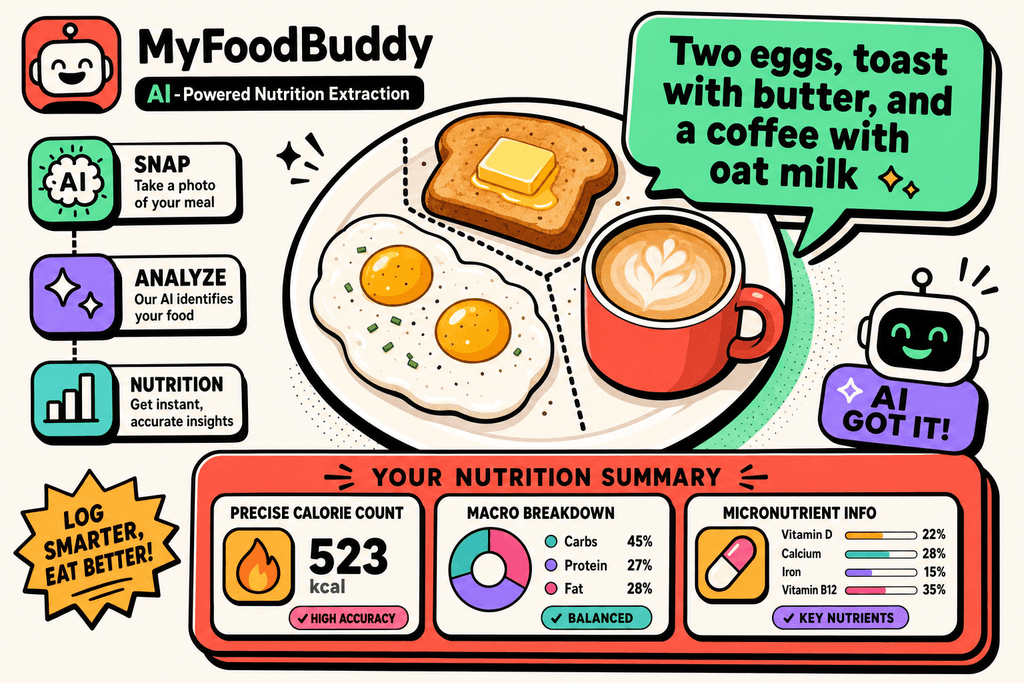
Remember the last time you tried to figure out how many calories were in your homemade stir-fry? You probably gave up halfway through weighing ingredients or just guessed. AI-powered nutrition extraction takes that entire headache off your plate by automatically calculating everything from your simple description. The system pulls from USDA database integration to ensure the numbers are accurate, not just rough estimates. You get precise calorie counts, macro breakdowns, and even micronutrient information without opening a calculator or nutrition label.
Step 2: Let AI Handle the Nutrition Math
Traditional apps make you search through databases with thousands of entries, many of them user-submitted and wildly inaccurate. Then you're stuck creating custom entries for anything homemade or restaurant-specific. The AI handles all of this automatically, tracking over 20 nutrients including vitamins and minerals you probably didn't even know you should be monitoring.
- Automatically calculates calories, protein, carbs, and fats from descriptions
- Identifies and tracks vitamins, minerals, and other micronutrients
- No searching through endless food databases or second-guessing entries
- Updates nutritional information based on portion descriptions
Step 3: Build Your Favorite Meals Library
Most of us eat the same 15 to 20 meals on rotation. Your Tuesday breakfast probably looks a lot like your Thursday breakfast. Saving frequently eaten meals as favorites means you can log that entire meal with one tap instead of entering each ingredient again. This works especially well if you meal prep or have consistent eating patterns throughout the week. The app lets you organize everything by meal type, so your breakfast favorites stay separate from your dinner options.
- Save complete meals for instant one-tap logging
- Organize by breakfast, lunch, dinner, and snacks
- Re-log entire meals in seconds instead of minutes
- Perfect for meal prep routines and weekly planning
Think about how much time you spend re-entering the same foods. Building your favorites library during the first week pays off for months afterward. You can learn more about how voice commands simplify tracking your diet to make this process even faster.
Step 4: Set Personalized Goals That Actually Work
Generic calorie targets don't work because everyone's body is different. A 25-year-old athlete needs completely different nutrition than a 45-year-old office worker, even if they're the same height and weight. Using built-in TDEE calculators gives you science-based targets that account for your age, activity level, and specific goals. You can customize macro ratios based on whether you're trying to lose weight, gain muscle, or just maintain where you are. The flexibility to adjust these goals as your body and lifestyle change keeps the app useful long-term.
Beyond just calories and macros, you can set micronutrient goals for specific vitamins and minerals. Maybe you're low on iron or trying to increase your fiber intake. Personalized nutrition goals turn vague health intentions into trackable targets. For more guidance on this, check out setting realistic health goals through a calorie tracking app.
- TDEE calculators provide personalized calorie targets
- Customize protein, carb, and fat ratios for your goals
- Track specific vitamins and minerals you care about
- Adjust targets as your needs change over time
Step 5: Use Visual Analytics to Spot Patterns
Numbers in a spreadsheet don't tell you much about your eating habits. But a color-coded calendar that shows you tracked every day this week except Saturday? That tells a story. Visual analytics make it easier to spot patterns you'd never notice otherwise, like how you always go over your calorie goal on Fridays or how your protein intake drops on weekends. Weight trend charts show you the bigger picture instead of obsessing over daily fluctuations that don't mean much.
- Color-coded calendars show tracking consistency at a glance
- Weight trend charts reveal long-term progress patterns
- Nutrient tracking across daily, weekly, and monthly views
- Visual feedback highlights both problem areas and wins
The calendar view is especially helpful for maintaining accountability. When you see a streak of green days building up, you don't want to break it. These visual tools turn abstract data into something you can actually understand and act on.
Step 6: Get Personalized Coaching from AI
Hiring a nutritionist costs hundreds of dollars per month, and they're not available at 11 PM when you're planning tomorrow's meals. AI nutrition coaches like Fiona analyze your eating patterns and provide personalized feedback based on your actual food logs, health data, and stated goals. The insights go beyond just "you ate too much today" to specific suggestions about nutrient deficiencies or areas where small changes could make a big difference. It's like having a nutritionist available 24/7 without the cost or scheduling hassle.
The AI learns from your patterns over time. If you consistently struggle with protein intake on busy days, it might suggest quick high-protein options that fit your preferences. Personalized insights beat generic advice every time because they're based on your real behavior, not assumptions.
- AI analyzes your eating patterns for personalized feedback
- Get suggestions based on your health data and goals
- Receive insights about nutrient gaps or improvement areas
- Available anytime without appointment scheduling
Step 7: Build Consistency with Gamification
The hardest part of app tracking food isn't learning how to use the app. It's remembering to actually do it every single day. Tracking streaks create positive momentum that makes you want to keep going, similar to how fitness apps use step streaks to keep you moving. When you're on day 47 of consistent logging, you're much less likely to skip day 48. Achievements celebrate milestones along the way, turning what could feel like a chore into something that actually feels rewarding.
- Streaks create accountability and positive momentum
- Achievements celebrate milestones and maintain motivation
- Smart reminders help you log before you forget
- Turns tracking from a chore into an engaging habit
Smart reminders are the safety net for busy days. They nudge you to log your lunch before you forget what you ate, which happens more often than you'd think. Gamification elements work because they tap into the same psychology that makes games addictive, but in a way that actually benefits your health. You can explore more about why intuitive health app logging boosts consistency to understand how these features work together.
Making App Tracking Food Work for Your Life
These seven steps aren't about making app tracking food more complicated. They're about making it so simple that you actually stick with it. The whole point is to remove the friction that makes most people quit after a week or two. When you can log a meal in seconds instead of minutes, when you don't need to weigh every ingredient, and when the app learns your habits over time, tracking becomes something you barely think about.
The technology should do the heavy lifting for you. MyFoodBuddy handles the calculations, remembers your favorite meals, and even gives you insights through an AI coach named Fiona. You just tell it what you ate, and it figures out the rest. That's how voice commands simplify tracking your diet in ways that traditional apps never could.
Here's what matters most: consistency beats perfection every single time. Missing a day or estimating portion sizes won't ruin your progress. What ruins progress is giving up because the process feels like a part-time job. If you've tried other apps and felt overwhelmed by all the searching and manual entry, you're not alone.
The difference between success and failure often comes down to whether your tools work with your lifestyle or against it. Modern voice-based tracking removes the biggest barrier that stops people from achieving personal health goals with a smart app. You can try it yourself with a 7-day free trial to see if it actually saves you time. Most people find they're more likely to track when it takes 10 seconds instead of 5 minutes.
Now let's address some common questions about making app tracking food work in real life.
Common Questions About App Tracking Food
When you're thinking about using an app tracking food intake, you probably have some questions about how it all works. The technology behind modern food tracking has changed a lot in recent years, especially with AI doing most of the heavy lifting. These questions come up all the time from people who want to make sure they're getting accurate data without spending their whole day logging meals. Here's what you need to know before you start.
How accurate is voice-based food logging compared to manual entry?
Voice-based logging is just as accurate as manual entry because both methods pull from the same nutritional databases like USDA data. The main difference is speed and convenience. When you say "two eggs and toast with butter," the AI interprets your input and matches it to verified nutritional information, which is the same process that happens when you manually search and select items. MyFoodBuddy uses AI to understand natural language, so you don't have to worry about finding the exact database entry yourself.
Can I track homemade meals and recipes easily?
Yes, you can describe homemade meals in plain language and the app will break down the ingredients for you. If you make the same recipe regularly, you can save it as a favorite and log it again with just a tap. This is way faster than apps like MyFitnessPal where you need to manually create recipes and input every single ingredient with exact measurements.
What happens if I forget to log a meal?
Missing a meal here and there won't ruin your progress, but consistency matters more than perfection. Most apps tracking food habits include reminder features to help you stay on track. You can always go back and log meals later in the day when you remember, though it's easier to do it right after eating while the details are fresh in your mind.
How long does it take to see results from consistent tracking?
Most people start noticing patterns in their eating habits within the first week of tracking. Physical results like weight changes typically show up after two to four weeks of consistent logging and sticking to your calorie goals. The key is that tracking itself doesn't create results, but it gives you the awareness you need to make better choices.
Do I need to track every single day to see benefits?
You don't have to be perfect, but tracking at least five to six days per week gives you enough data to understand your patterns. Weekend tracking is especially important since that's when most people go off track without realizing it. The easier your app makes logging, the more likely you'll stick with it daily.
How does AI know the nutritional content of my food?
AI doesn't guess at nutrition information. It pulls from established databases like the USDA nutrition database that contain verified information for thousands of foods. When you log "chicken breast," the AI matches your input to the database entry and calculates portions based on the quantity you mentioned. This is the same data that nutritionists and dietitians use, just accessed faster through natural language processing instead of manual searching.
Ready to start tracking smarter?
Download MyFoodBuddy and start tracking your calories by just saying what you ate. No more searching databases or guessing portions.
Get started