
Cronometer vs MyFitnessPal for Calories Macros and Ease
Cronometer vs MyFitnessPal compared for calories, macros, and ease of use. Find out which app fits your weight loss goals best.
Studies on habit apps show most people ditch calorie tracking within a month, usually because logging every bite feels like a part-time job. Cronometer and MyFitnessPal are the two names everyone brings up when they finally decide to try again, so this breakdown compares their calories, macros, and everyday ease of use. If typing out every meal sounds exhausting before you even start, apps like MyFoodBuddy that let you just talk or type naturally are worth knowing about before you pick a side.
Table of Contents
Quick Snapshot Before You Decide
Cronometer was built back in 2005 by a guy who wanted to track his own vitamin intake, and that history still shows today. It's known for tracking way more than just calories, things like vitamin K, magnesium, and other stuff most apps skip. MyFitnessPal came a few years later and took a different path, focusing on building the biggest food database around and adding social features so people could cheer each other on. Both apps have stuck around for over a decade, which says something about how many people rely on them daily. But sticking around doesn't always mean they fit how people actually eat and log food today.
Here's a fast side-by-side look before we dig into the details:
| Feature | Cronometer | MyFitnessPal |
|---|---|---|
| Main focus | Micronutrient accuracy | Huge food database |
| Free version | Yes, limited features | Yes, limited features |
| Paid price | Around $50 per year | Around $80 per year |
| Database size | Smaller, curated entries | Millions of crowdsourced entries |
| Social features | Minimal | Built in, friends and groups |
| Logging method | Manual search or barcode | Manual search or barcode |
Something to keep in mind here is that neither app was designed around voice or fast AI logging, which is a big deal if you've ever tried typing out a meal after a long day. Both rely heavily on you searching through lists, picking the right entry, and adjusting portion sizes by hand. That works fine for some people, but it can get old fast.
- Cronometer users tend to be folks who care about specific nutrients, like athletes or people managing health conditions
- MyFitnessPal users often want variety and don't mind a bigger, sometimes messier database
- Accuracy versus convenience is basically the tradeoff between these two
That tradeoff is exactly where this comparison gets interesting, especially once you start looking at how much time each app actually takes to use every single day.
Tracking Calories and Macros Accurately
Cronometer's food database went through actual verification, which is why nutrition nerds tend to trust it more. Every entry gets checked against manufacturer data or lab results before it goes live. This matters a lot if you're someone who logs the same 15 foods every week and needs those numbers to actually mean something.
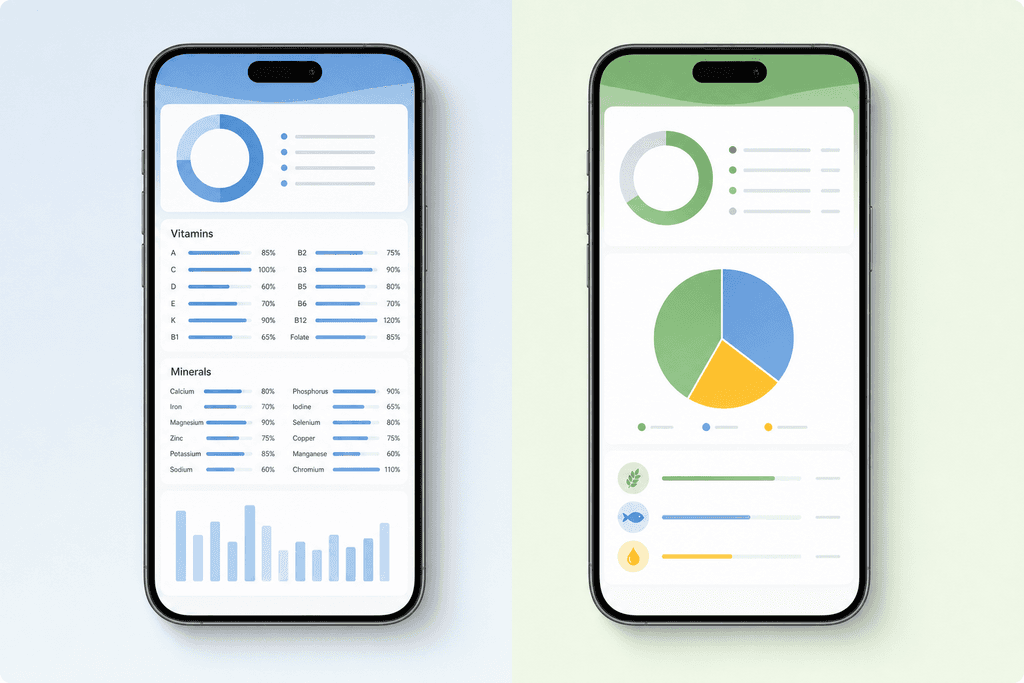
MyFitnessPal, on the other hand, runs mostly on crowdsourced entries. Anyone can add a food item, which means you'll sometimes find five different versions of "chicken breast" with five different calorie counts. It's not that the app is broken, it's just that the data quality depends on random users typing things in correctly (or not).
Here's a quick side-by-side of how the two stack up on the stuff that actually affects your tracking:
| Feature | Cronometer | MyFitnessPal |
|---|---|---|
| Database verification | Strict, checked entries | Crowdsourced, mixed accuracy |
| Macro tracking depth | Detailed, custom ratios | Basic custom goals |
| Micronutrient tracking | Extensive (vitamins, minerals) | Limited |
Both apps let you set custom macro targets, so if you're chasing a specific protein number for weight loss, either one can technically get you there. But Cronometer pulls ahead once you start caring about things like iron, potassium, or B12, since it tracks way more micronutrients than MyFitnessPal bothers with.
Ease of Use and Daily Logging Speed
This is where things get interesting, because accuracy doesn't matter much if you stop logging after four days. MyFitnessPal has a cleaner, more familiar interface, but you're still stuck searching through a food list and guessing at portion sizes every single time. Cronometer takes this a step further in the wrong direction, with more menus, more settings, and a learning curve that can feel like homework.
Neither app has really solved the actual bottleneck, which is the typing itself. Searching "grilled chicken breast 6 oz" and scrolling through ten results takes way longer than just saying it out loud.
- Cronometer pros: deep data, good for detail-obsessed trackers
- Cronometer cons: slower to log, more settings to configure
- MyFitnessPal pros: familiar layout, huge food database
- MyFitnessPal cons: still manual entry, inconsistent data
If you've ever given up on logging mid-week because searching for "protein bar, chocolate, brand X" felt like too much effort, you're not alone. That's actually the exact gap that voice-based calorie tracking was built to close, since talking through your meal takes a few seconds instead of a few minutes.
Wrapping It Up
Cronometer wins on data depth, MyFitnessPal wins on brand recognition, but both still ask you to do the heavy lifting yourself every time you eat something. If you're trying to lose weight and stay consistent, the app that actually gets used daily usually beats the one with the fanciest nutrient charts. For more on this, check out our breakdown of better alternatives to MyFitnessPal for AI meal tracking, or if speed is your main concern, take a look at 3 fast ways to log meals with a calorie tracking app.
What This Means If You Are Trying to Lose Weight
Here's something that doesn't get talked about enough: nearly 80% of people who start a diet app quit within the first few weeks. It's not because they lack willpower or don't care about their goals. It's because typing in every ingredient, searching databases, and weighing food gets old fast. Cronometer and MyFitnessPal both have loyal fans, but they're built for different people, and neither one fixes the real reason most diets fail.
If you love numbers and want to know your zinc intake down to the milligram, Cronometer might be your thing. It's built for people who don't mind extra setup time in exchange for detail.
- Detailed micronutrient tracking
- Good for athletes or people with specific health conditions
- Steeper learning curve for beginners
MyFitnessPal, on the other hand, works better for folks who just want a simple food database and some community support to stay accountable.
- Massive food database
- Social features like friend feeds and challenges
- Ads and paywalls can slow things down
But here's the thing both apps miss. Speed of logging matters more than accuracy for most people trying to lose weight, because the app you actually use beats the app that's perfect but abandoned after three weeks. This is where voice and AI-based logging changes the math entirely.
- Typing a meal into MyFitnessPal: 2 to 4 minutes
- Searching Cronometer's database for exact matches: even longer
- Saying what you ate out loud: a few seconds
That's the gap MyFoodBuddy was built to close. Instead of choosing between detail and simplicity, you just talk or type naturally, and the AI does the rest. Consistency beats precision when it comes to actual weight loss results, and consistency starts with logging being fast enough that you don't dread it.
Wrap-up Choosing Between Cronometer and MyFitnessPal
So here's where we land on cronometer vs myfitnesspal. If you want the most accurate numbers and you care about stuff like your iron or B12 levels, Cronometer probably wins that fight. If you just want a huge food database and something familiar that most of your friends already use, MyFitnessPal has that going for it.
But here's the thing nobody talks about enough. Both apps still make you do the same boring task every single day: search for your food, tap the right serving size, adjust the numbers, log it, repeat for every meal. That's the real problem, not which app has better charts.
If typing out every meal three times a day is the reason you keep quitting calorie tracking, that's worth paying attention to. Weight loss doesn't fail because of bad math. It fails because logging feels like a chore after week two.
This is where trying an app like MyFoodBuddy might change things for you. You just say what you ate out loud, and it handles the rest. No searching, no scrolling through ten versions of "chicken breast."
If you're curious how this stacks up against the app you're currently using, check out our breakdown on better alternatives to MyFitnessPal for AI meal tracking. And if speed is what you're really after, this piece on quick calorie logging for busy fitness buffs lays out exactly how much time you could get back each week.
Picking the right app isn't really about which one has more features. It's about which one you'll actually still be using a month from now.
Frequently Asked Questions
Still have questions about Cronometer vs MyFitnessPal? Here are the ones we get asked the most, answered plain and simple.
Is Cronometer more accurate than MyFitnessPal
Cronometer pulls a lot of its data from verified sources like the USDA database, which makes it more consistent than MyFitnessPal's crowdsourced entries. MyFitnessPal lets users submit their own food items, so you'll sometimes run into duplicate or wrong entries. If pinpoint accuracy on micronutrients matters to you, Cronometer usually wins here.
Which app is better for weight loss
Both apps can work for weight loss since the math is the same, you need to be in a calorie deficit. The real difference is which one you'll actually stick with. MyFitnessPal has a bigger food database and more social features, while Cronometer is better if you care about tracking things like fiber, potassium, or other micros.
Do both apps have free versions
Yes, both offer free versions, but they come with limits. MyFitnessPal's free version has ads and locks some features behind a paywall. Cronometer's free version is decent but pushes you toward the paid Gold plan for detailed analytics.
Can I use either app without a subscription
Technically yes, but you'll be stuck typing in every meal manually and dealing with ads or missing features. That's actually one of the biggest complaints people have about both apps, the free tiers feel more like a trial than a real tool.
Is there a faster alternative to typing in every meal
Yes. This is honestly where most people get frustrated with Cronometer and MyFitnessPal, since searching and logging each item takes time. With MyFoodBuddy, you just say or type what you ate in plain language and the AI handles the nutrition math for you. It also uses USDA data for accuracy, so you're not trading speed for correctness.
What if I eat the same meals often
Both Cronometer and MyFitnessPal let you save recent or favorite meals, which helps some. MyFoodBuddy takes this further with one-tap re-logging for meals you eat all the time, plus barcode scanning when you want to log something new fast.
Ready to start tracking smarter?
Download MyFoodBuddy and start tracking your calories by just saying what you ate. No more searching databases or guessing portions.
Get started