MyFitnessPal Macro Calculator Guide for Weight Loss
Learn how to use MyFitnessPal's macro calculator for protein, carbs, and fat tracking. Plus discover easier alternatives for weight loss.
You've been counting calories religiously for weeks, but the scale won't budge and you're losing muscle instead of fat. The problem isn't your effort—it's that you're only tracking half the equation. While apps like MyFitnessPal offer a macro calculator to help you dial in your protein, carbs, and fat, the constant manual logging makes it nearly impossible to stay consistent, which is exactly why tools like MyFoodBuddy let you track your macros in seconds using just your voice.
Why Your Macros Matter More Than You Think
Most people who want to lose weight start by cutting calories, which makes sense on the surface. You download an app, set a calorie goal, and try to stay under that number each day. But here's what nobody tells you: eating 1,500 calories of donuts affects your body completely differently than 1,500 calories of chicken, vegetables, and rice. The difference comes down to macros—the breakdown of protein, carbohydrates, and fat that make up those calories.
When you ignore your macro ratios, you're basically driving with a blindfold on. Sure, you might be in a calorie deficit, but your body could be burning through muscle tissue instead of fat. Protein determines whether you preserve muscle while losing weight, carbs fuel your workouts and daily energy, and fats keep your hormones balanced. Get the ratios wrong, and you'll end up skinny-fat, tired, and constantly hungry—even if the scale moves down.
This is where the MyFitnessPal macro calculator comes in handy for a lot of people. It helps you set specific targets for each macronutrient instead of just focusing on total calories. The problem is that actually hitting those targets every single day requires logging every ingredient, measuring portions, and spending 10-15 minutes per meal tapping through databases. That's why many people give up within a few weeks, even though they know tracking macros works.
Table of Contents
- Why Your Macros Matter More Than You Think
- What Are Macros and Why Should You Care
- How to Set Up Your Macros in MyFitnessPal
- Finding the Macro Settings
- Breaking Down the Numbers
- Why Most People Quit Tracking
- Why Most People Struggle with Macro Tracking Apps
- Making Macro Tracking Work for Your Life
- Common Questions About Macro Tracking
What Are Macros and Why Should You Care
Most people who start using a myfitnesspal macro calculator quickly realize that not all calories are created equal. You could eat 1,500 calories of candy bars or 1,500 calories of chicken and vegetables, and your body would respond completely differently. That's where macros come in, and understanding them can make or break your weight loss journey.
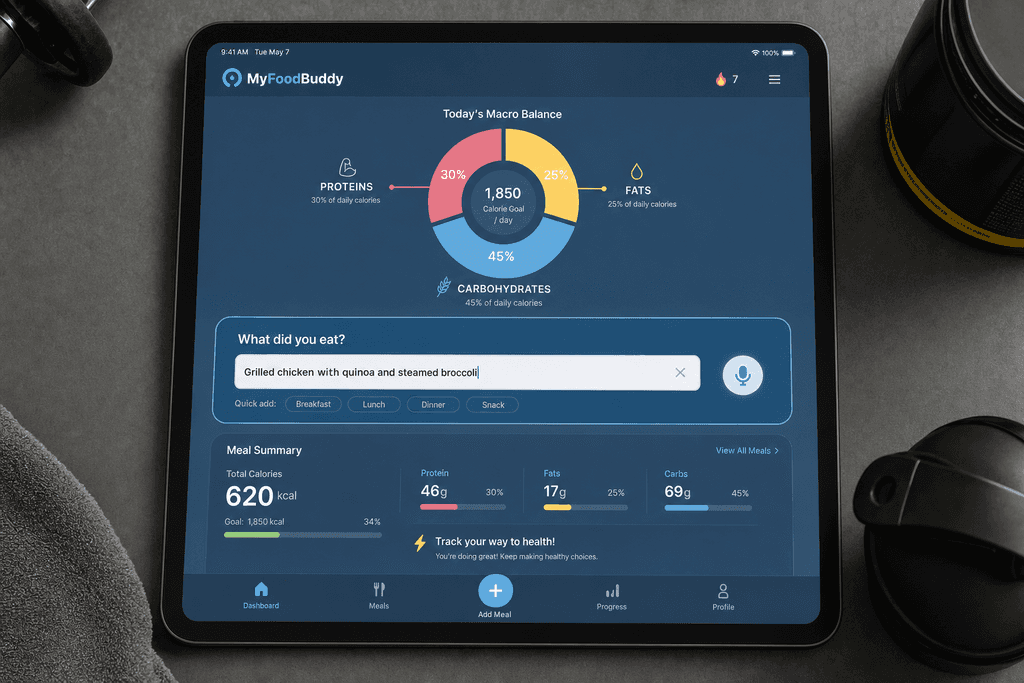
Macros is short for macronutrients, which are the three main types of nutrients your body needs in large amounts. Every single thing you eat contains some combination of protein, carbohydrates, and fats. When you track macros instead of just calories, you're basically telling your body exactly what kind of fuel you're giving it.
The Three Macros Explained
Protein is your muscle's best friend, and it does way more than just help bodybuilders get big. When you're trying to lose weight, protein keeps you from losing muscle along with fat. It also keeps you feeling full longer than the other macros, which means fewer trips to the snack drawer at 3pm.
Carbs get a bad reputation, but they're actually your body's preferred energy source. The trick is finding the right amount for your goals. Too many carbs and you'll store the extra as fat, but too few and you'll feel tired and cranky all day.
Fats might sound scary when you're trying to lose weight, but your body actually needs them. They help your hormones work properly and let your body absorb important vitamins. Plus, they make food taste better, which helps you stick to your diet longer.
Why Macro Tracking Beats Calorie Counting
Here's what happens when you focus on the right macro split instead of just cutting calories. Your body holds onto muscle while burning fat, your energy stays steady throughout the day, and you actually feel satisfied after meals. Apps like MyFoodBuddy make this easier by using AI to break down the macros in your meals automatically, so you don't have to guess or do math.
| Macro | Main Role | Calories Per Gram | Typical Range for Weight Loss |
|---|---|---|---|
| Protein | Builds muscle, keeps you full | 4 | 30-40% of calories |
| Carbs | Provides energy | 4 | 30-40% of calories |
| Fats | Supports hormones, absorbs vitamins | 9 | 20-30% of calories |
Protecting Your Muscle During Weight Loss
The biggest mistake people make when dieting is losing muscle along with fat. When you cut calories without tracking macros, your body doesn't know the difference between fat and muscle. It just knows it needs energy, so it breaks down whatever it can find.
Getting enough protein while keeping your other macros balanced tells your body to burn fat for energy instead. This is why two people can lose the same amount of weight but look completely different. One person loses mostly fat and looks toned, while the other loses muscle and fat and ends up looking soft.
- Higher protein intake preserves lean muscle mass
- Balanced carbs maintain workout performance
- Adequate fats keep your metabolism running smoothly
- The right macro split prevents the skinny-fat look
Most myfitnesspal macro calculator tools will give you a starting point based on your goals. The key is actually tracking what you eat and adjusting based on your results. That's where the real progress happens.
How to Set Up Your Macros in MyFitnessPal
Most people who download MyFitnessPal never actually change the default macro settings, which means they're following targets that have nothing to do with their actual body or goals. The app sets everyone to the same basic percentages right out of the box. If you want to use the myfitnesspal macro calculator properly, you need to dig into the settings and make some changes yourself. The process isn't exactly intuitive, but once you know where to look, it takes about five minutes to get everything dialed in.
First, you'll need to tap on the "More" tab at the bottom of the app, then select "Goals" from the menu. This is where all your macro settings live, though they're buried under a few different screens.
Finding the Macro Settings
- Open the app and navigate to the Goals section in your profile menu
- Look for "Calorie, Carbs, Protein and Fat Goals" or similar wording
- Choose between percentage-based targets (like 40% carbs) or gram-based targets
- Free users get basic adjustments, while premium users unlock more detailed customization
- The default 50/20/30 split rarely works for anyone trying to lose weight
The thing about MyFitnessPal is that it wants you to think in percentages, but most nutrition coaches and dietitians recommend thinking in grams instead. When you're trying to hit a specific protein target for muscle retention during weight loss, percentages get confusing fast.
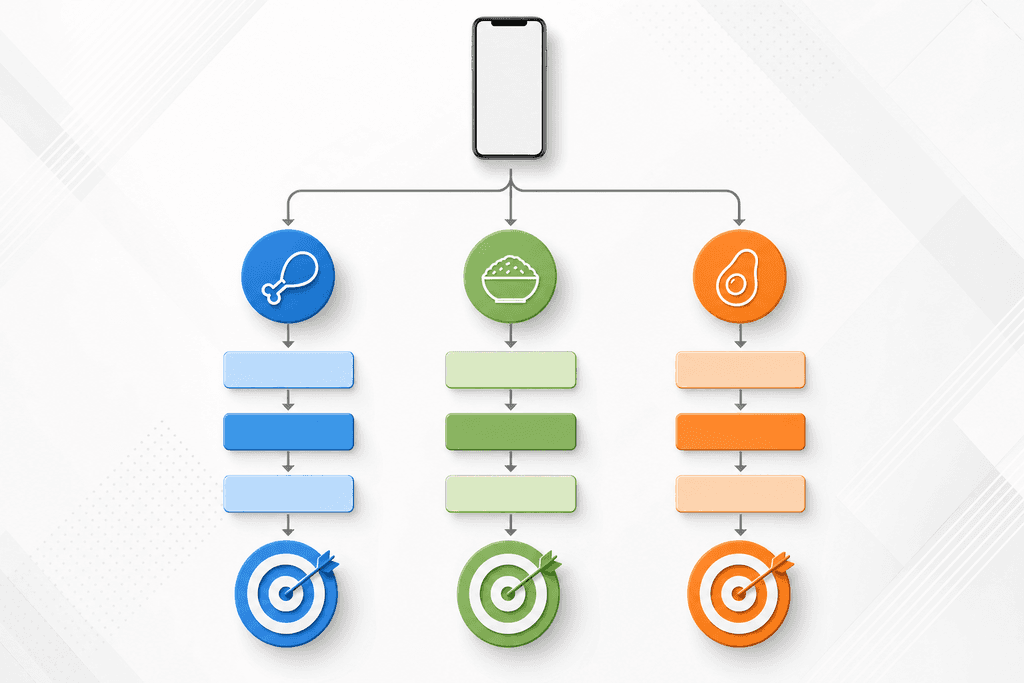
If you're following a specific diet like keto or high-protein, you'll need to manually adjust every single macro because the app doesn't have preset templates for different eating styles. This is where things start to feel like work instead of help.
Calculating Your Personal Macro Targets
Before you even open the myfitnesspal macro calculator, you need to know what numbers you're aiming for. Just plugging in random percentages won't get you anywhere. The math isn't complicated, but it does require knowing your body weight and having a rough idea of your activity level. Most people start with protein because it's the most important macro for weight loss, then fill in the rest with carbs and fats based on what keeps them full and energized throughout the day.
The standard recommendation is to eat 0.7 to 1 gram of protein per pound of body weight when you're trying to lose fat. So if you weigh 180 pounds, you'd aim for somewhere between 126 and 180 grams of protein daily.
Breaking Down the Numbers
| Goal Type | Protein | Carbs | Fats |
|---|---|---|---|
| Weight Loss (Active) | 40% | 30% | 30% |
| Weight Loss (Sedentary) | 35% | 30% | 35% |
| Balanced Approach | 30% | 40% | 30% |
After you lock in your protein target, the remaining calories get split between carbs and fats. Active people who work out regularly usually feel better with more carbs, while people with desk jobs often do fine with lower carb intake. There's no magic formula here.
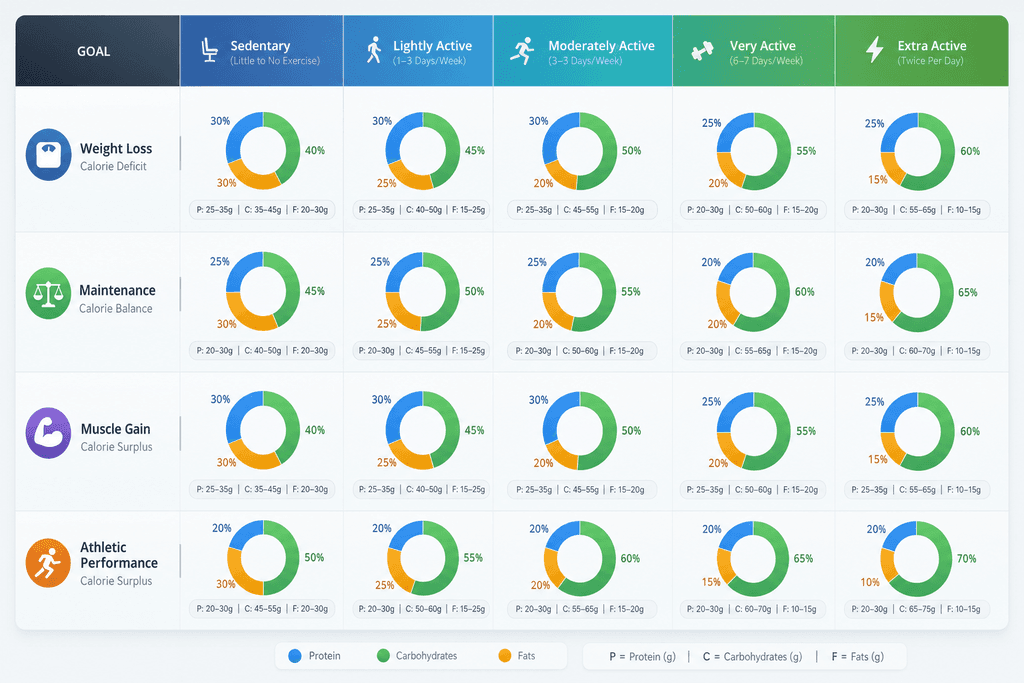
The real test comes after a week or two of tracking. If you're constantly hungry or dragging through the afternoon, your macro split probably needs adjusting. Some people feel amazing on 40/30/30, while others need more like 30/35/35 to function properly.
The Real Challenge Actually Tracking Your Macros Daily
Here's what nobody tells you about using the myfitnesspal macro calculator for weight loss. Setting up your targets takes five minutes, but logging every single meal to hit those targets takes hours every week. You open the app, search through thousands of database entries to find your food, adjust the serving size, realize the entry is wrong, search again, and finally log something that's probably close enough. Each meal takes anywhere from five to ten minutes if you're being thorough about it, and most people simply don't have that kind of time three to six times per day.
The database search function sounds helpful until you're standing in your kitchen trying to log "chicken breast grilled with olive oil" and getting 47 different entries with wildly different calorie counts. Which one is right? Who knows.
Why Most People Quit Tracking
- Manual entry eats up 5-10 minutes per meal when you factor in searching and portion adjustments
- Measuring every ingredient with a food scale gets old after the first week
- Restaurant meals turn into guessing games since the database entries rarely match what you actually ate
- Home-cooked recipes require logging every single ingredient separately
- Most people abandon their tracking habit within 2-3 weeks because it feels like a part-time job
The dropout rate for calorie tracking apps is brutal. Research shows that most users stop logging consistently after just 15 days because the time commitment becomes unsustainable. You start with good intentions, but after manually entering your lunch for the twentieth time, you start skipping meals in the app.
This is exactly why voice-based tracking exists. With MyFoodBuddy, you just say what you ate and the AI figures out the rest in under 30 seconds. No searching through databases, no measuring every ingredient, no ten-minute logging sessions. You can learn more about how voice-powered tracking works and why it's becoming the preferred method for people who actually stick with their goals. You can also explore the differences between Cronometer vs MyFitnessPal for calories, macros, and ease to find the app that best supports your weight loss journey.
The myfitnesspal macro calculator can tell you what to eat, but it can't make the daily tracking process any less tedious. If you're serious about hitting your weight loss targets, you need a system that doesn't require a time investment you can't maintain. Check out better alternatives for AI meal tracking that cut your logging time down to seconds instead of minutes, or explore how automation saves time and boosts accuracy in your daily routine.
Why Most People Struggle with Macro Tracking Apps
Studies show that 80% of people who start using a myfitnesspal macro calculator quit within the first month. The problem isn't a lack of motivation or willpower. Most tracking apps demand too much time and mental energy for something that should be simple. When you're standing in your kitchen trying to figure out if your chicken breast is 4 ounces or 6 ounces, and whether your rice is cooked or uncooked weight, the whole process starts to feel like a part-time job.
The Time Trap That Kills Consistency
Time commitment is the biggest reason people abandon macro tracking altogether. Traditional apps require you to search through databases, compare similar items, adjust serving sizes, and manually enter each ingredient. What should take 30 seconds ends up taking 5 minutes per meal. Multiply that by three meals plus snacks, and you're spending 20-30 minutes daily just logging food.
- Searching through thousands of database entries to find the right food
- Weighing and measuring every single ingredient
- Calculating recipes by entering each component separately
- Double-checking entries because user-submitted data is often wrong
Accuracy Anxiety Stops People From Logging
Here's what happens when you can't find the exact food you ate. You either skip logging it entirely or spend 10 minutes trying to find something close enough. This accuracy anxiety creates a cycle where people only log "easy" meals and ignore the complicated ones. The data becomes useless because it's incomplete, which makes people feel like failures.
| Tracking Method | Time Per Meal | 30-Day Adherence Rate |
|---|---|---|
| Manual Database Search | 4-6 minutes | 23% |
| AI Voice Input | 15-30 seconds | 71% |
Social Situations Expose the Awkwardness
Nobody wants to be the person pulling out a food scale at a restaurant or spending five minutes on their phone during a family dinner. Social eating becomes stressful when your tracking method makes you stand out. Apps that require less obvious input methods see much better adherence because users don't feel self-conscious.
- Restaurant meals with unclear ingredients and portions
- Home-cooked meals at someone else's house
- Office lunches and social gatherings
What Actually Helps People Stick With It
Research shows that apps simplifying the input process see three times better long-term adherence. Voice logging removes the need to type or search. AI estimation handles the guesswork about portions and ingredients. MyFoodBuddy uses both approaches so you can say "grilled chicken salad with ranch" and move on with your day. The app figures out the macros while you're already doing something else.
- Voice input that works while driving, cooking, or multitasking
- AI that estimates portions without requiring exact measurements
- Quick logging that doesn't interrupt social situations
- Saved meals for one-tap logging of repeated foods
The difference between quitting and succeeding often comes down to whether tracking feels like a burden or just another quick task. When the myfitnesspal macro calculator approach takes too long, people stop using it. When it takes seconds, it becomes a habit that actually sticks.
Making Macro Tracking Work for Your Life
The myfitnesspal macro calculator gives you all the numbers you need to lose weight, but here's the thing most people don't talk about. You can have the perfect macro split calculated down to the gram, but if logging your meals takes 10 minutes every time you eat, you'll probably quit within a week or two. The best tracking system isn't the one with the most features or the most accurate database, it's the one you'll actually use every single day without feeling like it's a part-time job.
Most people spend about 5-7 minutes logging a single meal in traditional apps because you have to search through databases, adjust serving sizes, and add each ingredient separately. That adds up to nearly an hour per day just tracking food. Modern AI tools can cut that time by 80% while keeping your macro counts accurate enough to see real results.
The truth is, consistency beats perfection when it comes to tracking macros. Being roughly right seven days a week will get you better results than being perfectly accurate three days a week before you burn out. If you're spending more time logging food than actually preparing it, something needs to change.
FoodBuddy lets you just say what you ate and handles the macro breakdown automatically, which means you can log meals in under 10 seconds instead of several minutes. The goal isn't to make tracking your whole life, it's to make it so easy that it barely interrupts your day. When tracking becomes that simple, sticking with your weight loss plan stops feeling like such a grind.
You've got the knowledge now about how macro calculators work and what numbers to aim for. The question is whether you'll still be tracking those numbers a month from now, and that depends entirely on how much friction your tracking method adds to your daily routine.
Common Questions About Macro Tracking
Macro tracking can feel overwhelming when you're just getting started, and it's normal to have questions about how strict you need to be or whether it's even worth the effort. Most people wonder if they're doing it right or if there's an easier way to see results. The truth is, macro tracking doesn't have to be perfect to work, and understanding the basics can save you a lot of stress. Here are the most common questions people ask when they start tracking macros for weight loss.
How accurate do my macros need to be?
You don't need to hit your macros down to the exact gram every single day. Being within 5-10 grams of your target for each macro is usually good enough to see results. The key is consistency over time, not perfection in every meal.
Can I lose weight without tracking macros?
Yes, you can lose weight by just tracking calories and eating in a deficit. However, tracking macros helps ensure you're getting enough protein to maintain muscle mass while losing fat, which leads to better body composition. It also helps you understand how different foods affect your hunger and energy levels throughout the day.
What's better, tracking macros or just calories?
Tracking macros gives you more control over your results because it ensures you're eating the right balance of protein, carbs, and fats. Just tracking calories can work for weight loss, but you might lose muscle along with fat if your protein intake is too low. Most people find better long-term success when they pay attention to macros, especially protein.
How long does it take to see results from macro tracking?
Most people start seeing changes on the scale within 2-3 weeks of consistent macro tracking. However, body composition changes like muscle definition can take 4-6 weeks to become noticeable. The speed of your results depends on your calorie deficit and how consistent you are with hitting your targets.
Do I need to hit my macros exactly every day?
No, and trying to be perfect every day usually leads to burnout. Think of your macro goals as targets to aim for throughout the week rather than daily requirements. Some days you'll be over, some days under, and that's completely normal as long as your weekly average is close to your goals.
Is MyFitnessPal free or do I need premium for macros?
MyFitnessPal's free version lets you track macros, but you can't customize your macro percentages without the premium subscription. If you want an easier way to track without the hassle of manual entry, MyFoodBuddy lets you log meals by voice or text in seconds, and the AI automatically calculates your macros. You get full macro customization and tracking for just $39 per year, which is less than most premium tracking apps charge.
Ready to start tracking smarter?
Download MyFoodBuddy and start tracking your calories by just saying what you ate. No more searching databases or guessing portions.
Get started