
When to Use Cronometer for Vitamin Tracking
Discover when Cronometer excels at vitamin tracking and when simpler alternatives like MyFoodBuddy might better fit your nutrition goals.
You're probably tracking dozens of vitamins and minerals you don't actually need to monitor. Most nutrition apps, including the app Cronometer, let you log every micronutrient imaginable, but that level of detail only matters in specific situations. Understanding when detailed vitamin tracking actually helps versus when it just wastes your time can save you hours each week and prevent the burnout that makes people quit tracking altogether.
Table of Contents
What Makes Cronometer Different
Most people think all calorie tracking apps are basically the same, but that's not true when it comes to tracking vitamins and minerals. While apps like MyFitnessPal or MyFoodBuddy focus on making food logging quick and easy, Cronometer takes a completely different approach. It's built for people who need to know exactly what's in their food down to the smallest micronutrient. If you've ever wondered whether you're getting enough vitamin K2 or selenium, Cronometer is probably the app you've heard about.
Tracking Depth That Goes Way Deeper
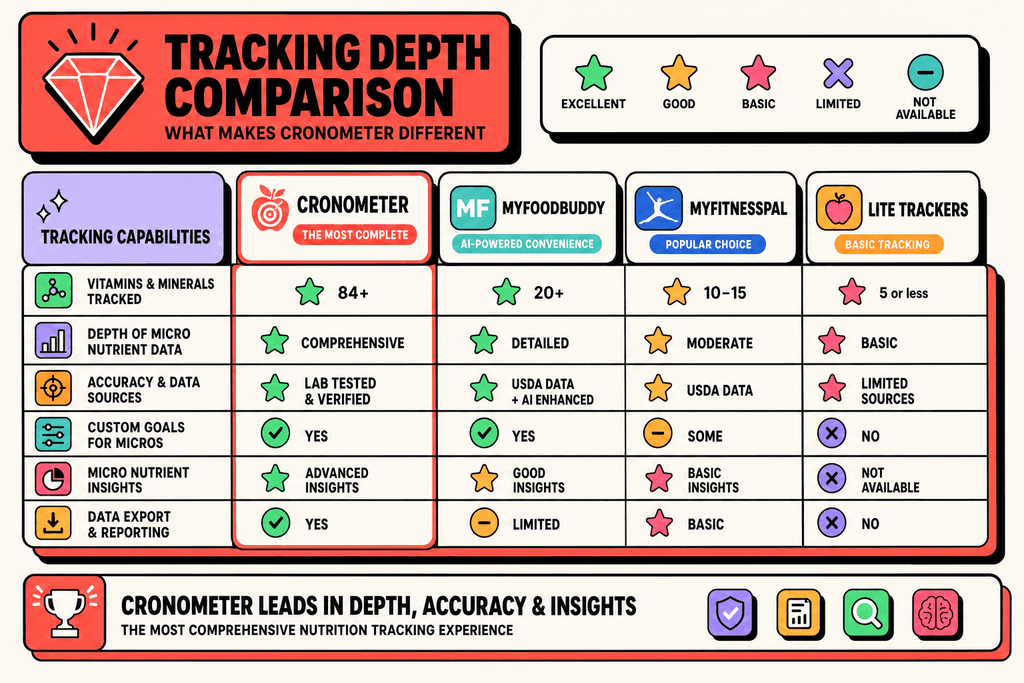
The biggest difference with Cronometer is how much nutritional data it tracks. Most nutrition apps give you the basics and call it a day. Cronometer tracks over 80 different micronutrients, which is way more than what you'll find anywhere else.
| App Type | Micronutrients Tracked | Best For |
|---|---|---|
| Basic Calorie Trackers | 5-10 nutrients | Simple weight goals |
| Standard Apps (MyFitnessPal) | 10-15 nutrients | General health tracking |
| Quick-Entry Apps (MyFoodBuddy) | 20+ nutrients | Convenient daily logging |
| Cronometer | 80+ micronutrients | Detailed vitamin tracking |
This level of detail matters if you're following a restrictive diet or managing a health condition. People on keto diets use it to track electrolytes. Vegans use it to make sure they're getting B12 and iron. Some folks just want to know if they're actually getting the nutrients they think they are.
The Tradeoff for Accuracy
Here's the catch with Cronometer. To get all that detailed nutritional data, you have to put in more work. There's no voice logging or AI that figures out what you ate. You search through their database, pick the exact food, and enter the amount manually.
- Every food entry requires searching the database
- You need to weigh or measure portions accurately
- Logging a meal takes several minutes instead of seconds
- The app prioritizes data accuracy over convenience
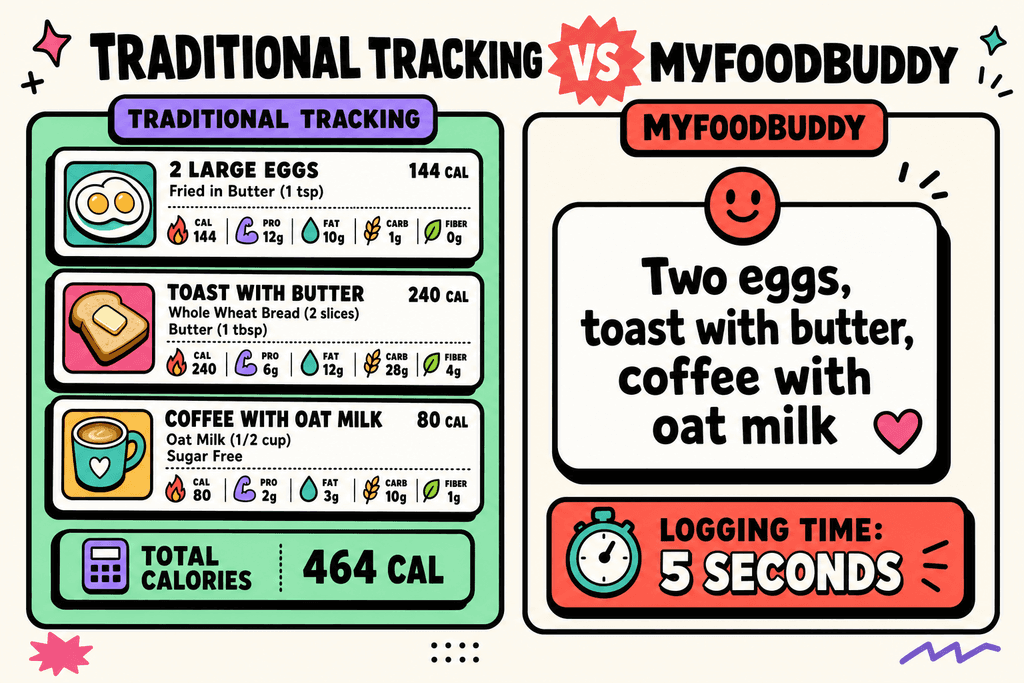
This is the opposite of how apps like MyFoodBuddy work, where you just say "two eggs and toast" and it handles everything. Cronometer makes you do the heavy lifting because that's how you get precise micronutrient data. For some people, that tradeoff is worth it. For others, it makes daily tracking feel like a chore.
Who Actually Needs This Level of Detail
Not everyone needs to track 80 different nutrients. Most people just want to know if they're eating the right amount of calories and hitting their protein goals. But certain groups of people really benefit from what Cronometer offers.
- People with diagnosed vitamin deficiencies who need to monitor specific nutrients
- Athletes tracking electrolytes and performance-related minerals
- Anyone following elimination diets or managing food sensitivities
- Health enthusiasts who want complete nutritional transparency
The app cronometer has become the go-to choice for people who treat nutrition tracking like a science project. If that sounds like you, then the extra effort might make sense. But if you just want to stay on track without spending ten minutes logging breakfast, there are faster options out there.
Perfect Situations for Cronometer
About 42% of Americans are deficient in at least one vitamin, but most people don't need to track every micronutrient down to the milligram. The app Cronometer excels in specific situations where detailed vitamin tracking actually matters. If you're dealing with a health condition that requires precise nutrient monitoring, Cronometer's comprehensive database becomes more than just a nice feature. It becomes necessary. But for most people trying to lose weight or build muscle, this level of detail can feel like using a microscope when you just need reading glasses.
Managing a diagnosed vitamin deficiency is probably the clearest reason to use Cronometer. When your doctor tells you that your vitamin D is dangerously low or your iron levels need monitoring, you need accurate data. Cronometer tracks over 80 micronutrients, which means you can see exactly how much vitamin D you're getting from that salmon and fortified milk.
- Restrictive diets like vegan, keto, or carnivore often create specific nutrient gaps that need watching
- Athletic performance at competitive levels where micronutrients directly impact recovery and results
- Absorption issues from conditions like Crohn's disease or celiac disease that affect how your body processes nutrients
- Working with a nutritionist who needs detailed intake reports to adjust your meal plan
- Pregnancy or breastfeeding when certain vitamins become critical for development
The thing about Cronometer is that it requires commitment. You're not just logging "chicken breast" but selecting the exact cut, preparation method, and portion size. This precision matters when you're tracking whether you hit 18mg of iron daily, but it takes time most people don't want to spend.
Signs You Need Detailed Vitamin Tracking
- Your doctor diagnosed a specific vitamin or mineral deficiency
- You follow a restrictive diet and experience fatigue or other symptoms
- You're training for competitive athletics and recovery feels slow
- You have a medical condition affecting nutrient absorption
- Your nutritionist requested detailed food logs with micronutrient data
- You're pregnant or planning pregnancy and need to monitor folate, iron, etc.
When Simpler Tracking Works Better
Most people who download a nutrition app just want to lose 15 pounds or make sure they're eating enough protein. They don't need to know they consumed 847mg of phosphorus yesterday. General weight management works perfectly fine with basic calorie and macro tracking. Your body doesn't care if you logged every vitamin when you're simply trying to maintain a caloric deficit or surplus.
If you're eating a reasonably varied diet with vegetables, fruits, proteins, and whole grains, you're probably getting enough micronutrients without obsessing over them. The people who quit apps like Cronometer usually do so because the detailed logging becomes a chore that kills their motivation entirely.
- Weight loss or gain goals without medical complications only require calorie and macro awareness
- Building muscle focuses mainly on protein intake and total calories, not zinc levels
- Time-constrained schedules where spending 5 minutes per meal logging isn't realistic
- Previous tracking failures because apps felt too complicated or tedious
This is where something like MyFoodBuddy makes more sense for most people. You can say "two eggs, toast with butter, and coffee with oat milk" and the app calculates everything automatically. It still tracks over 20 nutrients including vitamins and minerals, but without the manual work that makes you want to quit after three days.
| Tracking Approach | Best For | Time Required |
|---|---|---|
| Detailed (Cronometer) | Medical conditions | 5-10 min/meal |
| Simplified (MyFoodBuddy) | General health goals | 30 seconds/meal |
The reality is that convenience determines consistency. An app that takes 30 seconds to log a meal gets used daily. An app that requires searching databases and weighing portions gets abandoned by week two. If you're not dealing with a specific health issue, the simpler approach usually wins because you actually stick with it.
Making the Switch Decision
Choosing between detailed tracking and simplified tracking isn't permanent, and that's something people forget. You might need Cronometer for three months while addressing a deficiency, then switch to something easier for maintenance. The key is being honest about what you'll actually use versus what sounds good in theory. Most people overestimate their willingness to log detailed food data when they're tired after work or eating out with friends.
Ask yourself if you've actually looked at your micronutrient data in the past week. If you're logging everything in Cronometer but only checking calories and protein, you're doing unnecessary work. The best tracking system is the one you'll use consistently, not the one with the most features.
Self-Assessment Questions
- Do I have a diagnosed deficiency or medical condition requiring nutrient monitoring?
- Have I actually reviewed my vitamin data in the past two weeks?
- Am I spending more than 10 minutes daily on food logging?
- Has detailed tracking made me more anxious about food choices?
- Would I track more consistently if it took less time?
- Is my current app helping me reach my goals or just collecting data?
Some people benefit from using Cronometer temporarily. Maybe you track detailed nutrients for a month to identify patterns, then switch to simpler tracking once you understand your baseline. This approach gives you the data without the long-term burden.
Signs you're over-tracking include feeling anxious about meals you can't log perfectly, avoiding social situations because of tracking difficulty, or spending more time logging than actually eating. When tracking becomes the goal instead of the tool, it's counterproductive.
Modern apps bridge this gap by using AI to handle the complexity behind the scenes. MyFoodBuddy lets you speak naturally about what you ate and automatically calculates nutritional values using USDA data. You get nutrient tracking without the manual database searching that makes detailed apps feel like homework. For most people trying to balance tracking with a busy schedule, this middle ground works better than either extreme.
The decision ultimately comes down to whether you need the data Cronometer provides or just think you should need it. If your doctor isn't asking for detailed reports and you don't have absorption issues, automating your tracking with voice-based logging probably serves you better. Save the detailed tracking for when it's actually necessary, and use simpler tools for everyday health management.
The Real Cost of Over-Tracking
The average person spends 15-20 minutes per day logging food in detailed tracking apps like Cronometer, which adds up to over 100 hours per year just entering data. That's nearly three full work weeks spent typing in portion sizes and searching through databases. While Cronometer excels at providing comprehensive micronutrient data, this level of detail comes with a price that goes beyond the subscription fee. The time investment alone can turn what should be a helpful habit into a daily chore that feels more like homework than health management.
Research shows that 80% of people abandon nutrition tracking apps within the first month, with complexity being cited as the primary reason for quitting.
The Time Trap of Detailed Logging
When you compare app cronometer's detailed entry process to voice-based alternatives, the difference is stark. Traditional tracking requires multiple steps for each food item, and that friction adds up quickly throughout the day.
- Searching through extensive food databases to find exact matches
- Weighing portions or estimating serving sizes with precision
- Manually adjusting quantities and verifying nutritional accuracy
- Creating custom recipes and breaking down complex meals
Voice-based apps like MyFoodBuddy reduce this process to seconds. You simply say what you ate, and AI handles the calculations using USDA data without the manual work.
When Perfectionism Becomes the Problem
The psychological toll of hyper-detailed tracking often goes unnoticed until it's too late. Many users develop what experts call "tracking anxiety," where the fear of logging something incorrectly or incompletely creates stress around eating itself.
Studies indicate that 65% of detailed trackers report feeling guilty when they can't log meals perfectly, leading to either food restriction or complete abandonment of tracking.
- Avoiding social situations where exact nutritional information isn't available
- Experiencing decision fatigue from constant food calculations
- Developing an unhealthy fixation on hitting exact macro targets daily
Finding Sustainable Tracking Habits
The sweet spot for most people isn't maximum data collection. It's consistent tracking that doesn't feel like a burden. Long-term success in health goals depends more on building sustainable habits than achieving perfect nutritional precision every single day.
| Tracking Method | Daily Time Investment | 3-Month Retention Rate |
|---|---|---|
| Detailed Manual Entry | 15-20 minutes | 23% |
| Voice-Based Logging | 2-3 minutes | 67% |
The data tells a clear story about what actually works in practice. When tracking becomes effortless, people stick with it long enough to see real results.
Finding Your Tracking Sweet Spot
The truth is, app cronometer works really well for specific situations where you need detailed vitamin and mineral data. If you're working with a doctor on a medical condition, following a restrictive diet, or dealing with nutrient deficiencies, that level of detail matters. But here's what most people miss when choosing a tracking app: the best tool isn't the one with the most features, it's the one you'll actually use every single day without wanting to quit. If you want to explore the features of Cronometer and discover some alternatives for calorie tracking, read our Cronometer review and alternatives for calorie tracking.
Think about how many times you've downloaded a tracking app, used it for a week, then gave up because it took too long to log everything. The time you spend tracking matters just as much as the data you collect. If logging breakfast takes five minutes of searching and weighing, you'll probably stop doing it by Wednesday.
Most people don't need to track 82 micronutrients. They need to know their calories, protein, and maybe a few key vitamins. Modern apps like MyFoodBuddy handle this by letting you just say what you ate, and the AI figures out the nutrition automatically. You still get tracking for over 20 nutrients, but without the manual data entry that makes you want to throw your phone across the room.
The real question isn't whether Cronometer is good or bad. It's whether you need that level of detail for your specific goals. If simple and consistent tracking gets you to your goals, that's what works. If you need medical-grade precision, then detailed tracking makes sense. Just be honest with yourself about what you'll actually stick with long-term.
Common Questions About Vitamin Tracking Apps
Choosing the right tracking app can feel overwhelming, especially when you're trying to figure out if you need detailed micronutrient data or if something simpler will work. Most people wonder whether they're missing out by not tracking every vitamin and mineral, or if they're wasting time on details that don't matter. Here are the most common questions people ask when deciding between apps like Cronometer and simpler alternatives.
Can simpler apps track vitamins accurately enough?
Yes, simpler apps can track vitamins with reasonable accuracy if they use quality databases like USDA data. The real difference is how much detail you see and how easy it is to access that information. Apps like MyFoodBuddy use AI to extract nutritional data including vitamins and minerals from your voice or text input, so you get the tracking without the manual work. The accuracy depends more on the food database than the complexity of the interface.
How do I know if I need to track micronutrients?
Most people doing general health tracking or weight management don't need detailed micronutrient tracking unless they have specific deficiencies or medical conditions. If your doctor has identified a vitamin D deficiency or you're following a restrictive diet like vegan or keto, then tracking becomes more important. For everyone else, focusing on calories and macros usually covers 90% of your nutrition goals without the extra complexity.
Is Cronometer worth the learning curve?
It depends on your specific needs. Cronometer offers incredibly detailed micronutrient tracking, which is valuable if you're working with a nutritionist or managing a health condition. But if you're just trying to lose weight or maintain healthy eating habits, the time investment might not pay off. Many people find they abandon detailed tracking apps within weeks because the daily effort becomes too much.
Can I switch between detailed and simple tracking?
Absolutely, and many people do this successfully. You might use detailed tracking for a few weeks to identify problem areas in your diet, then switch to simpler tracking once you understand your patterns. Your food habits don't change that much day to day, so once you know your typical vitamin intake, you can maintain it without constant detailed logging.
What's the minimum tracking needed for health goals?
For weight loss or muscle gain, tracking calories and protein is usually enough. Most people see results by simply being consistent with basic tracking rather than obsessing over every micronutrient. If you're eating a varied diet with fruits, vegetables, and whole foods, your vitamin intake is probably fine without detailed monitoring.
How does voice logging compare to manual entry for accuracy?
Voice logging can be just as accurate as manual entry when the app uses good AI and database matching. The main advantage is speed, which means you're more likely to actually log your meals consistently. MyFoodBuddy lets you say something like "two eggs and toast with butter" and calculates everything including vitamins automatically. Consistency matters more than perfect precision, so if voice logging helps you track every day instead of giving up after a week, it's the better choice for accuracy over time.
Ready to start tracking smarter?
Download MyFoodBuddy and start tracking your calories by just saying what you ate. No more searching databases or guessing portions.
Get started