
MFP Macro Calculator vs Weight Loss Targets
Compare MFP macro calculator with weight loss targets. Learn how macronutrient tracking impacts results and find easier ways to hit your goals.
Three out of four people who start tracking macros quit before the end of their first month, not because they lack willpower, but because the process itself becomes a second job. You spend ten minutes logging a simple lunch, cross-referencing nutrition labels, and adjusting portion sizes in your mfp macro calculator, only to wonder if you're even hitting the right targets for actual weight loss. The truth is, the complexity of traditional macro tracking often works against your goals instead of supporting them.
Table of Contents
What MFP Macro Calculators Actually Do
Over 200 million people have downloaded MyFitnessPal to track their food, and most of them start by using the built-in macro calculator. This tool takes your basic info like age, weight, height, and activity level, then spits out numbers for how many grams of protein, carbs, and fat you should eat each day. The idea is simple: if you hit these targets consistently, you'll reach your weight loss or muscle gain goals.
How Macro Calculators Work
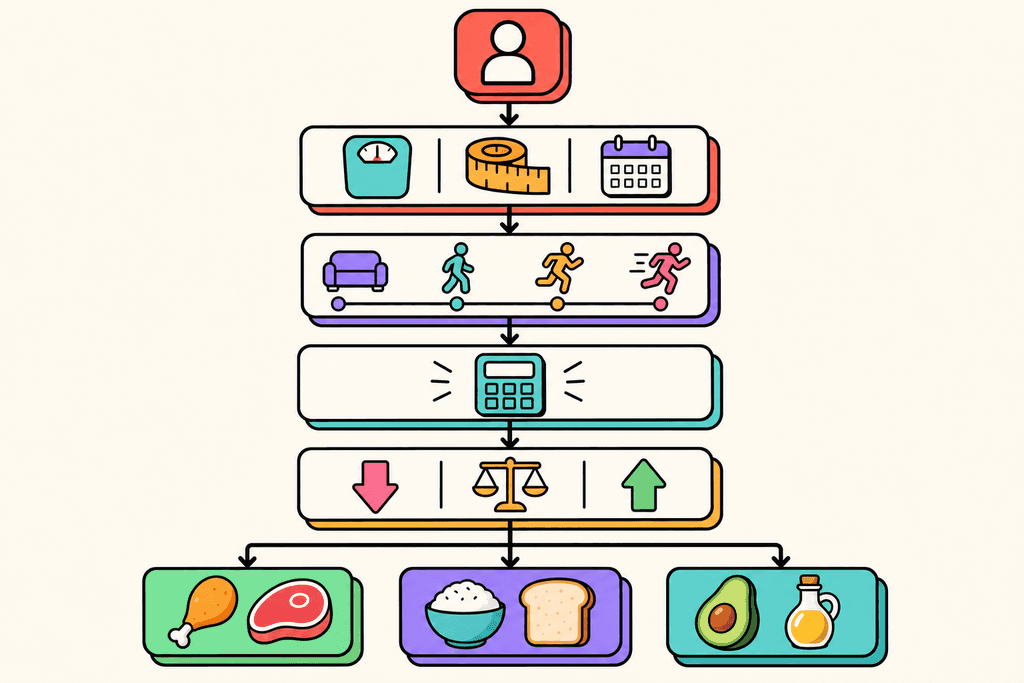
An mfp macro calculator starts by figuring out your TDEE, which stands for Total Daily Energy Expenditure. That's just a fancy way of saying how many calories your body burns in a day. Once it knows that number, it splits those calories into three main nutrients.
Here's what the calculator considers:
- Your basal metabolic rate (calories burned just staying alive)
- How active you are during the day
- Whether you want to lose, gain, or maintain weight
- Your preferred diet style (high protein, low carb, balanced, etc.)
The macronutrient calculator for weight loss typically suggests eating 500 calories below your TDEE to lose about a pound per week. Then it divides those calories into percentages, like 40% carbs, 30% protein, and 30% fat.
Why People Choose MFP for Tracking
MyFitnessPal became the default choice for macro tracking because it has a massive food database and it's free to start. Millions of people have already entered foods into the system, so you can usually find what you're looking for. The app also lets you scan barcodes and save frequent meals.
But here's the catch: getting your macro targets is the easy part. Actually tracking everything you eat takes way more time than most people expect.
| Method | Time Per Meal | Accuracy |
|---|---|---|
| Manual MFP Entry | 3-5 minutes | Depends on user |
| Barcode Scanning | 2-3 minutes | Good for packaged foods |
| Voice Logging (MyFoodBuddy) | 10-20 seconds | AI-powered extraction |
The Hidden Time Cost
Most people don't realize how much time traditional macro tracking actually takes. You need to search for each ingredient, adjust portion sizes, create custom recipes, and double-check that the nutrition info is correct. If you eat three meals and two snacks a day, that's 15-25 minutes of logging every single day.
That adds up to almost three hours per week just entering food data. No wonder most people quit tracking after a few weeks. The math works great on paper, but the daily grind of logging everything gets old fast.
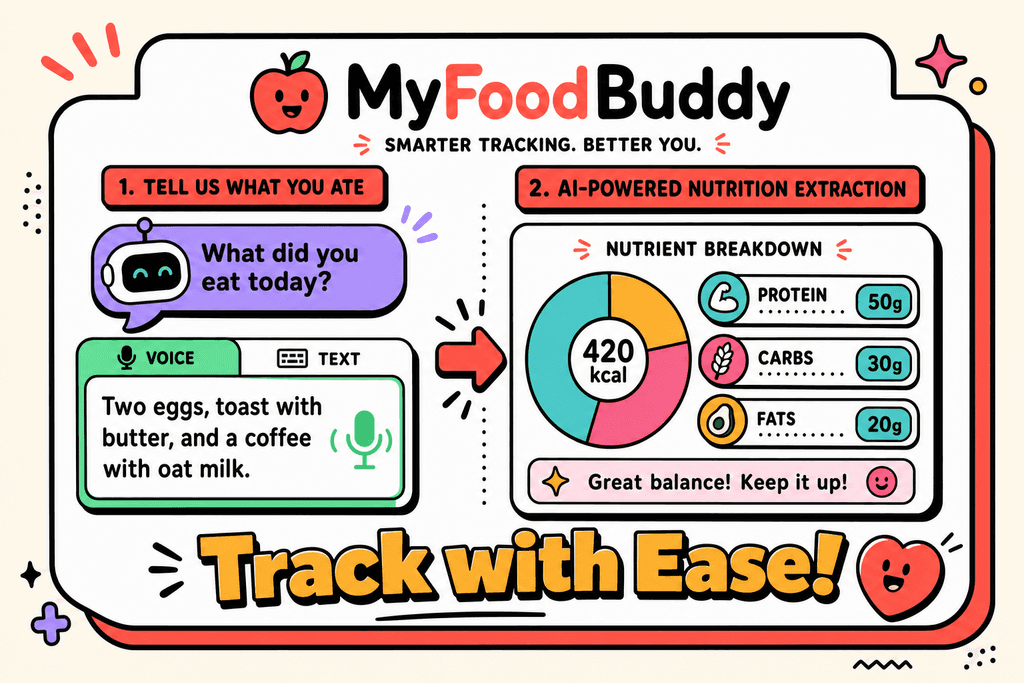
Apps like MyFoodBuddy take a different approach by letting you just say what you ate. Instead of spending minutes searching and selecting, you speak naturally and the AI figures out the macros for you. It's the same end result, but without the tedious data entry that makes people give up on their goals.
How Macro Calculators Set Your Targets
Most people think macro calculators are just fancy math machines, but there's actually a lot happening behind the scenes. When you plug your stats into an mfp macro calculator or any similar tool, it starts by calculating your Total Daily Energy Expenditure, or TDEE. This number represents how many calories your body burns in a day just existing and doing your normal activities. The calculator takes your age, weight, height, and biological sex, then multiplies it by an activity factor to estimate your total burn.
How Macro Calculators Set Your Targets
The tricky part is that activity multipliers can vary wildly between calculators. One app might label you as "moderately active" and give you 2,200 calories, while another puts you at 1,900 for the same activity level. This is where things get messy.
- Sedentary: 1.2x your base metabolic rate
- Lightly active: 1.375x
- Moderately active: 1.55x
- Very active: 1.725x
- Extremely active: 1.9x
Once your TDEE is set, the calculator splits those calories into macros. Common splits for weight loss include 40% carbs, 30% protein, and 30% fat, or sometimes 50/25/25. But here's what most calculators won't tell you: your body composition matters more than these generic ratios. Someone with more muscle mass needs different macros than someone at the same weight with less muscle. That's why one-size-fits-all approaches often leave people frustrated and stuck.
MyFoodBuddy's TDEE calculator handles this automatically, setting targets based on whether you want to lose, maintain, or gain weight. No guesswork needed.
The Real Challenge with Traditional Macro Tracking
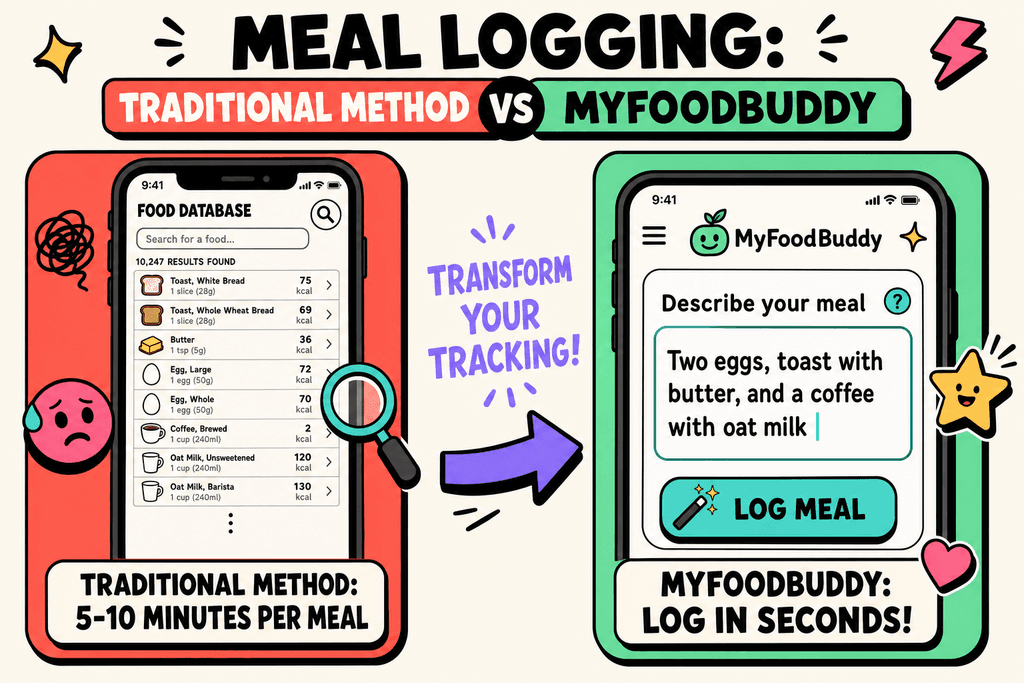
Getting your macros calculated is the easy part. Actually tracking them every single day is where most people hit a wall. Traditional apps require you to search through massive food databases, compare entries, adjust serving sizes, and manually log every ingredient. For a single meal, this process can take anywhere from 5 to 10 minutes. Multiply that by three meals plus snacks, and you're spending close to an hour each day just logging food.
The Real Challenge with Traditional Macro Tracking
The food database problem gets even worse when you're eating home-cooked meals or restaurant food. You'll find 47 different entries for "grilled chicken breast," each with wildly different calorie counts. Which one is actually accurate? Most people just pick one and hope for the best.
| Traditional Tracking | Voice Logging |
|---|---|
| 5-10 min per meal | Under 30 seconds |
| Manual database search | AI extraction |
| Multiple steps | One simple input |
Research shows that most people quit tracking within the first three weeks. The mental burden of constantly calculating, weighing, and logging becomes exhausting. You start avoiding social meals because logging a restaurant dish feels impossible. You skip tracking on weekends and then feel guilty about it. This is exactly why we built MyFoodBuddy with voice logging. You just say what you ate, like "two eggs, toast with butter, and coffee with oat milk," and the app calculates everything using AI and USDA data. No searching, no guessing, no frustration.
Weight Loss Targets vs Macro Targets
Here's something that confuses a lot of people: weight loss and macro tracking aren't the same thing. Weight loss comes down to one simple rule, which is eating fewer calories than you burn. You could eat nothing but pizza and still lose weight if you're in a calorie deficit. Macros matter, but they're the second priority, not the first. This is why obsessing over hitting exact macro percentages often backfires for regular people trying to drop a few pounds.
Macro precision really matters for specific groups like bodybuilders preparing for competition or athletes optimizing performance. For everyone else, getting close is good enough.
- Focus on total calories first
- Hit your protein target (most important macro)
- Let carbs and fats fall where they may
- Track consistently, not perfectly
The 80/20 rule applies perfectly here. If you're accurate 80% of the time, you'll see results. Trying to be perfect 100% of the time usually leads to burnout and quitting. That said, protein deserves special attention because it helps preserve muscle mass while you lose fat, keeps you full longer, and has a higher thermic effect than other macros. Most people should aim for around 0.7 to 1 gram of protein per pound of body weight when using a macronutrient calculator for weight loss.
MyFoodBuddy takes the guesswork out by automatically setting realistic targets through its built-in TDEE calculator. Whether you want to focus strictly on calories or dial in your macros, the app adjusts to your goals. And because logging takes seconds instead of minutes, you're way more likely to stick with it long enough to actually see results. If you want to dive deeper into how personalized calorie targets enhance weight loss, or learn about setting up dietary goals without complex math, we've got plenty of resources to help you understand the science without getting overwhelmed.
Why Simpler Tracking Leads to Better Results
Studies show that 80% of people who start using a calorie tracking app quit within the first two weeks. The reason isn't lack of motivation or willpower. It's the friction built into the process itself. When you need to search through databases, weigh portions, create custom meals, and manually adjust serving sizes every single time you eat, tracking becomes a chore instead of a helpful tool.
The data tells an interesting story about what actually works. Research on long-term weight loss success reveals that consistency beats precision every single time. People who track their food intake regularly, even with less detailed logging, lose more weight than those who track sporadically with perfect accuracy.
- Users who log meals in under 30 seconds are 3x more likely to maintain tracking habits beyond 90 days
- Simplified tracking methods show 67% better adherence rates compared to traditional database-search approaches
- People using voice-based logging complete their food diary 5 days more per week on average
The Precision Paradox
Here's where things get counterintuitive. More detailed tracking doesn't lead to better results. When people obsess over hitting exact macro targets calculated by an mfp macro calculator, they often miss the bigger picture. A macronutrient calculator for weight loss might tell you to eat exactly 156 grams of protein, but stressing over that last 6 grams creates unnecessary mental load.
The apps that require the most steps tend to have the worst long-term outcomes. You open the app, search for your food, scroll through dozens of user-submitted entries with questionable accuracy, adjust the serving size, add it to the wrong meal category, then repeat for every ingredient. By the time you've logged breakfast, you've spent five minutes and already feel exhausted.
How Friction Kills Habits
Every extra tap, search, or decision point creates friction. And friction is the enemy of habit formation. When tracking takes too long, you start skipping meals in your log. First it's just the handful of almonds you grabbed as a snack. Then it's your entire lunch because you ate something homemade and don't want to spend ten minutes breaking down the recipe.
- Traditional apps require 8-12 taps per meal entry on average
- Database searches often return 50+ results for common foods
- Custom meal creation can take 5-10 minutes for a single recipe
- Barcode scanning fails for fresh foods and restaurant meals
What Actually Builds Lasting Habits
The psychology behind sustainable behavior change is pretty straightforward. Habits stick when they're easy to do and provide immediate feedback. Voice-based tracking removes almost all friction from the logging process. You simply say what you ate, and the app handles everything else. MyFoodBuddy uses this approach, letting you log "two eggs, toast with butter, and coffee with oat milk" in seconds instead of minutes.
Real users who switched from traditional tracking methods report something interesting. They don't miss the detailed database searches or the ability to adjust every micronutrient. What they value is actually logging their food every single day without it feeling like homework. One user mentioned spending less time in the app but getting better results because they finally maintained consistency.
- Reduce the action to its simplest form
- Make it faster than the alternative
- Remove decision fatigue from the process
- Provide immediate confirmation and feedback
The shift from complex to simple tracking isn't about dumbing things down. It's about recognizing that the best tracking system is the one you'll actually use tomorrow, next week, and next month. When the barrier to entry drops from minutes to seconds, consistency becomes automatic instead of aspirational.
Finding Your Balance
Here's the thing about mfp macro calculators and weight loss targets: they're both just tools in your toolbox. Neither one is going to magically fix everything, and that's okay. The real question isn't which one is better, but which one fits how you actually live your life. If you're the type who gets stressed counting every gram of protein, then detailed macro tracking might just make you miserable. But if you like having specific targets to hit, a personalized calorie goal with macro breakdowns could be exactly what you need.
The best tracking system is the one you'll actually stick with for more than two weeks. You could have the most accurate macronutrient calculator for weight loss in the world, but if logging your food takes ten minutes every meal, you'll quit. That's where something like MyFoodBuddy comes in, since you can just say what you ate and move on with your day.
Most people don't need to obsess over hitting exact macro percentages. Simple calorie tracking works fine if your main goal is losing weight and you're eating a reasonably balanced diet. But if you're training for something specific or you've hit a plateau, then dialing in your macros might be worth the extra effort.
Start simple and add complexity only if you need it. Pick a method, give it at least a month, and see how you feel. Your body will tell you if something's working or not. The answers to some common questions about all this might help you figure out your next move.
Common Questions About Macros and Weight Loss
Tracking macros can feel overwhelming, especially when you're just trying to lose a few pounds. Most people have similar questions when they start looking into macro calculators and weight loss targets. Here are the answers to the most common questions we hear about using an mfp macro calculator and whether you really need to count every gram of protein and carbs to see results.
Do I need to track macros to lose weight?
No, you don't need to track macros to lose weight. Weight loss comes down to eating fewer calories than you burn, so you can lose weight just by tracking total calories. That said, tracking macros helps you maintain muscle mass while losing fat, which is why many people prefer it over simple calorie counting.
How accurate are MFP macro calculators?
Most macronutrient calculators for weight loss, including the one in MyFitnessPal, give you a decent starting point but aren't perfect. They use general formulas that don't account for your specific metabolism, activity level variations, or body composition. You'll likely need to adjust your targets after a few weeks based on your actual results.
What's the best macro split for weight loss?
There's no single "best" macro split because everyone's body responds differently. Most people do well with 40% carbs, 30% protein, and 30% fat, but some prefer higher protein or lower carbs. The key is finding a split you can stick with long-term, not the one that sounds most impressive on paper.
Can I lose weight without counting macros?
Absolutely. Many people lose weight successfully without ever opening a macro calculator. The challenge is that without tracking, it's harder to know if you're actually in a calorie deficit. Apps like MyFoodBuddy let you log meals quickly with voice or text, so you get the benefits of tracking without spending 10 minutes searching databases for every meal.
How often should I recalculate my macros?
Recalculate your macros every 10-15 pounds of weight loss or if your progress stalls for more than two weeks. Your body needs fewer calories as you get lighter, so what worked at the start won't work forever. Most people forget this step and wonder why they hit a plateau.
Is there an easier way to track than MFP?
Yes, newer apps have simplified the tracking process significantly. Traditional apps require you to search through databases, adjust serving sizes, and manually add each ingredient. MyFoodBuddy uses AI to calculate nutrition from simple voice or text entries like "chicken breast with rice and broccoli," cutting your logging time from minutes to seconds while still giving you accurate macro breakdowns.
Ready to start tracking smarter?
Download MyFoodBuddy and start tracking your calories by just saying what you ate. No more searching databases or guessing portions.
Get started