How to Set Up MyFitnessPal Calories for Weight Loss
Learn how to calculate and set accurate calorie targets in MyFitnessPal for weight loss. Step-by-step setup guide with tips for better results.
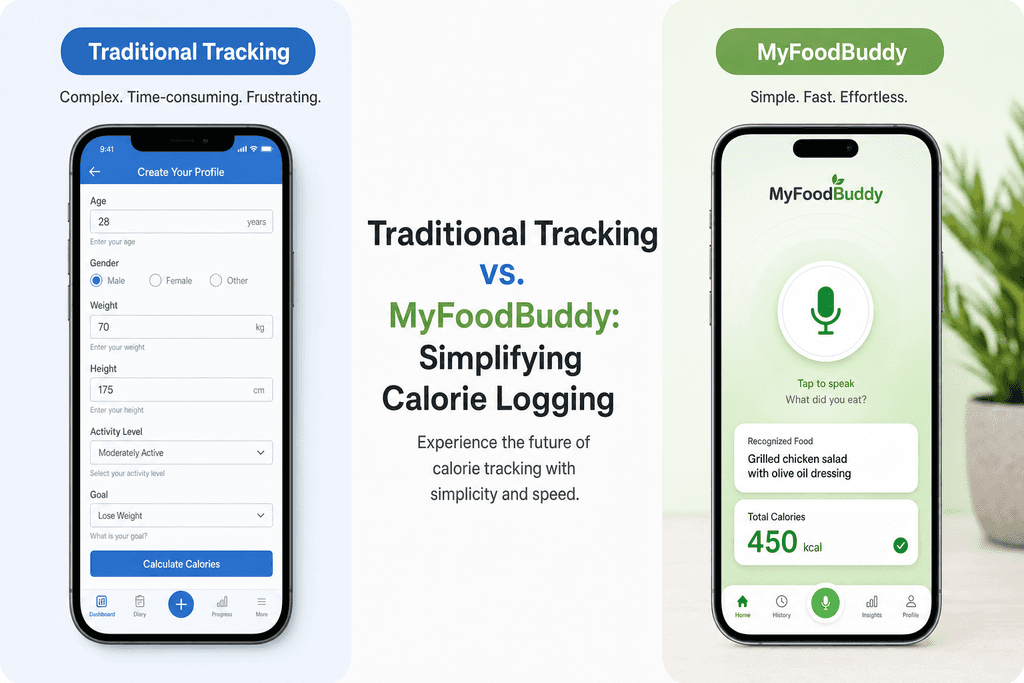
You spend ten minutes hunting through food databases, guessing portion sizes, and manually entering every ingredient in your lunch, only to realize three weeks later that your calorie target was set wrong from the start. Most people using MyFitnessPal to calculate calories make critical mistakes during setup that sabotage their weight loss before they even begin. While apps like MyFitnessPal require this tedious manual setup process, tools like MyFoodBuddy let you simply speak what you ate and handle the calculations automatically, but understanding how calorie targets work matters regardless of which tracking method you choose.
Table of Contents
Understanding How MyFitnessPal Calculates Your Numbers
Most people who use MyFitnessPal have no idea how the app actually comes up with their daily calorie target. The app asks you a bunch of questions about your age, weight, height, and how active you are, then spits out a number. But what's actually happening behind the scenes matters a lot, especially if you want to lose weight without feeling like you're starving or accidentally eating way too little.
The Basic Math Behind Your Calorie Target
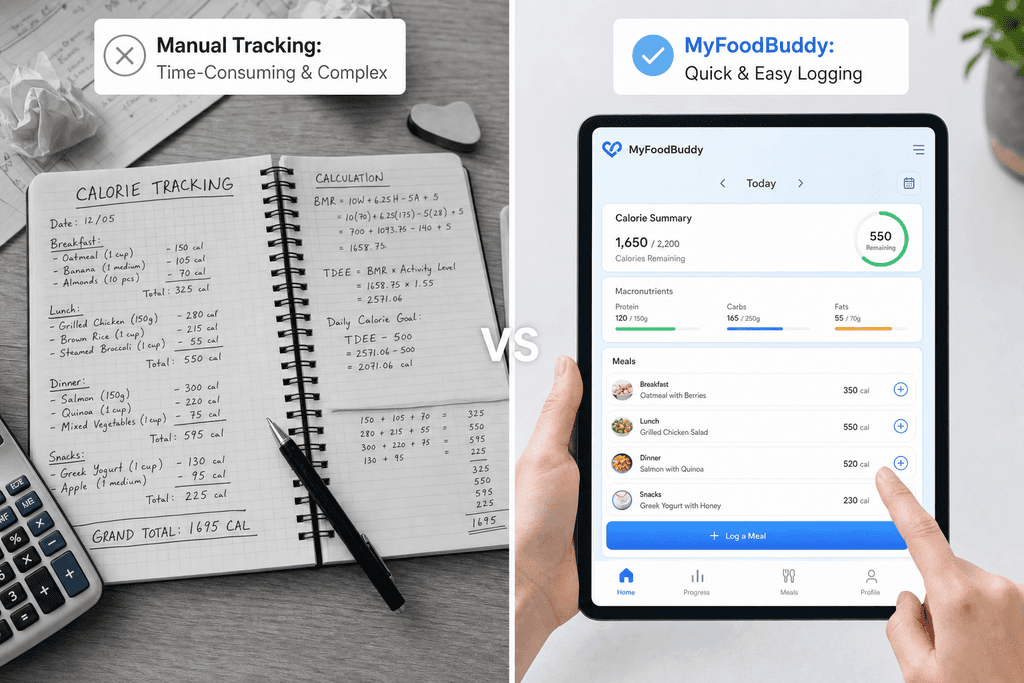
MyFitnessPal starts by estimating something called your Total Daily Energy Expenditure, or TDEE for short. This is basically how many calories your body burns in a normal day just existing and doing your regular activities. The app uses your personal stats to figure out your base metabolism, then multiplies that number based on how active you told it you are.
Once it knows your TDEE, MyFitnessPal subtracts calories based on how fast you want to lose weight. Pick "lose 2 pounds per week" and it'll subtract 1,000 calories from your TDEE. Pick "lose 1 pound per week" and it takes away 500 calories instead.
Why Activity Levels Trip Everyone Up
Here's where most people mess up their setup. The activity level you pick has a huge impact on your final calorie number, but the descriptions in MyFitnessPal are pretty vague. What counts as "lightly active" versus "active" anyway?
| Activity Level | Multiplier | What This Actually Means |
|---|---|---|
| Sedentary | 1.2x | Desk job, minimal walking |
| Lightly Active | 1.375x | Light exercise 1-3 days weekly |
| Moderately Active | 1.55x | Moderate exercise 3-5 days weekly |
| Very Active | 1.725x | Hard exercise 6-7 days weekly |
| Extra Active | 1.9x | Physical job plus daily training |
Most people overestimate their activity level because they want more calories to eat. But picking the wrong multiplier can throw off your entire weight loss plan by hundreds of calories per day.
When the Numbers Don't Make Sense
Understanding how myfitnesspal calculate calories helps you spot problems with your setup. If you're a 5'2" woman and the app is telling you to eat 2,500 calories to lose weight, something's clearly wrong with your inputs. Same thing if you're a 6'2" guy getting assigned only 1,200 calories.
Apps like MyFoodBuddy take a different approach by using AI to understand your actual eating patterns and activity data from your phone, which can give you a more realistic picture without all the manual setup. But whether you use MyFitnessPal or another tracker, knowing the basic formula helps you make smarter choices about your calorie targets.
Setting Up Your Profile Information Correctly
Most people mess up their calorie targets before they even log their first meal. The problem starts with how you fill out your profile information, and one wrong click can throw off your entire weight loss plan. When you're setting up MyFitnessPal or any calorie tracking app, the numbers you enter determine everything that comes after. Your current weight should be measured first thing in the morning, after using the bathroom but before eating or drinking anything. This gives you the most consistent baseline to work from as you track your progress over time.
Here's where things get tricky. Most people should select 'sedentary' as their activity level, even if they hit the gym five days a week. The activity level setting is meant to capture your daily movement outside of intentional exercise, not your workout routine.
Activity Level Checklist
- Sedentary: Desk job, minimal walking, most of your day sitting
- Lightly Active: On your feet 3-4 hours per day, teacher or retail worker
- Moderately Active: Physical job like nursing or warehouse work
- Very Active: Construction worker or professional athlete
The difference between a desk job and an active job matters way more than you think. Someone who sits at a computer all day burns hundreds fewer calories than someone who's on their feet serving tables or stocking shelves. Your gym sessions get added separately as exercise, so don't count them twice by picking a higher activity level.
Common mistakes include overestimating how active you really are during the day. Walking to the coffee machine three times doesn't make you lightly active. If you're unsure, always round down to the lower activity level because it's easier to add calories back than to figure out why you're not losing weight.
Choosing Your Weight Loss Goal and Weekly Deficit
After you've got your profile set up, MyFitnessPal will ask how fast you want to lose weight. This is where the magic happens, or where everything falls apart. The app typically offers options ranging from losing half a pound per week up to two pounds per week. Each option creates a different calorie deficit, which is just a fancy way of saying how much less you'll eat compared to what your body burns each day.
The sweet spot for most people sits right at one to two pounds per week. This range gives you real results without making you feel like you're starving all the time. When you try to lose weight faster by picking an aggressive deficit, you're setting yourself up to quit within a few weeks.
| Weekly Loss | Daily Deficit | Best For |
|---|---|---|
| 0.5 lbs | 250 calories | Last 10-15 lbs |
| 1 lb | 500 calories | Most people |
| 1.5 lbs | 750 calories | Higher starting weight |
| 2 lbs | 1000 calories | Significant weight to lose |
Your starting weight actually determines which deficit makes sense for you. Someone who needs to lose 100 pounds can handle a bigger deficit than someone trying to lose their last 15 pounds. The closer you get to your goal weight, the slower you should go. This isn't just about comfort, it's about keeping the weight off once you lose it.
Slower weight loss means better adherence, which is just a fancy way of saying you'll actually stick with it. You can learn more about setting realistic calorie goals that match your lifestyle instead of fighting against it.
Adjusting Your Macros Beyond Just Calories
Calories matter most for weight loss, but the breakdown of protein, carbs, and fat can make the difference between feeling satisfied or constantly hungry. MyFitnessPal sets default macros when you create your account, but these defaults usually miss the mark on protein. The standard recommendation often sits around 20% of your calories from protein, which leaves most people feeling hungry and losing muscle along with fat. A better target for weight loss puts protein closer to 30-35% of your total calories, or about 0.7 to 1 gram per pound of body weight.
Higher protein intake keeps you full longer and helps preserve muscle mass while you're in a calorie deficit. This matters because muscle burns more calories at rest than fat does, so keeping your muscle means keeping your metabolism higher.
| Approach | Protein | Carbs | Fat |
|---|---|---|---|
| Balanced | 30% | 40% | 30% |
| Higher Protein | 35% | 35% | 30% |
| Lower Carb | 35% | 25% | 40% |
Fat plays a bigger role than most people realize, especially for hormone health during weight loss. Going too low on fat can mess with your hormones, energy levels, and even your mood. Keep fat at least 25-30% of your calories to support basic body functions.
The question of when to adjust macros versus just tracking calories depends on your experience level. If you're new to calorie tracking, start by just hitting your calorie target for the first few weeks. Once that feels manageable, then start paying attention to your protein intake. Apps like MyFoodBuddy make this easier by automatically extracting nutritional information when you log meals, so you can see your macro breakdown without doing math.
Handling Exercise Calories and Adjustments
This is where MyFitnessPal confuses almost everyone who uses it. When you log exercise, the app automatically adds those burned calories back to your daily target. So if your target is 1,500 calories and you burn 300 calories running, MyFitnessPal tells you to eat 1,800 calories that day. The idea makes sense in theory, but it creates problems in practice because exercise calorie estimates are wildly inaccurate.
Fitness trackers and cardio machines typically overestimate calorie burn by 20-50%. That treadmill saying you burned 400 calories might be closer to 250 in reality. If you eat back all those calories based on inflated numbers, you're accidentally eating at maintenance instead of a deficit.
- Eat back 0% if you want the fastest results and can handle the hunger
- Eat back 50% as a middle ground that accounts for overestimation
- Eat back 100% only if you're using a highly accurate tracker and feel exhausted
Most people do best eating back about half their exercise calories. This gives you some extra fuel for your workouts without completely erasing your deficit. The real test is how you feel and what the scale does over 2-3 weeks. If you're losing weight at your target rate and feel good, keep doing what you're doing.
As you lose weight, your body needs fewer calories to function because there's less of you to fuel. This means you need to recalculate your targets every 10-15 pounds lost. Signs your calorie target needs adjustment include weight loss stalling for more than three weeks, feeling constantly exhausted, or losing weight faster than two pounds per week. For more guidance on staying consistent with tracking, check out strategies that actually work long-term.
The whole process of calculating, adjusting, and tracking can feel overwhelming when you're using traditional apps that require manual entry for everything. That's why tools like MyFoodBuddy let you simply speak or type what you ate, and the AI handles the nutrition extraction automatically. This makes it way easier to stay consistent with tracking, which matters more than having perfect numbers.
Why Accurate Setup Matters Less Than Consistency
Here's something most people don't realize when they first try to myfitnesspal calculate calories for weight loss: spending hours getting your numbers "perfect" doesn't actually matter that much. The formulas and calculators everyone uses are just educated guesses based on average people, and you're not average. Your metabolism, daily movement, stress levels, and even how well you sleep all affect how many calories you actually burn. The real magic happens when you pick a reasonable starting point and track what actually happens to your body over time. That's where the truth lives, not in some formula.
Research shows that 78% of successful weight loss comes from consistent tracking, not perfect calculations. People who track daily lose 2-3x more weight than those who obsess over perfect numbers but track inconsistently.
What Your Body Tells You vs What Formulas Say
Your actual results over 2-3 weeks tell you everything you need to know. If you're eating what MyFitnessPal suggests and not losing weight, the app's estimate was too high for your body. If you're losing more than 1-2 pounds per week, it might be too low.
- Weigh yourself at the same time each day (morning works best)
- Take the average weight for each week to smooth out daily fluctuations
- Compare week-to-week averages, not day-to-day numbers
- Adjust your calorie target by 200-300 if you're not seeing expected changes
Why Some People Need Different Approaches
Traditional apps like MyFitnessPal require you to search through databases, measure portions, and manually enter everything. This works great for some people but drives others crazy. The time investment becomes the biggest barrier, not the actual eating plan.
| Tracking Method | Time Per Meal | Accuracy |
|---|---|---|
| Manual database search | 3-5 minutes | Depends on user |
| Voice/AI logging | Under 30 seconds | Consistent |
Modern tools like MyFoodBuddy let you just say what you ate and handle the rest automatically. When tracking takes seconds instead of minutes, you're way more likely to actually do it every single day. And daily tracking beats perfect calculations every time.
Getting Started With Your Numbers
Setting up your calories for weight loss doesn't need to be perfect from day one. The truth is, most people spend too much time trying to find the exact right number when they should be focusing on building the tracking habit itself. Start with a conservative estimate based on your TDEE calculation, then give your body at least two weeks to show you what's actually happening before you make any changes.
The biggest mistake people make is jumping between different calorie targets every few days because they don't see immediate results. Your weight will fluctuate daily because of water retention, digestion, and a dozen other factors that have nothing to do with fat loss. Staying consistent with your tracking matters way more than having the perfect number.
Here's what actually works when you're getting started:
- Pick a reasonable calorie target and stick with it for at least 14 days
- Track everything you eat, even on days when you go over your goal
- Weigh yourself at the same time each day and look at the weekly average, not daily numbers
- Adjust your calories by 100-200 if you're not seeing progress after two weeks
The tracking part used to be the hardest thing about losing weight, but tools like MyFoodBuddy make it way easier by letting you just say what you ate instead of searching through databases. When tracking takes seconds instead of minutes, you're much more likely to actually do it every single day.
Remember that your calorie needs are personal to you, and what works for someone else might not work for your body. Focus on building a solid tracking routine first, then fine-tune your numbers based on real results.
Common Questions About MyFitnessPal Calorie Setup
Setting up your calorie target can feel confusing at first, especially when you're staring at activity levels and trying to figure out what applies to you. These questions come up all the time from people trying to get their numbers right. The good news is that most of these issues have straightforward answers that can help you avoid common mistakes.
Should I choose sedentary or lightly active?
Most people should pick sedentary even if they work out regularly. The activity level setting is meant to capture your daily movement outside of exercise, like if you're a nurse walking around all day versus someone sitting at a desk. You'll log your workouts separately, so starting with sedentary prevents you from accidentally double-counting calories.
How often should I update my calorie goal?
Update your goal every 10-15 pounds of weight loss or once a month, whichever comes first. As you lose weight, your body needs fewer calories to function, so what worked at the start won't work forever. Skipping this step is why many people hit frustrating plateaus after a few months of progress.
What if I'm not losing weight with my current target?
Give it at least two weeks before making changes, since weight naturally fluctuates day to day. If you're still not seeing results after that, double-check that you're tracking everything accurately, including cooking oils, condiments, and weekend meals. Most tracking issues come from underestimating portions rather than the calorie target being wrong.
Should I eat back my exercise calories?
Eat back about half of what MyFitnessPal gives you for exercise. The app tends to overestimate calorie burn from workouts, so eating back the full amount can slow down your progress. If you're feeling exhausted or losing weight too quickly, you can adjust this up or down based on how your body responds.
Can I set different calorie goals for different days?
MyFitnessPal doesn't make this easy in the free version, which can be annoying if you want higher calories on workout days. Some people work around this by manually adjusting their goal each day, but that gets tedious fast. Apps like MyFoodBuddy handle this more smoothly by letting you focus on what you ate without constantly fiddling with settings.
What's a good alternative if MyFitnessPal feels too complicated?
If you're spending more time managing settings than actually tracking meals, you might want something simpler. MyFoodBuddy lets you just say or type what you ate and handles the calorie math automatically using AI. The whole process takes seconds instead of minutes, which makes it way easier to stick with long-term without getting burned out on tracking.
Ready to start tracking smarter?
Download MyFoodBuddy and start tracking your calories by just saying what you ate. No more searching databases or guessing portions.
Get started