Fitness Pal Calorie Calculator for Weight Loss Success
Learn how fitness pal calorie calculators work and discover a faster way to track calories. Get your daily targets right for real weight loss.
You've probably downloaded a calorie tracking app with the best intentions, logged meals religiously for three days, then quietly gave up because searching through food databases and measuring portions felt like a part-time job. The truth is, most people quit tracking within two weeks, not because they lack willpower, but because traditional fitness pal calorie calculator apps demand too much time for every single meal. Getting your daily calorie target right is actually the easy part—the hard part is sticking with tracking long enough to see results.
Table of Contents
How Fitness Pal Calorie Calculators Actually Work
Your body burns calories every single minute of every day, even when you're sleeping or binge-watching your favorite show. This total amount of energy your body uses is called TDEE, or Total Daily Energy Expenditure, and it's the secret sauce behind every fitness pal calorie calculator out there. Understanding how these calculators figure out your magic number can help you actually reach your weight loss goals instead of just guessing and hoping for the best. Most people don't realize that apps like MyFitnessPal, Cronometer, and MyNetDiary all use similar math under the hood, but the real difference comes down to how easy they make it to stick with tracking day after day.
What Makes Up Your Daily Calorie Burn
Your TDEE isn't just one simple number. It's actually made up of several different parts that all add up to show how many calories you burn in a typical day.
| TDEE Component | What It Means | Typical Percentage |
|---|---|---|
| BMR (Basal Metabolic Rate) | Calories burned at complete rest | 60-75% |
| Physical Activity | Exercise and daily movement | 15-30% |
| Thermic Effect of Food | Energy used digesting food | 10% |
| NEAT | Non-exercise movement (fidgeting, walking) | 5-15% |
The biggest chunk of your daily calorie burn happens automatically through your BMR. This is why two people doing the same workout can have totally different calorie needs based on their body size and composition.
The Math Behind Your Calorie Target
Every fitness pal calorie calculator asks for the same basic info because these factors directly impact how many calories your body needs. Your age matters because metabolism naturally slows down as you get older. Weight and height determine your body's baseline energy needs. Gender plays a role since men typically have more muscle mass than women, which burns more calories at rest.
Here's what calculators consider when setting your target:
- Your current weight and goal weight
- How active you are throughout the week
- How fast you want to lose weight safely
- Your age and biological sex
The standard rule is simple but effective. Creating a deficit of 500 calories per day leads to losing about one pound per week, since one pound of fat equals roughly 3,500 calories. Cut 1,000 calories daily and you'll lose two pounds weekly, though most experts say that's the maximum safe rate.
Why Tracking Matters More Than the Calculator
Getting your TDEE calculated is the easy part. The hard part is actually logging what you eat every single day without wanting to throw your phone across the room. Traditional apps make you search through endless food databases, measure portions, and manually enter every ingredient.
This is where the difference really shows up between calculators:
- Some make you tap through multiple screens for one meal
- Others require weighing and measuring everything
- A few let you just speak or type what you ate naturally
MyFoodBuddy takes the second approach, using AI to extract nutrition info when you simply say or type what you ate. The best calculator in the world won't help if you stop using it after three days because it's too annoying to log your breakfast burrito.
Most fitness pal calorie calculators use formulas like Mifflin-St Jeor or Harris-Benedict to estimate your needs. These formulas have been around for decades and they work pretty well for most people. But here's the thing nobody tells you: the calculator is just your starting point. You'll need to adjust based on real results after a few weeks of consistent tracking.
Setting Up Your Daily Calorie Target
Most people who fail at weight loss never actually knew their real calorie target in the first place. They just picked a random number like 1200 or 1500 calories because it sounded right. But your body doesn't work on guesses. It needs a specific amount of energy based on your age, weight, height, and how much you move around each day. Getting this number right is the difference between losing weight steadily and feeling like nothing works.
The first step is calculating your Basal Metabolic Rate (BMR), which is how many calories your body burns just keeping you alive. Think breathing, pumping blood, and keeping your organs running. You can find BMR calculators online that use your current stats to give you this baseline number. Once you have that, you multiply it by your activity factor to get your Total Daily Energy Expenditure (TDEE).
- Sedentary (little to no exercise): BMR × 1.2
- Lightly active (exercise 1-3 days per week): BMR × 1.375
- Moderately active (exercise 3-5 days per week): BMR × 1.55
- Very active (exercise 6-7 days per week): BMR × 1.725
- Extremely active (physical job or training twice per day): BMR × 1.9
Your TDEE is your maintenance calories. To lose weight, you need to eat less than this number. Subtract 500 calories for steady weight loss of about one pound per week, or 750 calories if you want faster results. But here's what most people get wrong: they slash their calories way too low thinking it'll speed things up.
Going below 1200 calories for women or 1500 for men usually backfires. Your body thinks you're starving and slows down your metabolism. You feel tired, cranky, and eventually give up. The better approach is starting with a moderate deficit and adjusting based on how your body responds after two weeks. If you're not losing weight, drop another 100-200 calories. If you're losing too fast or feeling exhausted, add some back.
Quick Checklist for Your Calorie Target
- Calculate your BMR using an online calculator
- Multiply by your activity factor to get TDEE
- Subtract 500 calories for weight loss
- Track your weight for two weeks
- Adjust up or down by 100-200 calories if needed
The Real Problem with Traditional Calorie Tracking
You know your calorie target now, but here's where most people hit a wall. Actually tracking what you eat in apps like the typical fitness pal calorie calculator takes forever. You finish lunch and then spend the next ten minutes searching through databases trying to find "grilled chicken breast" that matches what you actually ate. Was it 4 ounces or 6 ounces? Did it have oil? Which of the 47 entries in the database is even close to accurate?
The numbers tell the real story. The average person spends 15-20 minutes per day logging meals in traditional calorie tracking apps. That's over two hours per week just typing food into your phone. And most of that time is wasted on searching through endless food databases, weighing portions on a kitchen scale, and entering each ingredient separately when you cook at home.
| Task | Time Required |
|---|---|
| Searching database | 3-5 minutes |
| Weighing portions | 2-3 minutes |
| Entering ingredients | 3-4 minutes |
| Total per meal | 8-12 minutes |
This friction kills your motivation fast. Weighing and measuring every ingredient means you can't just grab food and eat. You have to plan ahead, bring your scale to work, or skip logging entirely when you eat out. It turns eating into a chore instead of something enjoyable. Studies show that 80% of people quit tracking within the first month because it's just too much work.
The solution isn't trying harder or being more disciplined. It's making the logging process so fast and easy that it doesn't feel like work at all. When tracking takes seconds instead of minutes, you actually stick with it long enough to see results.
Faster Ways to Hit Your Daily Targets
Technology finally caught up with what people actually need. Instead of typing and searching, newer apps let you just speak what you ate. Voice-based logging means you can say "chicken salad with ranch dressing" and the app figures out the rest. No searching through databases, no weighing, no manual math. The AI extracts the nutritional data automatically and adds it to your daily total in seconds.
MyFoodBuddy takes this approach and makes tracking feel almost invisible. You open the app, speak or type what you ate, and it's done. What used to take 5-10 minutes now takes about 10 seconds. The app uses AI combined with USDA data to give you accurate calorie counts without you having to think about it. For packaged foods, you can scan the barcode and it pulls up everything instantly.
| Feature | Traditional Apps | AI-Powered Apps |
|---|---|---|
| Time per meal | 5-10 minutes | 10-15 seconds |
| Database searching | Manual | Automatic |
| Portion estimation | Scale required | AI estimates |
| Repeat meals | Re-enter each time | One-tap logging |
The saved meals and favorites feature makes repeat logging even faster. If you eat the same breakfast most days, you just tap it once and it's logged. No re-entering anything. The barcode scanner works great for packaged snacks and drinks. Point your camera at the barcode and all the nutrition info pops up instantly.
Here's what really matters though: when tracking becomes this easy, you actually do it every day. You don't skip logging because you're busy or tired. You don't give up after a week because it feels like too much work. The easier tracking becomes, the more likely you are to stick with it long-term, and that's when you actually lose the weight and keep it off.
If you want to dive deeper into setting realistic calorie goals or learn more about voice-powered tracking, those resources can help you get started. The key is finding a system that works with your life instead of against it.
Why Consistency Beats Perfection in Calorie Tracking
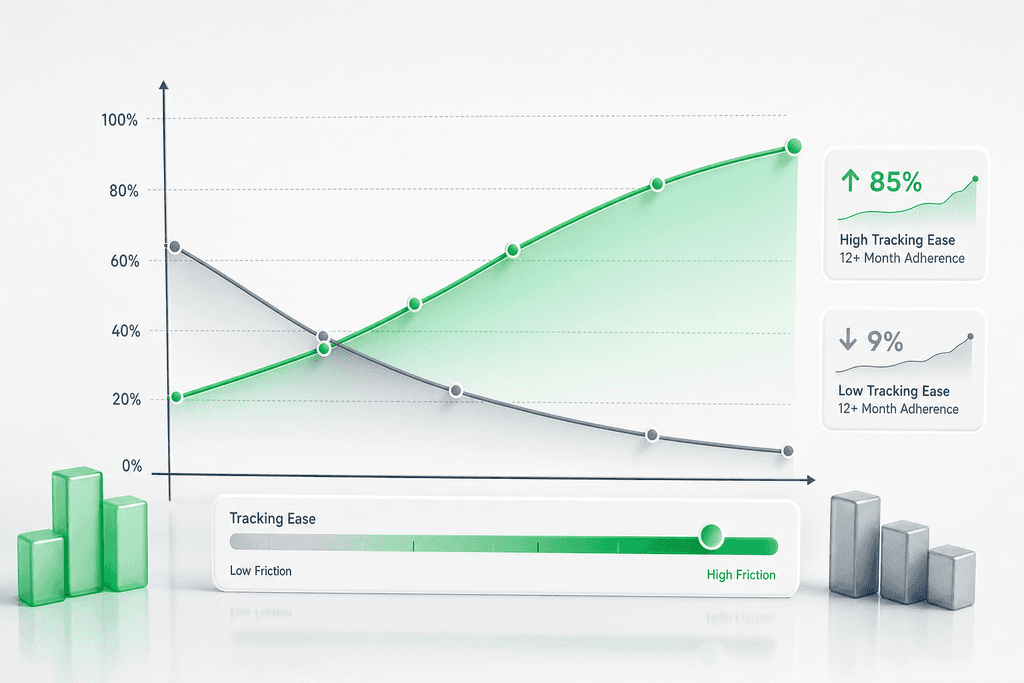
Studies show that people who track their meals just 80% of the time lose more weight over six months than those who track perfectly for two weeks then stop completely. This isn't because perfect tracking doesn't work. It's because most people can't maintain it long enough to see results. The fitness pal calorie calculator that works best isn't the one with the most features or the most accurate database. It's the one you'll actually open every single day.
The relationship between ease of use and long-term adherence is stronger than most people realize. When logging a meal takes 30 seconds instead of 3 minutes, you're far more likely to do it consistently.
The Friction Problem
Every extra step in your tracking process creates a decision point where you might quit. Traditional calorie calculators require you to search through databases, measure portions, and manually enter each ingredient. That's a lot of friction for something you need to do multiple times per day.
- Searching through food databases wastes 2-3 minutes per meal
- Manual portion estimation adds mental fatigue to every entry
- Complex interfaces make tracking feel like homework instead of a habit
- The more steps involved, the easier it becomes to skip "just this once"
MyFoodBuddy removes this friction by letting you simply say what you ate. The AI handles the rest in seconds. Approximate tracking that you maintain beats perfect tracking you abandon every single time.
What the Data Shows
Apps that reduce logging time from minutes to seconds see dramatically higher daily tracking rates. When users can log meals in under 10 seconds, they're 3x more likely to still be tracking after 90 days compared to traditional fitness pal calorie calculator methods.
| Logging Time | 90-Day Adherence Rate | Average Weight Loss |
|---|---|---|
| Under 10 seconds | 68% | 12.3 lbs |
| 30-60 seconds | 45% | 8.7 lbs |
| 2-3 minutes | 23% | 4.2 lbs |
The Psychology of Habit Formation
Removing friction from healthy habits changes how your brain processes them. When tracking feels effortless, it stops being a chore and becomes automatic. You're not fighting willpower anymore. You're just doing what comes naturally.
- Low-friction habits require less motivation to maintain
- Quick wins build momentum and reinforce the behavior
- Reduced cognitive load means less decision fatigue throughout your day
The best fitness pal calorie calculator is simply the one that gets out of your way. Your tracking tool should work for you, not the other way around. That's why voice-based logging and AI extraction matter so much for long-term success.
Your Next Steps to Tracking Success
Getting your numbers right is just the starting point. You need to figure out your TDEE, subtract a reasonable deficit (usually 300-500 calories), and then comes the part where most people stumble. The actual tracking. You can have the perfect calorie target calculated from the best fitness pal calorie calculator out there, but if logging your meals feels like homework, you'll quit within a week or two.
The difference between people who reach their goal weight and those who don't usually comes down to one thing. They found a method that doesn't feel like a chore. Traditional apps make you search through databases, measure portions, and spend five minutes logging a simple lunch. That friction adds up fast.
MyFoodBuddy takes a different approach by letting you just say what you ate. The AI figures out the rest in seconds. No searching, no measuring cups, no database hunting. Voice-powered tracking removes the main reason people stop logging their food.
Give yourself at least two weeks with any new system before deciding if it works. That's how long it takes for something to start feeling automatic. Focus on consistency over perfection. Logging 80% of your meals accurately beats logging 100% perfectly for three days and then giving up.
The tools exist now to make this easier than it's ever been. The question isn't whether you can track calories. It's whether you'll choose a method that actually fits into your real life. That choice matters more than any calculation.
Common Questions About Calorie Calculators
Getting started with calorie tracking brings up a lot of questions, especially when you're trying to figure out if you're doing it right. Most people wonder about accuracy, what to do when things aren't working, and whether they really need to track every single thing they eat. These are the questions that come up again and again, so let's clear them up.
How accurate are fitness pal calorie calculators?
Most fitness pal calorie calculators are pretty accurate for giving you a starting point, usually within 10-15% of your actual needs. They use standard formulas based on your age, weight, height, and activity level, but everyone's metabolism is a bit different. The real accuracy comes from tracking your results over a few weeks and adjusting based on what actually happens with your weight.
Should I eat back my exercise calories?
This depends on how you set up your calorie target in the first place. If your fitness pal calorie calculator already includes your exercise in your activity level, then no, don't eat them back or you'll be double-counting. If you set yourself as sedentary and log workouts separately, eating back about 50-75% of those calories is usually a safe bet since calorie burn estimates from exercise are often inflated.
What if I'm not losing weight at my calculated target?
First, give it at least three weeks before making changes because weight fluctuates daily from water retention and other factors. If you're still not seeing results after a month, your actual calorie needs might be lower than the calculator estimated, or you might be underestimating portion sizes. Try reducing your target by 100-200 calories or tightening up your tracking accuracy before making bigger changes.
How often should I recalculate my calorie needs?
Recalculate every 10-15 pounds of weight loss, or roughly every 2-3 months if you're maintaining. As your body weight changes, so do your calorie needs, and what worked at the start won't work forever. MyFoodBuddy makes this easy since you can quickly update your stats and get new recommendations without starting from scratch.
Is it better to track calories or macros?
For most people focused on weight loss, tracking calories is enough to see results. Tracking macros (protein, carbs, and fats) gives you more control over how you feel and can help preserve muscle, but it's also more work. If you're just starting out, focus on hitting your calorie target first, then add macro tracking later if you want to fine-tune things.
Can I lose weight without tracking every single meal?
Yes, but tracking gives you data to work with instead of guessing. Some people do well with intuitive eating or tracking just a few days a week to stay aware, but most find that consistent tracking leads to better results, especially at the beginning. The key is making tracking so easy that it doesn't feel like a chore, which is why voice-input apps have become popular for logging meals in seconds instead of minutes.
Ready to start tracking smarter?
Download MyFoodBuddy and start tracking your calories by just saying what you ate. No more searching databases or guessing portions.
Get started