Nine Fitness Pal Calories Calculator Tips Worth Trying
Master your fitness pal calories calculator with 9 proven tips. Learn shortcuts, accuracy hacks, and time-saving tricks to track nutrition effortlessly.
Most people quit using their fitness pal calories calculator within two weeks because logging every meal feels like a part-time job. The endless searching through food databases and manual entry turns what should be a simple health habit into a daily frustration. The good news is that a few smart strategies can cut your tracking time from minutes to seconds, and tools like MyFoodBuddy make it even easier by letting you just say what you ate instead of typing and searching.
Table of Contents
- How Calorie Calculators Actually Work
- Use Voice Logging to Save Hours Each Week
- Create Meal Templates for Recurring Foods
- Set Realistic Goals Using TDEE Calculators
- Track Nutrients Beyond Just Calories
- Leverage Gamification to Build Consistency
- Making Calorie Tracking Work for Your Life
- Common Questions About Calorie Calculators
How Calorie Calculators Actually Work
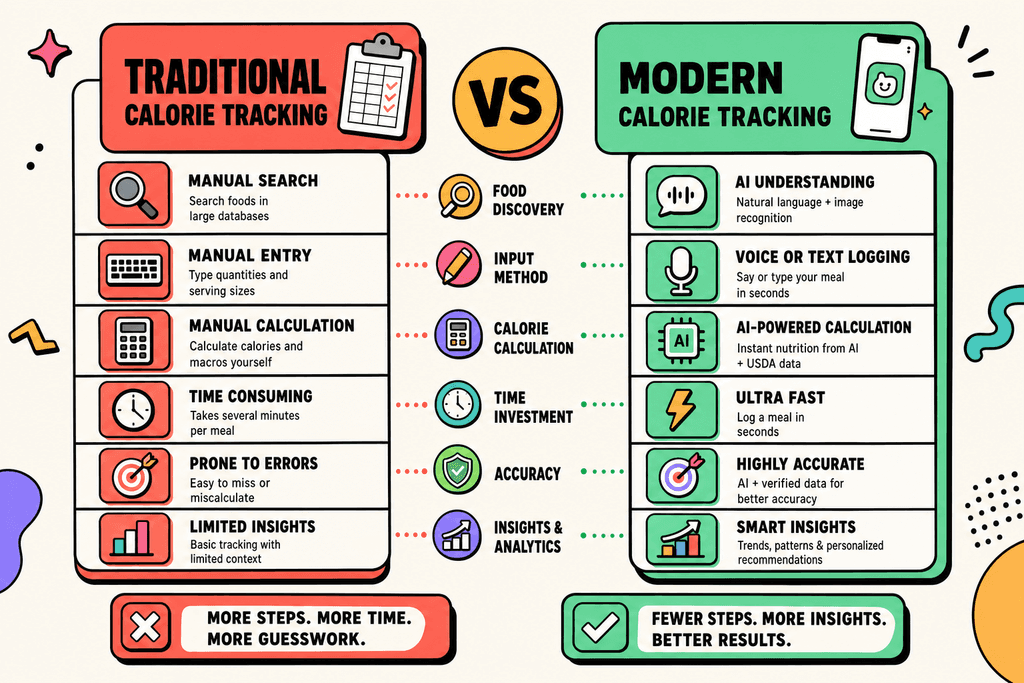
Most people who try tracking calories give up within the first two weeks. The reason isn't lack of motivation, it's the sheer amount of time it takes to log every single meal. Traditional fitness pal calories calculator tools require you to search through thousands of food items, measure portions, and manually add each ingredient. What should take seconds ends up eating 10 to 15 minutes of your day, and that gets old fast.
The Old Way of Tracking Calories
Traditional calorie tracking apps built their systems around massive food databases. You'd open the app, type in what you ate, scroll through dozens of similar entries, and hope you picked the right one. Then came the math part.
Here's what the old process looked like:
- Search for each food item individually in a database of thousands of entries
- Select the correct brand or generic version from multiple options
- Manually adjust serving sizes and portions for accuracy
- Repeat this process for every ingredient in your meal
- Double-check that all nutritional values add up correctly
The whole system depended on you being patient enough to do this three to five times per day. Most people weren't, which is why over 80% of users stop tracking within a month.
How Modern AI Changes the Game
New fitness pal calories calculator technology works completely differently. Instead of making you search and select, it listens to how you naturally describe food. You say "chicken breast with rice and broccoli" and the AI figures out the rest.
The technology behind this uses something called natural language processing. It's the same tech that helps your phone understand when you ask about the weather. But instead of weather data, it connects to nutritional databases like the USDA food composition tables.
Modern tools handle several tasks automatically:
- Convert casual descriptions into specific food items
- Estimate reasonable portion sizes based on context
- Calculate macros and micros from comprehensive databases
- Learn your eating patterns to improve accuracy over time
Apps like MyFoodBuddy use this approach to cut logging time from minutes down to seconds. You just tell it what you ate, and it does the database searching and calculation work for you.
Understanding TDEE and Why It Matters
Before any fitness pal calories calculator can help you, it needs to know your Total Daily Energy Expenditure, or TDEE. This number tells you how many calories your body burns in a typical day. Get this wrong, and your whole tracking effort falls apart.
TDEE calculations consider multiple factors:
- Your basal metabolic rate (calories burned just staying alive)
- Activity level from exercise and daily movement
- Age, height, weight, and biological sex
- Goals for weight loss, maintenance, or muscle gain
Once you know your TDEE, you can set macro targets that actually make sense for your body. Eating 500 calories below your TDEE typically results in losing about one pound per week. Eating above it helps you gain weight, ideally as muscle if you're training.
| Method | Time Per Meal | Database Search | Accuracy |
|---|---|---|---|
| Traditional Manual Entry | 5-10 minutes | Required | High (if done correctly) |
| Barcode Scanning | 2-3 minutes | Partial | High for packaged foods |
| AI Voice Logging | 10-30 seconds | Automatic | High with AI learning |
| Photo Recognition | 1-2 minutes | Automatic | Moderate |
The difference between these methods isn't just about speed. It's about whether you'll actually stick with tracking long enough to see results. When logging takes 30 seconds instead of 10 minutes, you're way more likely to do it consistently.
Use Voice Logging to Save Hours Each Week
Most people quit tracking calories within the first two weeks, and the reason is simple. Traditional apps make you search through endless food databases, measure portions, and manually enter every ingredient. That process takes anywhere from three to five minutes per meal, which adds up to over an hour each week just logging food. The biggest breakthrough in calorie tracking isn't about better databases or more accurate numbers, it's about removing the friction entirely.

Voice logging changes everything because you can log an entire meal in under 10 seconds. Instead of tapping through screens and searching for foods, you just say what you ate. MyFoodBuddy handles natural language like "two eggs, toast with butter, and coffee with oat milk" and automatically calculates all the nutritional values using AI and USDA data.
- Speak naturally - no need to use specific phrases or formats
- Include details - mention cooking methods and portion sizes when you know them
- Log immediately - capture meals right after eating while details are fresh
- Use text for complex recipes - typing works better when you have exact measurements
The time savings are real. If you're logging three meals and two snacks daily, voice input saves you about 50 minutes per week compared to traditional manual entry. That's over 40 hours per year you get back.
Create Meal Templates for Recurring Foods
Here's something most people don't realize about their eating habits. Research shows that the average person eats roughly 70% of the same meals on repeat throughout the week. You probably have your go-to breakfast, a few lunch options you cycle through, and maybe five dinner recipes you make regularly. Once you accept this pattern, you can use it to your advantage.
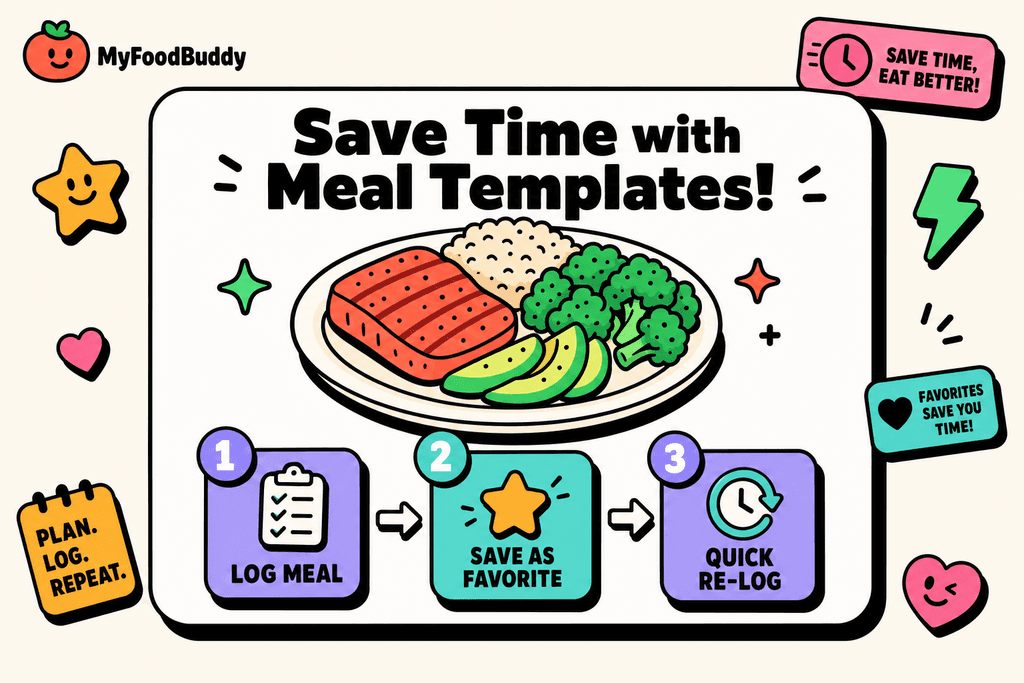
Meal templates eliminate the need to log the same foods over and over. After you log something once, you can save it as a favorite and organize it by category like Breakfast, Lunch, Dinner, or Snack. The next time you eat that meal, it's just one tap to re-log everything.
Building your template library takes about a week of normal eating. As you log meals, mark the ones you eat regularly as favorites. Within a few days, you'll have a personalized collection that covers most of your typical eating patterns.
- Start with your most frequent breakfast options
- Add your standard lunch combinations
- Include your regular dinner rotations
- Save common snacks and drinks
- Create templates for meal prep batches
The flexibility is important too. You can log a saved meal and then adjust portions or add extra items without losing the base template. This works perfectly for meal prep where you're eating similar combinations but varying the quantities or sides throughout the week.
Set Realistic Goals Using TDEE Calculators
Setting random calorie goals is one of the fastest ways to fail at nutrition tracking. Too aggressive and you'll be miserable and quit. Too conservative and you won't see results. The problem is that most people just guess at their calorie needs or copy what worked for someone else. Your body burns a specific amount of energy each day based on your size, age, activity level, and goals.
Total Daily Energy Expenditure (TDEE) is the actual number of calories your body burns in a day. It includes everything from your basic metabolic functions to your workouts and daily movement. Once you know this number, you can set appropriate targets for weight loss, maintenance, or gain.
| Goal | Calorie Adjustment | Expected Rate |
|---|---|---|
| Weight Loss | -500 calories/day | 1 lb per week |
| Maintenance | 0 calories | Stable weight |
| Weight Gain | +300-500 calories/day | 0.5-1 lb per week |
MyFoodBuddy's TDEE calculator automatically sets targets for weight loss or gain based on your personal data. This removes the guesswork and gives you a starting point that's actually tailored to your body. You can also adjust your macro goals based on whether you're focused on muscle building, endurance training, or general health.
The key is starting with accurate baseline numbers and adjusting based on real results. Track for two weeks, see how your body responds, and fine-tune from there. This approach beats random calorie goals every time, as explained in more detail in this guide on tailoring calorie intake.
Track Nutrients Beyond Just Calories
Calories tell you about energy, but they don't tell you about nutrition. You could hit your calorie goal eating nothing but candy and still be malnourished. The quality of those calories matters just as much as the quantity. Protein keeps you full and preserves muscle. Fiber supports digestion and blood sugar control. Vitamins and minerals run thousands of processes in your body that affect everything from energy levels to immune function.
Comprehensive nutrient tracking reveals patterns you'd never notice with calories alone. Maybe you're consistently low on iron, which explains the fatigue. Or you're not getting enough protein, which is why you're always hungry even when hitting your calorie targets.
MyFoodBuddy tracks over 20 nutrients including vitamins and minerals automatically every time you log a meal. The app uses color-coded systems to show you at a glance whether you're meeting your nutritional needs across different categories.
- Protein intake - crucial for muscle maintenance and satiety
- Fiber levels - impacts digestion and blood sugar stability
- Micronutrients - vitamins and minerals that support overall health
- Macro balance - the ratio of carbs, protein, and fats
The analytics features let you review your intake over days, weeks, or months to spot trends. You might notice you eat plenty of protein on weekdays but fall short on weekends. Or that your vitamin D is consistently low during winter months. These insights help you make targeted improvements instead of just guessing what might be wrong. For more on automating your tracking for better accuracy, check out our detailed breakdown.
Leverage Gamification to Build Consistency
The hardest part of nutrition tracking isn't the logging itself, it's doing it every single day. Motivation fades after the first week or two, and that's when most people stop. But there's a reason apps like Duolingo keep people coming back daily for years. They tap into basic human psychology through streaks, achievements, and progress markers that make the habit feel rewarding.
Tracking streaks create a visual representation of your consistency. Once you hit a seven-day streak, you don't want to break it. At 30 days, that streak becomes something you actively protect. It's not about perfection, it's about showing up.
MyFoodBuddy includes gamification features like streaks and achievements that turn tracking into something more engaging than a chore. You get reminders that work with your schedule, not generic notifications that you'll ignore. The system celebrates milestones without being annoying about it.
- Set reminders for your typical meal times
- Track your logging streak and aim for consistency
- Unlock achievements as you hit tracking milestones
- Review your progress through visual calendars
- Focus on building the habit, not perfect accuracy
Consistency beats perfection every time. Logging 80% of your meals for three months gives you way more useful data than logging 100% of your meals for two weeks before quitting. The gamification elements help you stay engaged long enough for tracking to become automatic. If you're looking for more ways to maintain consistency, our article on maintaining a healthy lifestyle with efficient tracking offers additional strategies.
Making Calorie Tracking Work for Your Life
The best fitness pal calories calculator is the one you'll actually stick with beyond the first week. Most people quit tracking because traditional apps turn a simple task into a time-consuming chore that requires searching through endless food databases and manually entering every ingredient. The tips we covered focus on making tracking faster and more natural, whether that's using voice logging to record meals in seconds, creating meal templates for foods you eat regularly, or setting realistic goals that match your actual lifestyle instead of some perfect ideal.
The real secret isn't finding the perfect calorie counting method. It's finding tools that remove friction from the process. Voice technology has changed how people track their meals because it matches how we naturally communicate, and MyFoodBuddy uses this approach to let you log entire meals by just saying what you ate.
If you've tried other apps and felt like they demanded too much of your time, the 7-day free trial gives you a chance to see what tracking looks like when it takes seconds instead of minutes. The difference between success and giving up often comes down to whether your tracking system fits into your life or forces you to rearrange everything around it.
Your time matters more than perfect precision. Automating the tedious parts of calorie tracking means you can focus on making better food choices instead of becoming a data entry clerk. The questions below cover some common concerns people have when they're trying to find a tracking method that actually works for them.
Common Questions About Calorie Calculators
Calorie tracking can feel confusing when you're just getting started, especially with all the different methods and tools available. Whether you're comparing a fitness pal calories calculator to newer AI options or trying to figure out what numbers actually matter, these questions come up all the time. The good news is that most of these concerns have straightforward answers that can help you make better choices about tracking your food. Here's what people ask most often about using calorie calculators and what you need to know to get real results.
How accurate are AI-powered calorie calculators compared to manual entry?
AI-powered calculators like the one in MyFoodBuddy typically match or exceed manual entry accuracy because they pull from comprehensive databases like USDA nutritional data. The main advantage is that they eliminate human error from rushed logging or guessing portion sizes. While traditional apps like MyFitnessPal require you to search through thousands of user-submitted entries that might be wrong, AI systems cross-reference multiple data sources to give you consistent results.
What's the difference between TDEE and BMR in calorie calculations?
Your BMR (Basal Metabolic Rate) is the calories your body burns just staying alive, like breathing and keeping your heart beating. TDEE (Total Daily Energy Expenditure) includes your BMR plus all the calories you burn from moving around, exercising, and digesting food. Most fitness pal calories calculator tools use TDEE to set your daily targets because it gives you a more realistic number to work with for weight loss or gain.
How long does it take to see results from consistent calorie tracking?
Most people notice changes within two to four weeks of consistent tracking, though the scale might not move right away due to water weight fluctuations. The key word here is consistent, which is why apps that make logging faster tend to work better long-term. When tracking takes 30 seconds instead of five minutes per meal, you're way more likely to stick with it past the first month.
Can voice logging accurately track homemade meals with multiple ingredients?
Yes, voice logging handles complex meals surprisingly well when you describe the ingredients naturally. You can say something like "chicken stir fry with rice, broccoli, and soy sauce" and the AI breaks down each component to calculate totals. This works because the system recognizes common recipes and ingredient combinations, though being specific about portions helps improve accuracy.
Is it better to track macros or just calories for weight loss?
Tracking just calories works fine for basic weight loss since you need a calorie deficit regardless of where those calories come from. However, monitoring macros (protein, carbs, and fats) helps you maintain muscle mass and feel fuller longer, which makes the whole process easier. Most modern calorie trackers show both anyway, so you might as well glance at your protein intake even if you're not being strict about it.
How often should I update my calorie goals as my weight changes?
Recalculate your targets every 10-15 pounds of weight loss or gain, or roughly every two to three months if you're losing weight slowly. Your calorie needs decrease as you get lighter because there's less of you to fuel. Some apps automatically adjust your goals based on weight syncing from Apple Health or similar platforms, which saves you from having to remember to update manually.
Ready to start tracking smarter?
Download MyFoodBuddy and start tracking your calories by just saying what you ate. No more searching databases or guessing portions.
Get started