
Chipotle Macro Calculator for Calories and Nutrition
Use our free Chipotle macro calculator to see calories, protein, carbs & fat update live as you build your bowl. Try it now.
A "healthy" chicken bowl at Chipotle can hit 600 calories or quietly climb past 1,200, and the only thing standing between those two numbers is what you point at during the line. Most people guess, add cheese and queso without thinking twice, then wonder why the scale isn't moving. A chipotle macronutrient calculator fixes that guessing game by showing exact calories and macros before you even leave the counter, which is exactly what the tool below is built to do.
Table of Contents
Chipotle Nutrition Basics You Should Know
A single chicken burrito bowl can range anywhere from 500 to over 1,200 calories depending on what you pick. That's a huge swing, and it's exactly why so many people get frustrated trying to guess their macros at the counter. Chipotle doesn't hide their nutrition info, but reading through a giant PDF while someone's yelling "what's next" behind you isn't exactly relaxing. Most folks just want a quick number so they can move on with their meal and their day. That's where knowing the basic building blocks of your order actually helps, before you even open a chipotle macronutrient calculator.
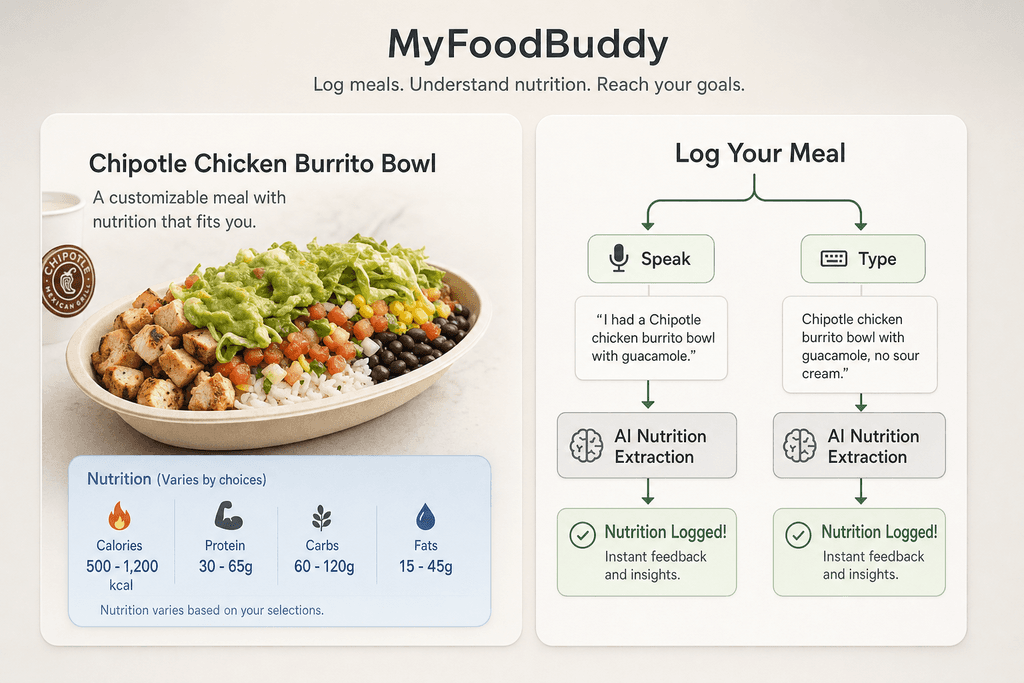
Here's a rough breakdown of the calorie and macro ranges for common ingredients, based on standard serving sizes used at Chipotle.
| Ingredient | Calories | Protein (g) | Fat (g) | Carbs (g) |
|---|---|---|---|---|
| Chicken | 180 | 32 | 7 | 0 |
| Steak | 150 | 21 | 6 | 0 |
| Barbacoa | 170 | 21 | 8 | 2 |
| Sofritas | 150 | 8 | 10 | 9 |
| White rice | 210 | 4 | 4 | 40 |
| Black beans | 130 | 8 | 1 | 22 |
| Guacamole | 230 | 2 | 22 | 8 |
| Queso | 120 | 6 | 9 | 4 |
| Sour cream | 110 | 2 | 9 | 2 |
A few things jump out once you look at this side by side. Protein options range widely in calories and fat, so swapping steak for barbacoa isn't as neutral as it seems. Rice and beans carry most of the carb load in your bowl, which matters if you're watching carbs closely. And sauces and dressings are small in size but big in calories, meaning a couple scoops of guac or queso can quietly add up to a few hundred extra calories.
None of this means you need to skip the good stuff. It just means knowing these ranges ahead of time makes the math a lot less annoying, especially when you're trying to hit a specific target for the day.
Try The Chipotle Macro Calculator Now
A single Chipotle bowl can swing anywhere from 300 calories to over 1,200 depending on what you toss in it. That's a huge gap, and most people just guess. The calculator below takes the guesswork out by letting you build your exact order and see the numbers change right in front of you. No more squinting at a menu board doing math in your head while the line behind you grows.
Here's how it works. You pick your base, your protein, rice, beans, salsas, and toppings one at a time. As you add each item, the calories, protein, carbs, and fat update instantly. Everything is pulled from USDA-backed nutrition data, so you're not relying on some random blog post estimate.
To build your order in the calculator, follow these steps:
- Choose your base (bowl, burrito, salad, or tacos)
- Pick a protein and note the portion size
- Add rice, beans, or both
- Select your salsas and extras
- Watch your totals update live before you order
It sounds simple because it is. That's kind of the point.
How To Get The Most Accurate Numbers
The calculator only works as well as the info you put into it. A lot of people rush through and pick generic ingredient names without paying attention to scoop size, which throws off the whole result. Chipotle measures almost everything with a scoop, so a "small" scoop of guac and a "double" scoop of guac are two very different stories for your daily totals. Getting this right matters even more if you're tracking closely for weight loss.
Here's what actually changes your numbers the most:
- Select exact scoop sizes, not just the ingredient name
- Double proteins and extra scoops can add 150 to 300 calories in one click
- Save your go-to build so you're not rebuilding it from scratch every time
That last point matters more than people think. If you order the same bowl every Tuesday, there's no reason to redo the math each week. If you want to save that go-to build and reuse it faster, the Chipotle macros calculator for custom orders and calories lets you dial in the exact meal without starting from scratch every time.
Sample Builds For Weight Loss Goals
Seeing a few real examples usually helps more than reading instructions. Below are three builds people commonly search for when they're trying to hit a specific goal, whether that's more protein, fewer carbs, or just a smaller meal overall. These aren't rules, just starting points you can tweak inside the calculator to match your own numbers.
| Build | Calories | Protein | Carbs | Fat |
|---|---|---|---|---|
| High-protein bowl | 640 | 52g | 48g | 22g |
| Low-carb burrito bowl | 510 | 44g | 18g | 28g |
| Balanced 500-cal build | 500 | 32g | 45g | 18g |
The high-protein bowl swaps double chicken for the base protein and skips rice for extra beans. The low-carb version leans on lettuce instead of rice and goes light on beans. The 500-calorie build sticks to single portions across the board, which sounds boring but actually keeps you full longer than you'd expect.
Why A Calculator Beats Guessing Every Time
About 80% of people who start tracking their food by hand quit within the first month. That's not a random guess, that's just how habit-building works when the process feels like homework. A chipotle macronutrient calculator solves a tiny piece of this puzzle, but it points to a bigger problem with how most people try to manage their nutrition. Writing down every ingredient, looking up numbers, doing math in your head at the counter while people wait behind you in line, none of that feels good. It's no wonder people give up. The whole point of tracking is supposed to be helping you, not stressing you out.
Here's the thing about decision fatigue. Standing at the counter trying to remember if guac adds 150 or 230 calories is mental energy you don't have to spend.
- Manual tracking requires remembering or looking up every single ingredient
- Real-time tools give you the answer before you even order
- Less math means less chance you just skip logging altogether
This is where the pros and cons really matter. A calculator tool gets you a fast answer for one specific meal. Manual tracking apps ask you to build the meal yourself, piece by piece, every single time.
| Method | Speed | Effort |
|---|---|---|
| Calculator tool | Instant | Low |
| Manual app entry | Slow | High |
| Memorizing macros | Unreliable | Very high |
The catch with a single-restaurant calculator is that it only works for that one place. Real life doesn't work that way. You eat at ten different spots in a month, maybe more. This is exactly why MyFoodBuddy exists as more than a one-trick tool. You just say what you ordered out loud, and it pulls the same kind of instant breakdown, whether that's Chipotle, a taco truck, or your kitchen at home. No typing, no searching, no guessing. Compared to apps like MyFitnessPal or Cronometer where you're still manually searching entries, this cuts out the friction that makes people quit in the first place. Convenience is what keeps people consistent, and consistency is what actually gets results.
Wrap-Up Build Smarter, Not Harder
A chipotle macronutrient calculator does one simple thing really well. It stops you from guessing what's in your bowl. No more adding up numbers in your head or hoping your estimate is close enough. You just plug in your order and see exactly where you stand.
The small stuff matters more than people think. Swapping sour cream for salsa, or asking for half rice instead of full, can save you a few hundred calories without changing much about your meal. That's the kind of thing that adds up over weeks of eating out.
But here's the thing. Chipotle is just one stop on your food journey. You've got mornings with coffee and eggs, snacks between meetings, dinner at home, maybe a McChicken run when you're short on time. Tracking one meal well doesn't help much if the rest of your day is a mystery. If you're looking for a similar tool to help you track meals at Subway, our Subway calorie counter tool for sandwiches and custom orders can make the process just as easy.
This is where things get easier. Instead of typing every ingredient into a calculator, apps like MyFoodBuddy let you just say what you ate out loud, or type a quick sentence, and it logs the whole thing in seconds. No searching for the exact Chipotle menu item or guessing portion sizes.
If you're curious how this stacks up against manually calculating everything, this piece on why automated calorie calculators save time breaks it down further. And if you want to see what a full day of easy tracking actually looks like, voice powered tracking for fast food lovers is worth a read too.
Either way, the goal is the same. Less time doing math, more time actually working toward your goals.
Chipotle Macro Calculator FAQs
Got more questions about crunching numbers on your burrito bowl? Here's a quick rundown of what people usually want to know before they trust a chipotle macronutrient calculator with their meal plan.
Where does the nutrition data come from
Most calculators, including the numbers we reference here, pull from Chipotle's own published nutrition info combined with USDA food data for anything that needs cross-checking. This keeps the numbers grounded instead of just guessed at.
Can I save my favorite build
If you order the same bowl every time, typing it out again and again gets old fast. That's where MyFoodBuddy comes in handy, since you can save your go-to Chipotle order as a favorite and log it again with one tap next time you're craving it.
Does the calculator account for extra scoops
Yes, and this is actually where a lot of people mess up their tracking. An extra scoop of guac or double meat isn't a small tweak, it can add well over 100 calories, so any calculator worth using needs to let you adjust portions instead of assuming a standard build.
How accurate is it compared to Chipotle's own numbers
A good calculator should land close to Chipotle's official nutrition calculator, since both are working off the same base data. Small differences can pop up depending on how portions are rounded, but it shouldn't be off by much if it's built correctly.
Can I log my Chipotle order directly into MyFoodBuddy
Yes. Instead of manually adding up each ingredient, you can just say or type something like "chicken bowl with brown rice, black beans, and mild salsa" and the app handles the rest. It's a lot faster than plugging numbers into apps like myfitnesspal.com or cronometer.com one item at a time.
Do I need to track every single meal forever
Not really. A lot of people track closely for a few weeks to learn portion sizes and habits, then loosen up once it becomes second nature. The point isn't to obsess over every gram, it's to actually understand what you're eating so you can hit your goals without guessing.
Ready to start tracking smarter?
Download MyFoodBuddy and start tracking your calories by just saying what you ate. No more searching databases or guessing portions.
Get started