How Accurate Is Whoop Calories Burned for Weight Loss
Whoop calories burned accuracy isn't perfect. Learn what it misses and how to track your deficit correctly for real weight loss results.
You've been crushing your workouts, watching your Whoop strap track every calorie burned, and eating what you think is less than you're burning. But the scale hasn't budged in weeks, and you're starting to wonder if something's off with the math. The truth is, how accurate is Whoop calories burned matters more than most people realize, because even small errors in those numbers can completely derail your weight loss progress.
Table of Contents
What Whoop Actually Measures
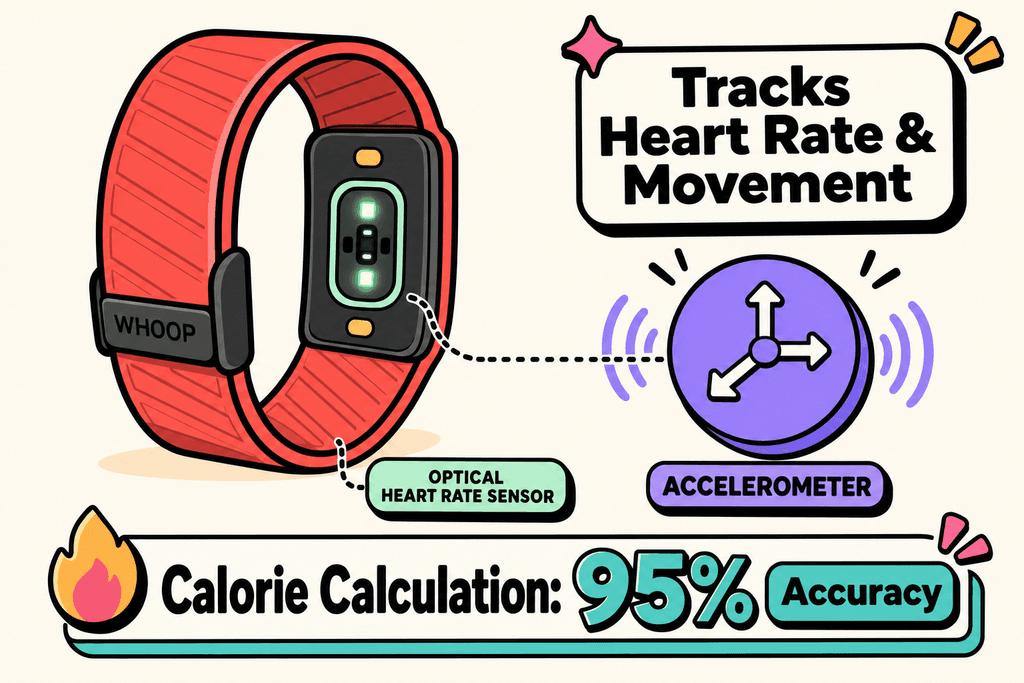
Your Whoop strap sits on your wrist all day, tracking every heartbeat and movement you make. But what's actually happening under the hood when it spits out that daily calorie number? The device uses a combination of heart rate sensors and motion detectors to build a picture of your energy expenditure. It's constantly monitoring your pulse through optical sensors that shine light into your skin, while accelerometers track how much you're moving around. These two data streams feed into Whoop's algorithms, which then estimate how many calories you're burning throughout the day.
The Three Parts of Your Daily Burn
Whoop doesn't just give you one big calorie number and call it a day. It actually breaks down your energy expenditure into three distinct categories that paint a fuller picture of where your calories are going.
- Baseline metabolism covers what your body burns just staying alive, like breathing and keeping your heart pumping
- Strain measures the calories you burn during workouts and physical activities
- Recovery tracking looks at how your body uses energy to repair itself during rest periods
The baseline number is basically your resting metabolic rate. Whoop calculates this using your personal stats like age, weight, height, and sex, combined with your heart rate data when you're completely at rest.
| Component | What It Measures | Typical % of Daily Burn |
|---|---|---|
| Baseline Metabolism | Resting energy needs | 60-70% |
| Strain | Activity and exercise | 15-30% |
| Recovery | Sleep and rest periods | 10-15% |
How the Algorithms Make Their Guesses
Here's where things get tricky. Whoop can't actually measure the calories leaving your body, so it has to estimate based on patterns and assumptions. The algorithms look at how hard your heart is working and translate that into an energy expenditure estimate.
- Heart rate variability helps determine your metabolic state
- Movement patterns indicate activity intensity levels
- Personal data creates a baseline profile for calculations
- Historical trends refine estimates over time
The problem is that everyone's body responds differently to exercise and stress. Two people with the same heart rate during a workout might be burning very different amounts of calories. If you're trying to lose weight and tracking your intake with something like MyFoodBuddy, understanding how accurate is whoop calories burned becomes pretty important for your overall calorie math.
The device makes educated guesses based on population averages and your specific metrics. But those guesses rely on assumptions about your muscle mass, fitness level, and metabolic efficiency that might not match reality.
Where Whoop Gets Calories Burned Wrong
Your Whoop strap might tell you that you burned 2,800 calories today, but here's the uncomfortable truth: that number could be off by hundreds of calories. Research on fitness trackers shows they can miss the mark by 20-30% when estimating calorie burn, which is a massive problem if you're trying to lose weight. The issue isn't that Whoop is a bad device, it's that measuring human energy expenditure is incredibly complex, and even the best wearables struggle with accuracy. When you're trying to create a calorie deficit for weight loss, being off by 500 calories means the difference between losing weight and staying stuck.
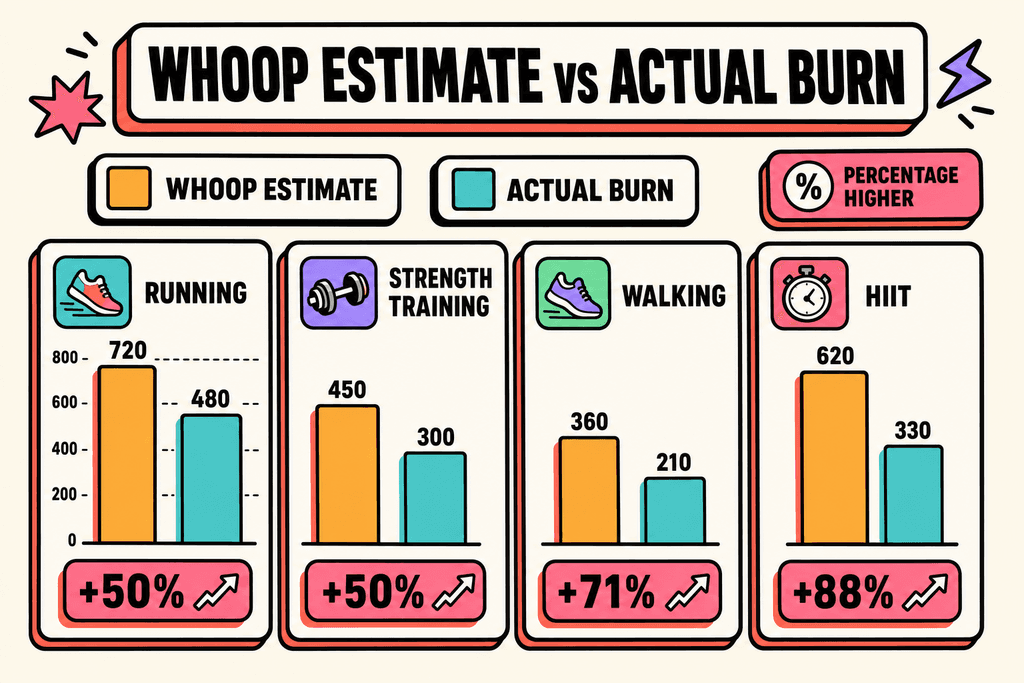
The biggest problem with how accurate is whoop calories burned comes down to how the device actually works. Whoop uses your heart rate to estimate calories, which sounds logical until you realize that heart rate doesn't always match energy expenditure perfectly.
- Strength training throws off the calculations because your heart rate spikes but you're not burning as many calories as cardio
- HIIT workouts confuse the algorithm with rapid heart rate changes that don't match traditional exercise patterns
- Your individual metabolism is unique and the device uses population averages that might not fit you
- Muscle mass makes a huge difference in calorie burn, but Whoop can't measure your body composition
Here's what really matters for weight loss: if Whoop says you burned 2,500 calories but you actually burned 2,000, and you eat 2,300 calories thinking you're in a deficit, you're actually gaining weight. Metabolic adaptation is another factor that wearables completely miss. As you lose weight, your body becomes more efficient and burns fewer calories, but your Whoop doesn't know that's happening.
The Missing Piece: What You Eat Matters More
Most people obsess over their Whoop strain score and daily calorie burn while completely ignoring the elephant in the room. You could have the most accurate calorie burn tracker in the world, and it still wouldn't matter if you're not tracking what goes into your mouth. The math is simple but brutal: you cannot out-exercise a bad diet, no matter how many calories Whoop says you burned during that morning workout. A single restaurant meal can easily pack 1,500 calories, which would take hours of exercise to burn off, and that's assuming Whoop's estimate is even correct.

The real problem is that while people worry about whether how accurate is whoop calories, they're making much bigger errors on the food side. Studies show that most people underestimate their food intake by 30-50%, which is way worse than Whoop's accuracy issues.
| Focus Area | Typical Error Rate | Impact on Weight Loss |
|---|---|---|
| Calorie Burn Tracking | 20-30% | Moderate |
| Food Intake Estimation | 30-50% | Severe |
Think about it this way: if you burn 2,000 calories and Whoop says 2,400, that's a 400 calorie error. But if you eat 2,500 calories and think you only ate 1,800, that's a 700 calorie error going the wrong way. The food tracking error is bigger and more dangerous because it works against your goals. Plus, Whoop doesn't track the thermic effect of food, which is the energy your body uses to digest what you eat, adding another layer of complexity to the equation.
How to Actually Track Your Deficit
The good news is that you don't need perfect accuracy from Whoop to lose weight. What you need is a system that accounts for both sides of the calorie equation and adjusts based on real results. Use Whoop as a relative measure, not an absolute truth. If it says you burned more calories today than yesterday, that's useful information even if the exact numbers are off. The key is combining that data with accurate food tracking, which is where most people's weight loss plans fall apart. You need to know what you're actually eating, not what you think you're eating.
Here's the process that actually works for creating a real calorie deficit:
- Track every single thing you eat with a proper calorie tracking app, not just estimates in your head
- Use your Whoop data as a guide but don't treat the calorie numbers as gospel
- Weigh yourself consistently and track the trend over 2-4 weeks, not day-to-day fluctuations
- Adjust your food intake based on actual results, not what the devices tell you should be happening
- Make food logging easy so you'll actually stick with it long enough to see results
This is where tools like MyFoodBuddy come in handy because they remove the biggest barrier to accurate food tracking: the time and effort it takes. You can just say what you ate and the AI figures out the calories, which means you're way more likely to log everything instead of skipping meals because it's too much work. Consistency in tracking beats perfect accuracy every time, and if logging takes 30 seconds instead of 5 minutes, you'll actually do it.
The bottom line is this: Whoop can help you understand your activity levels and recovery, but it's not accurate enough to be your only tool for weight loss. You need to track both sides of the equation, and the food side is actually more important. When you combine relative activity data from Whoop with accurate food intake tracking, then validate everything against your actual weight loss results over several weeks, you've got a system that works regardless of how accurate is whoop calories burned.
Why Most People Fail Despite Tracking Everything
Studies show that people who wear fitness trackers often gain weight instead of losing it, which seems backwards at first. The problem isn't the technology itself but how we respond to the data these devices give us. When your Whoop tells you that you burned 600 calories during your morning workout, your brain immediately starts calculating how many extra snacks you've "earned." This mental math almost always works against your weight loss goals, even when you think you're being careful about it.
Research from the American Journal of Clinical Nutrition found that people overeat by an average of 2-3 times the calories they actually burned during exercise. If you burned 400 calories, you might eat back 800-1200 calories thinking you're still in a deficit.
The Earned Calories Trap
The biggest mistake happens when people treat burned calories like money in the bank. Your Whoop might say you torched 500 calories, so you grab that post-workout smoothie and protein bar without thinking twice. But here's what actually happens in most cases:
- Fitness trackers can overestimate calorie burn by 20-40% depending on the activity
- Restaurant and packaged food labels can be off by up to 20% legally
- Your brain rounds down what you eat and rounds up what you burn
- Small tracking errors compound daily, turning a planned 500-calorie deficit into a 200-calorie surplus
This creates what researchers call the compensation effect. The more you exercise, the more your body and brain push you to eat. It's not a character flaw or lack of willpower.
False Confidence in Your Deficit
Tracking devices give you precise numbers that feel scientific and trustworthy. When Whoop tells you exactly how accurate is whoop calories burned during your workout, down to the single digit, it creates a sense of certainty that doesn't match reality. This false confidence leads people to eat right up to their calculated limit, leaving zero margin for error.
| Tracking Scenario | Perceived Deficit | Actual Result |
|---|---|---|
| Perfect tracking | 500 cal deficit | 200 cal surplus |
| Eating back exercise | Maintenance | 400 cal surplus |
| Loose tracking | 300 cal deficit | 500 cal surplus |
What Actually Works for Weight Loss
The people who succeed with weight loss don't obsess over whether how accurate is whoop calories or any other tracker. They build simple habits that create a natural deficit without constant calculation. Consistency beats precision every single time.
- Log your meals quickly without agonizing over exact portions (apps like MyFoodBuddy make this easy with voice input)
- Never eat back more than 50% of your tracked exercise calories
- Focus on protein intake and meal timing rather than total calorie perfection
- Track your weight trend over weeks, not daily fluctuations
The goal isn't to have perfect data. It's to build awareness of your eating patterns without creating the psychological trap of earned calories. When tracking becomes quick and effortless, you're more likely to stick with it long enough to see real results.
Your Next Steps for Real Weight Loss
So how accurate is whoop calories burned when you're trying to lose weight? The truth is, it's good enough to show you trends and effort levels, but not precise enough to base your entire weight loss plan on. Whoop can tell you if you're working harder this week than last week, but it can't tell you if you're actually in a calorie deficit. That's where the real problem shows up for most people trying to drop pounds.
The only way to know if you're eating less than you burn is to track what goes in your mouth. Apps like MyFitnessPal and Cronometer can do this, but most people quit after a few days because logging every ingredient takes forever. That's why tools like MyFoodBuddy let you just say what you ate and the AI figures out the calories in seconds, which means you might actually stick with it long enough to see results.
Here's what actually works for weight loss:
- Use Whoop to track your activity trends and recovery
- Track your food intake accurately every single day
- Weigh yourself weekly and adjust based on real results, not what the devices say
- Pick tracking tools that are so easy you won't quit after a week
The scale is the final judge of whether how accurate is whoop calories or your food tracking really matters. If the number goes down over time, you're doing it right. If it doesn't, something in your tracking is off and you need to tighten things up on the food side first.
Common Questions About Whoop and Calories
If you're using Whoop to track your weight loss progress, you probably have some questions about whether you can actually trust those calorie numbers. The truth is, most people don't know how to use their tracker's data properly, which leads to frustration when the scale doesn't move. Here are the most common questions people ask about Whoop's calorie tracking and what you actually need to know to make progress.
How accurate is Whoop calories burned compared to other trackers?
Whoop typically falls within 10-20% accuracy for total daily calories burned, which is similar to other wrist-worn trackers like Apple Watch or Fitbit. The device is better at tracking heart rate-based activities like running or cycling than it is at estimating calories from strength training or daily movement. Most fitness trackers struggle with the same limitations because they're making educated guesses based on your heart rate and movement patterns.
Can I trust Whoop for creating a calorie deficit?
You can use Whoop as a general guide, but don't treat the numbers as exact. The smarter approach is to track your actual weight changes over 2-3 weeks while eating a consistent amount of calories. If you're not losing weight, you're not in a deficit, regardless of what Whoop says. Your body's response is the real test, not what any device tells you.
Should I eat back the calories Whoop says I burned?
This is where most people mess up their weight loss efforts. If Whoop says you burned 500 extra calories from a workout, eating back all 500 will likely stall your progress because the estimate is probably inflated. A safer bet is to eat back only 25-50% of exercise calories if you're really hungry, or better yet, stick to your planned calorie target regardless of what you burned.
What's the best way to track calories for weight loss?
The best approach combines tracking what you eat with monitoring your actual results. You need an easy way to log your food intake without spending 10 minutes per meal doing math. MyFoodBuddy lets you just say what you ate and handles the calorie counting automatically, which makes it way easier to stay consistent. Pair that with weekly weigh-ins and you'll know if you're actually in a deficit.
How do I know if I'm actually in a deficit?
The scale and measurements don't lie over time. Weigh yourself at the same time each day for two weeks and look at the average. If the average is going down, you're in a deficit. If it's staying the same or going up, you're not, even if how accurate is whoop calories burned shows a big deficit. Your body's response matters more than any calculation, so adjust your food intake based on real results, not estimated numbers.
Ready to start tracking smarter?
Download MyFoodBuddy and start tracking your calories by just saying what you ate. No more searching databases or guessing portions.
Get started