
Best Calorie Counting Apps for Easy Daily Tracking
Discover the best calorie counting applications that make weight loss tracking simple. Compare features, pricing, and find your perfect fit.
You've probably downloaded a calorie tracking app with the best intentions, logged meals religiously for three days, then quietly abandoned it because entering every ingredient felt like a part-time job. Most people quit tracking calories within the first week, not because they lack motivation, but because traditional apps turn a simple meal into a 10-minute data entry task. The good news is that a new generation of applications for calorie counting are fixing this problem by letting you speak what you ate instead of typing it all out.
Table of Contents
What Makes a Calorie Counting App Actually Work
Most people who download an application for calorie counting stop using it within two weeks. The reason isn't that they give up on their health goals. It's that logging every single meal becomes a massive pain. Studies show that apps requiring more than 60 seconds per meal entry lose about 80% of their users by day 14. The apps that survive in people's daily routines share a few specific traits that make tracking feel less like homework and more like a quick check-in.
Speed Beats Perfection Every Time
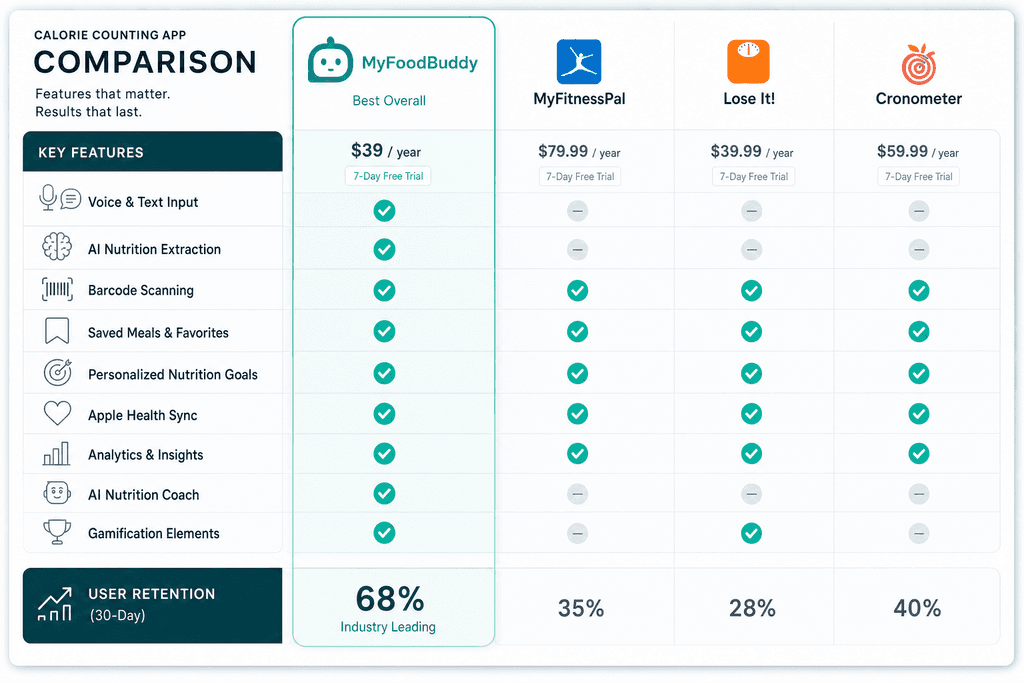
The fastest way to kill someone's tracking habit is making them search through endless food databases or weigh every ingredient. Apps that let users log meals in under 30 seconds see retention rates three times higher than those requiring detailed manual entry. Voice input and AI-powered food recognition have changed the game here. For example, MyFoodBuddy lets you just say what you ate and handles the rest, which is why people actually stick with it past the first week.
Traditional apps make you type "grilled chicken breast" then scroll through 47 different entries trying to guess which one matches your portion size. Modern solutions skip that entire frustrating process.
Accuracy Without the Annoying Parts
Here's the thing about calorie counting: being roughly right beats being precisely wrong. Apps that demand exact measurements down to the gram sound great in theory but fail in practice. People eat out, grab snacks, and cook without measuring cups. The best applications for calorie counting use AI and databases like USDA nutritional data to make smart estimates based on normal portion descriptions.
- Voice and text input that understands natural language
- Barcode scanning for packaged foods
- Saved meals and favorites for one-tap logging
- Smart defaults based on common portion sizes
Features That Actually Keep You Coming Back
The difference between apps you use once and apps you use daily comes down to a few key features. Personalized nutrition goals matter because everyone's body and targets are different. Analytics that show your progress over time help you see patterns you'd otherwise miss. Some apps add streaks and achievements to tap into that part of your brain that likes completing things.
- Custom macro and micronutrient goal setting
- Progress charts across different time ranges
- Integration with health platforms like Apple Health
- AI coaching for personalized insights
What You'll Actually Pay
Price matters when you're committing to daily use. The calorie counting app market ranges from free ad-supported options to premium subscriptions costing over $80 per year. Free versions usually lock key features behind paywalls or bombard you with ads. Mid-range options typically cost between $30-60 annually.
| Price Range | Annual Cost | Typical Features |
|---|---|---|
| Free Tier | $0 | Basic logging, ads, limited data |
| Budget | $20-40 | Full features, no ads |
| Premium | $60-80+ | Advanced analytics, coaching |
MyFoodBuddy sits in the budget range at $39 per year, offering AI-powered logging and personalized coaching without the premium price tag. The real question isn't just cost though. It's whether you'll actually use the app long enough to make any price worth it.
Voice-Powered Apps That Save You Time
Most people quit tracking calories within the first week because it takes too long. Opening an app, searching through thousands of foods, measuring portions, and manually entering everything can eat up 10-15 minutes per meal. That's where voice-powered tracking changes everything. Instead of typing and tapping through endless menus, you just say what you ate and the app figures out the rest.
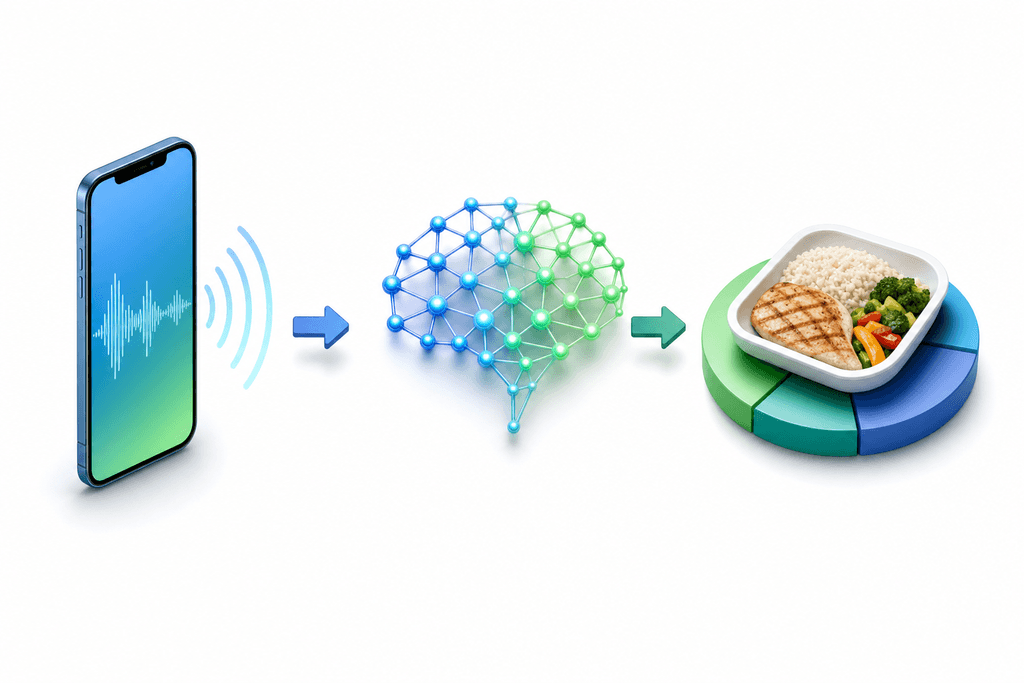
MyFoodBuddy uses AI to understand your meals whether you speak or type them. You can say something like "chicken breast with rice and broccoli" and the app extracts all the nutritional data automatically. No searching, no measuring cups, no math. The whole process takes about 10 seconds instead of several minutes.
- Voice input lets you log meals while cooking or eating
- AI nutrition extraction pulls calorie and macro data from your description
- Natural language processing understands how people actually talk about food
- Works with both voice and text for flexibility
Real users have noticed the difference. One person mentioned they could finally stick to tracking because they just say what they ate instead of spending forever searching databases. Another user pointed out how the app calculates everything automatically, which removes the biggest pain point of traditional calorie counting.
The accuracy question comes up a lot with AI-powered tracking. MyFoodBuddy combines AI with USDA data to provide reliable nutritional information. While no app is perfect, the slight trade-off in precision is worth it when you actually stick with tracking long enough to see results. Consistency beats perfection every time.
For best results with voice input, mention portion sizes when you can and be specific about cooking methods. Saying "grilled chicken breast, about 6 ounces" works better than just "chicken." But even rough descriptions give you useful data, which is better than not tracking at all because the process felt too complicated.
Traditional Apps with Modern Features
MyFitnessPal has been around for years and built a massive food database with millions of entries. The community features let you connect with other people tracking their meals, and you can find almost any food imaginable in their system. Lose It takes a similar approach but adds meal planning tools and barcode scanning to speed things up. Both apps have helped millions of people track their calories, but they come with some frustrations that make people quit.
The main issue is time. Traditional apps require you to search, select, and adjust portions for every single ingredient. Making a stir-fry with seven ingredients means seven separate searches and entries. That's why so many people start strong in January and give up by February.
| Feature | Benefits | Drawbacks |
|---|---|---|
| Large food databases | Find almost anything | Too many duplicate entries |
| Barcode scanning | Quick for packaged foods | Doesn't help with home cooking |
| Community features | Social support | Can feel overwhelming |
| Recipe builder | Save custom meals | Takes time to set up |
These apps work well if you eat a lot of packaged foods or the same meals repeatedly. Once you've logged something, it's easier to find again. But if you cook at home or eat varied meals, you're looking at significant time investment every single day. Premium versions cost between $10-20 per month and unlock features like meal planning and detailed macro tracking.
The learning curve matters too. New users often feel overwhelmed by all the options and settings. You need to understand serving sizes, how to split recipes, and which database entries are accurate. For people who want simple tracking without becoming nutrition experts, traditional apps can feel like homework.
Smart Features That Keep You Consistent
The difference between apps you use once and apps you use daily comes down to features that remove friction. Saved meals and favorites let you re-log your regular breakfast or lunch with one tap instead of entering everything again. If you eat oatmeal with berries every morning, you shouldn't have to log it from scratch 365 times a year. This simple feature alone can save you hours over time and makes tracking feel less like a chore.

Gamification elements like streak tracking and achievements tap into something that actually works for building habits. MyFoodBuddy includes streaks and achievements that give you small wins for showing up consistently. It sounds simple, but seeing a 30-day streak can motivate you to keep going on days when you'd rather skip it.
- One-tap re-logging for meals you eat regularly
- Streak counters that build momentum over weeks
- Achievement systems that reward consistency
- Smart reminders that prompt you at meal times
AI coaching takes things further by analyzing your patterns and offering personalized insights. Fiona, MyFoodBuddy's AI coach, looks at your food logs alongside sleep and activity data to give you feedback that actually applies to your situation. Instead of generic advice, you get specific suggestions based on what you're actually eating and how your body responds.
Integration with Apple Health and fitness trackers creates a complete picture of your health. When your app knows how many steps you took or how well you slept, it can adjust your calorie targets accordingly. MyFoodBuddy syncs with Apple Health to pull in this data automatically, so you're not manually entering exercise or activity levels.
Analytics and progress charts show you trends over time that daily numbers can't reveal. You might notice you eat more on weekends or that certain foods leave you hungrier. Charts across various time ranges help you spot patterns and adjust your approach. Barcode scanning rounds out the feature set by making packaged foods quick to log, though it's less useful for home-cooked meals where voice input shines.
The combination of these features determines whether you'll still be tracking three months from now. Apps that make logging fast, provide useful feedback, and reward consistency give you the best shot at reaching your weight loss goals. If you're looking for more details on essential features that make calorie apps actually usable, or want to explore how voice commands simplify daily nutrition logging, those resources break down what really matters in an application for calorie counting. If you're looking for more details on how many carbs are in eggs, our guide on egg carb count per egg and serving size provides exact carb counts and tips for tracking them daily.
Choosing the Right App for Your Weight Loss Goals
Most people download three or four different calorie counting apps before finding one they actually stick with. The problem isn't commitment, it's compatibility. What works for someone who loves detailed macro tracking might feel like torture for someone who just wants to quickly log meals and move on. The best application for calorie counting is the one you'll actually use every single day, not the one with the most features or the biggest brand name.
Your daily schedule plays a huge role in which app will work for you. If you're constantly rushing between meetings or chasing kids around, spending five minutes searching through food databases for every meal just won't happen. Apps like MyFoodBuddy that let you speak what you ate and get instant calorie counts make tracking possible even during your busiest days.
Matching Features to Your Lifestyle
Think about how you actually eat and live before picking an application for calorie counting. Some features sound great in theory but become annoying in practice.
- If you eat similar meals regularly, look for apps with saved meals and favorites
- Barcode scanning matters most if you eat a lot of packaged foods
- Voice input becomes essential when you're logging meals while driving or cooking
- AI nutrition extraction saves time compared to manual entry in traditional apps
Budget and Trial Periods
Free apps often come with ads or limited features that get frustrating over time. Paid options range from $40 to $100+ per year, which adds up if you're not sure you'll stick with it.
- Always use the full trial period before committing to a paid subscription
- Test the app during your actual daily routine, not just on a relaxed weekend
- Check if the free version locks essential features you need
- Compare annual costs against how much time the app saves you
Your App Selection Checklist
Before downloading yet another application for calorie counting, run through these questions to narrow down your options.
| Question | Why It Matters |
|---|---|
| How much time daily? | Determines complexity level |
| Tech comfort level? | Affects learning curve |
| Budget available? | Filters free vs paid |
| Main goal? | Matches feature priorities |
The right app should feel almost invisible in your daily routine, not like another chore on your to-do list. If you find yourself dreading the logging process, that's a sign to try something different during your next trial period.
Start Tracking Without the Hassle
Here's the thing about choosing an application for calorie counting. The best one isn't necessarily the one with the most features or the biggest food database. It's the one you'll actually open and use every single day. Most people quit tracking within the first two weeks because traditional apps turn a simple task into a 10-minute chore of searching, measuring, and calculating.
The apps that work best now are the ones that let you log your meals by just talking. You can literally say what you ate while you're still chewing. MyFoodBuddy does exactly this, using AI to figure out the calories and macros without you having to do any math or searching through endless food lists.
Most modern tracking apps offer free trials, which means you can test them out before spending any money. This matters because what works for your friend might not work for you. Some people love scanning barcodes, others prefer voice logging, and some just want to type quickly and move on.
The real secret to weight loss through tracking isn't perfect accuracy. It's showing up consistently, even when you're tired or busy. A rough log that happens every day beats a perfect log that only happens twice a week. That's why user-friendly features matter more than you might think.
The questions below cover some common concerns people have when they're just getting started with calorie tracking.
Common Questions About Calorie Counting Apps
Choosing the right application for calorie counting can feel overwhelming with so many options available. People often have similar questions when they're trying to figure out which app will actually work for their lifestyle. Here are the most common questions we hear about calorie tracking apps, along with honest answers that'll help you make the right choice.
How accurate are AI-powered calorie counting apps?
AI-powered apps like MyFoodBuddy typically achieve 85-95% accuracy when estimating calories, which is comparable to manual entry methods. The accuracy depends on how detailed your description is and whether the app uses reliable databases like USDA nutritional data. Most AI apps get better over time as they learn your eating patterns, and you can always adjust entries if something seems off.
Do I need to pay for a calorie tracking app?
Free apps exist, but they usually come with ads and limited features that can make tracking feel like a chore. Paid apps like MyFoodBuddy cost around $39 per year and offer features like voice logging, AI nutrition extraction, and personalized coaching that save you significant time. If you're serious about tracking consistently, the time saved with a paid app often justifies the cost within the first month.
How long does it take to log meals with different apps?
Traditional apps like MyFitnessPal can take 2-5 minutes per meal because you're searching databases and adjusting portion sizes manually. Voice-enabled apps reduce this to 10-30 seconds since you just describe what you ate and the AI handles the rest. Apps with barcode scanning fall somewhere in between, taking about 1-2 minutes depending on whether the food is in their database.
Can calorie counting apps help with specific diets like keto or vegan?
Most modern calorie tracking apps let you customize macro goals for specific diets. You can set targets for carbs, protein, and fat to match keto requirements, or track micronutrients important for vegan diets. The key is finding an application for calorie counting that offers detailed macro tracking and doesn't just focus on total calories.
What happens to my data if I stop using an app?
This varies by app, but most keep your data stored for a certain period even after you stop paying. Some apps let you export your data before canceling, which is useful if you want to switch to a different tracker. Always check the app's data retention policy before committing to make sure you won't lose months of tracking history.
Do these apps work offline?
Some apps offer limited offline functionality where you can log meals without internet, then sync later when you're connected. However, AI-powered features usually require an internet connection to process your voice input or extract nutritional data. Apps with large local databases handle offline mode better than those relying entirely on cloud processing.
Ready to start tracking smarter?
Download MyFoodBuddy and start tracking your calories by just saying what you ate. No more searching databases or guessing portions.
Get started