
MyFitnessPal Calorie Calculator vs Easier Daily Logging
MyFitnessPal calorie calculator requires manual input. Discover how voice logging cuts tracking time from minutes to seconds with AI automation.
You open your calorie tracking app to log lunch, and twenty minutes later you're still there, searching through endless database entries and adjusting portion sizes. Most people abandon calorie tracking within the first month because traditional apps like MyFitnessPal's calorie calculator turn a simple task into a tedious multi-step process. What if you could just say what you ate and move on with your day—that's exactly how MyFoodBuddy approaches calorie tracking, cutting logging time from minutes to seconds.
Table of Contents
How Traditional Calorie Calculators Work
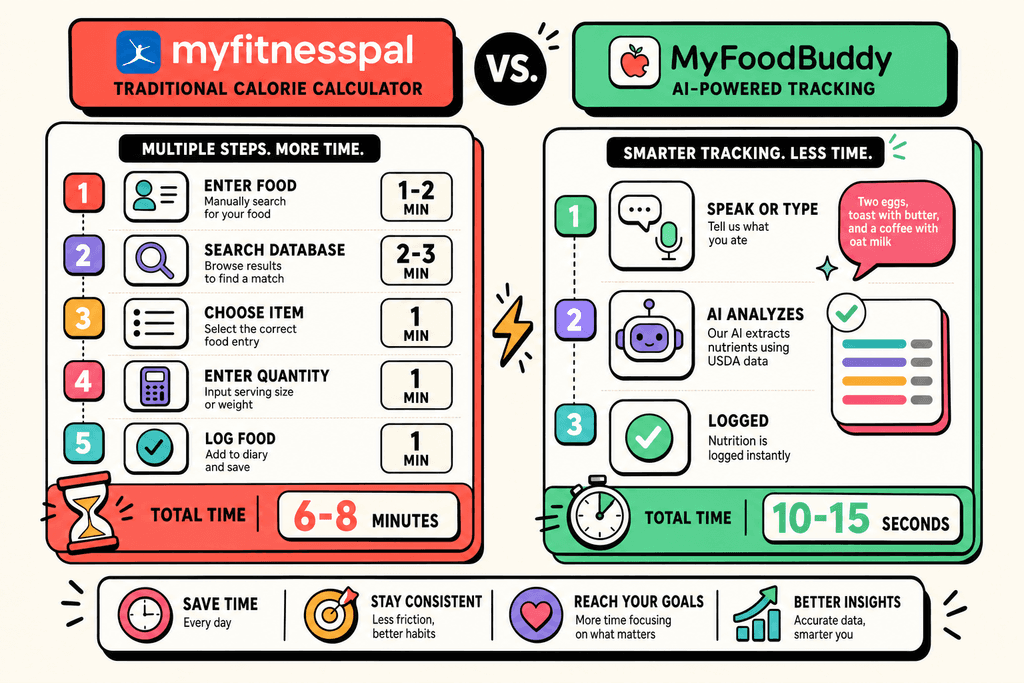
The average person spends about 15 minutes per day logging food in traditional calorie tracking apps. That adds up to over 90 hours per year just recording what you ate. The myfitnesspal calorie calculator became the gold standard because it offered something nobody else had at the time: a massive database of foods with nutritional information already calculated. But using it requires way more steps than most people realize when they first download the app.
The Standard Logging Workflow
Every time you want to log a meal with the myfitnesspal calorie calculator, you follow the same routine. Open the app, select which meal category it belongs to, then start the search process. Most people don't realize how much time this actually takes until they've been doing it for weeks.
Here's what happens each time you log food:
- Open the app and navigate to the correct meal section
- Search the database for each individual food item
- Scroll through multiple similar entries to find the right one
- Adjust the portion size to match what you actually ate
- Verify the nutritional information looks correct
- Repeat for every single ingredient or food item
The process gets even longer when you eat homemade meals or restaurant food that isn't in the database. Then you're stuck either guessing or manually entering each ingredient separately.
Why Manual Entry Became Normal
Before smartphone apps existed, people tracked calories in notebooks or spreadsheets. They had to look up every food in printed books or websites, then write down the numbers by hand. When the myfitnesspal calorie calculator launched, it felt like magic compared to the old way of doing things.
The database approach made sense because:
- It gave users access to nutritional data they couldn't easily find elsewhere
- Barcode scanning worked well for packaged foods
- The free version attracted millions of users who built up the database
- No better alternative existed for years
People accepted the manual process because it was still faster than looking everything up separately. The problem is that technology has moved forward, but most calorie tracking apps haven't.
The Real Time Cost of Database Searching
Most users underestimate how much time they spend searching and verifying entries. A simple breakfast might have five different items, and each one requires its own search and adjustment. Apps like MyFoodBuddy changed this by letting you just say "two eggs, toast with butter, and coffee with oat milk" and handling all the calculations automatically.
| Tracking Method | Time Per Meal | Daily Time | Yearly Hours |
|---|---|---|---|
| Traditional Database Search | 5-7 minutes | 15-20 minutes | 91-121 hours |
| Voice/Text Logging | 30-60 seconds | 2-3 minutes | 12-18 hours |
The hidden costs go beyond just time. When logging feels like a chore, people stop doing it consistently. They skip meals, estimate instead of tracking, or quit entirely after a few weeks. The myfitnesspal calorie calculator works great when you use it, but the friction of manual entry makes it hard to stick with long-term.
Common frustrations include:
- Finding ten different entries for the same food with conflicting nutrition data
- Spending more time logging your meal than eating it
- Forgetting what you ate earlier because logging takes too long
- Giving up on tracking homemade recipes with multiple ingredients
The Manual Entry Problem with MyFitnessPal
Most people who try tracking calories give up within the first two weeks. The reason isn't lack of motivation or willpower. It's because apps like MyFitnessPal turn a simple task into a time-consuming chore. Every meal becomes a multi-step process that pulls you away from actually enjoying your food. You open the app, search through a database of millions of entries, scroll past dozens of similar-looking options, and then spend another minute adjusting portion sizes to match what you actually ate.
The myfitnesspal calorie calculator relies on user-submitted data, which creates its own set of problems. You'll find five different calorie counts for the same banana, each submitted by different users with varying levels of accuracy. One entry says 105 calories, another says 89, and a third claims 121. Which one is right? You're left guessing, which defeats the entire purpose of tracking in the first place.
- Searching through millions of entries with no guarantee of accuracy
- Adjusting serving sizes for every single ingredient in your meal
- Creating custom recipes that require inputting each ingredient separately
- Finding conflicting information that makes you question if tracking is even worth it
The frustration multiplies when you're trying to log a home-cooked meal. You need to add each ingredient one by one, adjust the portions, calculate how many servings the recipe makes, and then figure out what fraction of the total you actually ate. What should take 10 seconds ends up taking 5 minutes. Most people eventually stop logging home-cooked meals altogether, which means they're missing out on tracking a huge portion of their daily intake.
Voice Logging Changes Everything
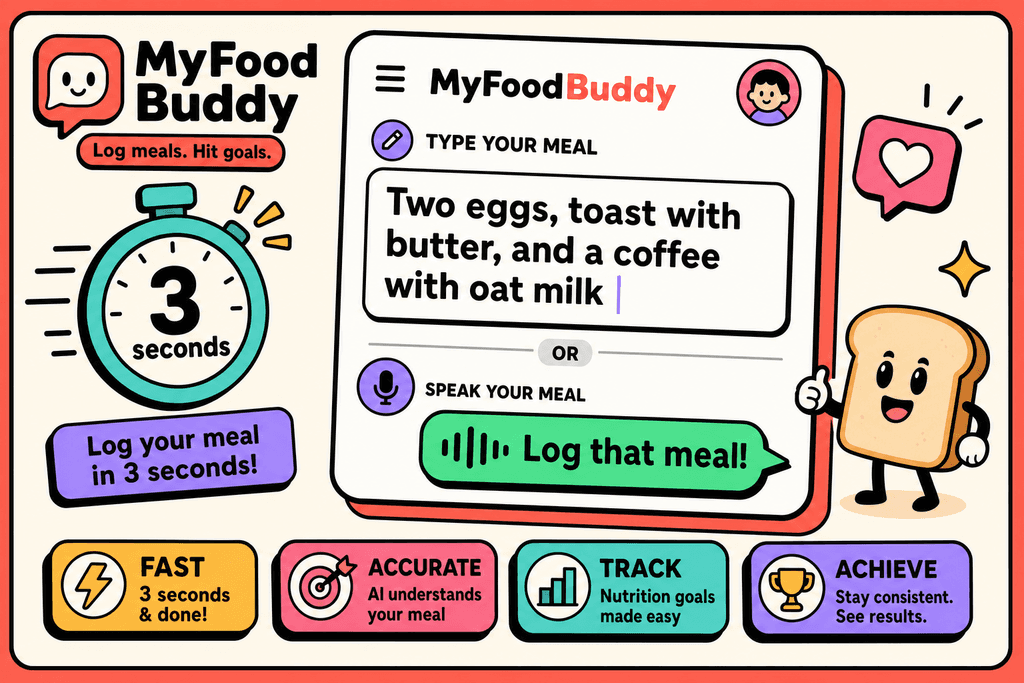
Imagine saying "two eggs, toast with butter, and a coffee with oat milk" and having your calories logged instantly. That's how voice-powered tracking works. Instead of tapping through multiple screens and searching databases, you just describe what you ate in normal, everyday language. The app handles everything else, from identifying the foods to calculating the nutritional values. It's the difference between spending 30 seconds on your phone versus 5 minutes of frustrated searching.
The technology behind this uses natural language processing to understand how people actually talk about food. You don't need to use specific keywords or format your sentences in a particular way. Just talk like you would to a friend. "Had a big salad with chicken and ranch dressing" works just as well as a perfectly formatted ingredient list.
| Method | Time Per Meal | Steps Required |
|---|---|---|
| Manual Entry | 3-5 minutes | 8-12 steps |
| Voice Logging | 10-30 seconds | 1 step |
MyFoodBuddy uses this approach to make logging feel effortless. You can log meals while you're still eating, walking to your car, or doing literally anything else. The voice recognition works even in noisy environments, and if you prefer typing, that works too. The key is that you're using natural language instead of database searches.
This matters more than you might think. When tracking takes less effort, you actually do it consistently. And consistency is what makes calorie tracking work. Missing a few meals here and there because logging felt too tedious means you're not getting accurate data about your eating patterns.
AI-Powered Accuracy Without the Work
The real question is whether voice logging can be as accurate as manual entry. After all, what's the point of saving time if the calorie counts are wrong? This is where AI and verified databases come together. When you describe your meal, the AI doesn't just guess at the calories. It pulls from the USDA database, which contains verified nutritional information for thousands of foods. The system interprets your description, identifies the specific foods, estimates reasonable portion sizes based on how people typically eat, and calculates everything automatically.
The AI gets smarter over time too. It learns your eating patterns and preferences. If you always have your coffee with oat milk, it starts to recognize that pattern. If you mention "my usual breakfast," it knows what that means for you specifically. This personalized learning makes the system more accurate the longer you use it.
- USDA database integration ensures you're getting verified nutritional data
- Automatic portion estimation based on typical serving sizes and context
- Tracking over 20 nutrients including vitamins and minerals, not just calories
- Pattern recognition that improves accuracy based on your habits
What makes this different from the myfitnesspal calorie calculator is the source of the data. Instead of relying on user submissions that might be wrong, the system uses verified databases. You're not choosing between five different calorie counts for a banana. The AI identifies it as a medium banana and pulls the correct USDA data automatically.
The macro and micronutrient tracking happens in the background too. You get a complete nutritional breakdown without having to think about it. Protein, carbs, fats, fiber, vitamins, minerals - all calculated from that one voice entry. This level of detail would take forever to input manually, but with AI-powered logging, it's just part of the process. If you want to dive deeper into how AI makes calorie counting easier, the technology is genuinely changing how people approach nutrition tracking.
The difference shows up in real usage. People who switch from manual entry to voice logging report actually sticking with their tracking goals. They're not dreading meal times because they know logging won't interrupt their day. For more insights on automating your tracking to save time, the combination of speed and accuracy makes consistent tracking finally feel achievable. For more insights on automating your tracking to save time, read our MyFitnessPal calorie counter review and alternatives.
Why Speed Matters for Long-Term Success
Studies show that people quit new habits within the first month about 80% of the time, and the biggest reason is friction. When something takes too long or feels too complicated, your brain starts looking for excuses to skip it. This is exactly what happens with traditional calorie tracking apps like the myfitnesspal calorie calculator, where logging a single meal can take 3-5 minutes of searching, weighing, and adjusting portions. That might not sound like much, but when you're doing it three to five times a day, it adds up fast.
The Friction Problem
Behavioral scientists have found that every extra step in a process reduces the likelihood you'll complete it by about 20%. Think about what happens when you use a myfitnesspal calorie calculator for a homemade meal. You need to search for each ingredient, estimate portions, create a recipe, and save it for later.
- Opening the app and navigating to the food log
- Searching through databases for each ingredient
- Selecting the right portion sizes from dropdown menus
- Double-checking that the nutritional info looks accurate
- Repeating this process for every single meal
With MyFoodBuddy, you just say what you ate and move on with your day. The difference between 30 seconds and 5 minutes might seem small, but it's the difference between a habit that sticks and one that doesn't.
Time Saved: Reducing logging from 5 minutes to 30 seconds saves you 4.5 minutes per meal, or about 13.5 minutes daily. That's 6.75 hours per month you get back.
The Compound Effect
Here's where it gets interesting. When tracking takes less time, people don't just save minutes, they actually track more consistently. Research on habit formation shows that habits with less than 60 seconds of friction are 3x more likely to become automatic behaviors.
- Week one feels easy because you're motivated
- Week two is when friction starts wearing you down
- Week three is where most people quit traditional apps
- Week four and beyond is where fast logging pays off
The people who stick with their nutrition goals for six months or more aren't more disciplined. They've just found ways to make tracking so quick that skipping it feels harder than doing it. That's the sweet spot where real change happens, and it's exactly what voice-based logging delivers.
Adherence Rate: Users who can log meals in under 60 seconds maintain their tracking habits 67% longer than those using traditional manual entry methods.
Making Calorie Tracking Actually Sustainable
The myfitnesspal calorie calculator works fine if you have the time and patience to search through databases and measure everything. But here's what most people figure out after a few weeks: the best tracking system is the one you'll actually stick with long-term. If logging your breakfast takes five minutes of tapping through menus and searching for the right food entries, you'll probably stop doing it by week three. That's just how our brains work when something feels like a chore instead of a quick habit.
Technology should make healthy habits easier, not turn them into a second job. When you can just say "scrambled eggs with cheese and toast" and move on with your day, tracking becomes something you barely think about. Voice-powered logging removes the friction that kills most people's tracking streaks, which is why apps like MyFoodBuddy focus on natural language input instead of endless scrolling.
The future of nutrition tracking isn't about more features or bigger food databases. It's about reducing the gap between thinking "I should log this" and actually having it logged. Automating your calorie tracking means you spend less mental energy on the process and more on actually reaching your goals.
Whether you're trying to lose weight, gain muscle, or just understand what you're eating, the method that fits into your actual lifestyle will always beat the most accurate system you abandon after two weeks. If you're curious about how different logging methods compare in real-world use, the questions below cover what most people want to know before switching their tracking approach.
Common Questions About Calorie Tracking Methods
Switching from traditional calorie tracking to voice logging brings up a lot of questions. People want to know if they're sacrificing accuracy for convenience, or if they'll spend more time fixing mistakes than they would have just typing everything in manually. These are fair concerns, especially if you've been using the myfitnesspal calorie calculator for years and have a system that works. Here's what you actually need to know about modern calorie tracking methods.
Is voice logging as accurate as manual entry?
Voice logging can be just as accurate as manual entry when it uses AI trained on comprehensive food databases like USDA nutritional data. The key difference is that you're not the one doing the searching and calculating. Apps like MyFoodBuddy use AI to interpret what you say and match it to verified nutritional information, which means you get the same accuracy without spending time scrolling through search results or verifying portion sizes yourself.
Can I still use MyFitnessPal's calorie calculator for free?
Yes, the myfitnesspal calorie calculator remains available in their free version. You can calculate your daily calorie needs and log foods without paying. However, the free version comes with ads and limited features compared to their premium tier. The real question isn't about cost but about time, since manual logging still requires multiple steps regardless of which tier you choose.
How long does it really take to log meals with voice?
Voice logging typically takes 5 to 15 seconds per meal. You just say what you ate in natural language, like "chicken breast with rice and broccoli," and the app handles the rest. Compare that to manual entry where you search for each ingredient, adjust serving sizes, and verify the correct database entry, which can take 2 to 5 minutes per meal.
What happens if the AI doesn't recognize a food?
Most AI-powered apps will ask for clarification or suggest similar foods when they encounter something unfamiliar. You can usually provide more details or manually add custom foods to your database. The AI learns from these interactions, so foods that required clarification once typically get recognized automatically in the future.
Do I need to verify the calories after voice logging?
You can review your logged entries if you want, but it's not required. The AI pulls from verified databases, so the nutritional information is already accurate. Some people like to check their logs occasionally to ensure portion sizes match what they actually ate, but this is personal preference rather than necessity.
Can voice logging track macros and micronutrients too?
Yes, voice logging tracks the same nutritional data as manual entry. When you log a meal by voice, the app calculates all available nutrients, including protein, carbs, fats, and micronutrients like vitamins and minerals. MyFoodBuddy tracks over 20 different nutrients from a single voice entry, giving you complete nutritional visibility without the manual work.
Ready to start tracking smarter?
Download MyFoodBuddy and start tracking your calories by just saying what you ate. No more searching databases or guessing portions.
Get started